

Before Building on Corti
Before writing a single line of code, align on the fundamentals:Define Supported Encounter Types
Define Supported Encounter Types
Start by defining which encounter types your solution will support. The encounter type will help define the needed output as well as guide you for what available context can be used for coding.Common options include:
- Outpatient visits (most common starting point)
- Inpatient encounters
- Emergency department visits
- Telehealth consultations
Identify Input Context for Coding
Identify Input Context for Coding
Corti’s Predict Codes endpoint is stateless and allows you to take control of what context you (and our users) provide for code prediction. Most organizations look to use one of the following:Options include:
- Final clinical note (recommended) - Provides the most structured and complete context. It typically has multiple human in the loop points to ensure accuracy.
- Transcript (raw conversation) - Enables earlier coding but may introduce noise.
- Hybrid approach - Use transcript for early predictions and the final note for finalized coding.
- Should the provider explicitly select context (e.g. allow the provider to select a note)
- Should your solution automatically uses the latest available version of the note?
Pinpoint Your Trigger for Coding
Pinpoint Your Trigger for Coding
Corti’s API allows for flexibility in when and how you code an encounter. Coding should be intuitive in your workflows. Common workflow triggers include:
- On Note Submission - Ensures the note is complete and reviewed before coding.
- On Demand - Give the provider/user the ability to trigger code prediction when they need to.
- At encounter completion - Automatically trigger coding once the session ends.
Design for Confidence & Explainability
Design for Confidence & Explainability
Help providers understand why a code was predicted. Not only does this help with provider trust, but this becomes an early guide to Clinical Documentation Integrity efforts.
Corti recommends using the evidences returned by the endpoint to surface the model rationale for a predicted code.
Plan for Human Input & Review
Plan for Human Input & Review
Plan your workflows and determine how clinicians and coders interact with the generated codes.
Common options include:
- Provider-in-the-loop - Clinicians review and adjust codes before submission.
- Coder review workflow- Codes are sent to professional coders for validation.
- Fully automated (with audit) - Codes are auto-submitted but monitored for compliance.
Establish your Success Metrics
Initial Code Acceptance Rate
Initial Code Acceptance Rate
Accuracy in initial predictions of codes is a heavy indicator of the success of both the deployed model and the quality of the input to the model.
Measure:
Code accuracy rate - Percentage of codes accepted without changes
Coder override rate - How often human coders modify or replace suggested codes
Measure:
Code accuracy rate - Percentage of codes accepted without changes
Coder override rate - How often human coders modify or replace suggested codes
Time to Code
Time to Code
Decreasing the time from the encounter date to a billed encounter allows for more efficient coding workflow
Measure:
Time from note completion → coded encounter
Reduction in manual coding time per encounter
Turnaround time for billing readiness
Time from note completion → coded encounter
Reduction in manual coding time per encounter
Turnaround time for billing readiness
Provider Efficiency
Provider Efficiency
Providers wear a lot of hats and often coding is one of those hats. Helping them to code fast allows them to focus more time to be with patients.
Measure:
Time spent on coding per encounter
Number of manual edits per encounter
Documentation-to-coding workflow interruptions
Measure:
Time spent on coding per encounter
Number of manual edits per encounter
Documentation-to-coding workflow interruptions
Revenue Impact
Revenue Impact
Rejected claims or undercoded encounters cost a practice significant revenue. Ensuring coding accuracy helps to make sure providers are paid for the services they provide.
Measure:
Denial rate related to coding errors
Reduction in undercoding or missed codes
Change in average reimbursement per encounter
Measure:
Denial rate related to coding errors
Reduction in undercoding or missed codes
Change in average reimbursement per encounter
The Corti API Basics
Interactions
The interaction is the central hub for managing conversational sessions, letting you create and update interactions that drive clinical AI workflows.
Speech to Text Endpoints
Text Generation Endpoints
Agentic Endpoints
Transcribe
Real-time, stateless speech-to-text over WebSocket designed to power fluid dictation experiences with reliable medical language recognition.
Facts
Extract and retrieve clinically relevant facts from interactions to enhance insight and decision support.
Codes
Predict diagnosis and procedure codes to increase support and accuracy of your coding program.
Streams
Live WebSocket interaction streaming that concurrently produces transcripts and clinical facts to support ambient documentation workflows.
Templates
Define reusable document structures that ensure clarity and consistency in generated outputs.
Agents
Create and manage AI-driven agents that automate contextual messaging and task workflows with experts registry support.
Recordings
Upload and organize audio recordings tied to interactions to fuel downstream transcription and document generation.
Documents
Generate polished clinical documents from transcripts and templates for notes, summaries, or referrals.
Transcripts
Convert uploaded recordings into structured, usable text to support review and documentation.
How to Implement Encounter Coding
1. Map Your Coding Workflows
Encounter coding is not just code generation. It is a clinical and revenue cycle workflow. Before building, map the end-to-end experience:Questions to Align On
- When should coding happen?
- On note submission?
- On demand by the provider?
- Automatically at encounter completion?
- What input context should be used for coding?
- Final clinical note?
- Transcript (raw conversation)?
- Something else?
- Who controls the input?
- Does the provider explicitly choose what gets coded (e.g., select a note)?
- Or does the system automatically use the latest available context?
- How should providers interact with suggested codes?
- How should model rationale be surfaced?
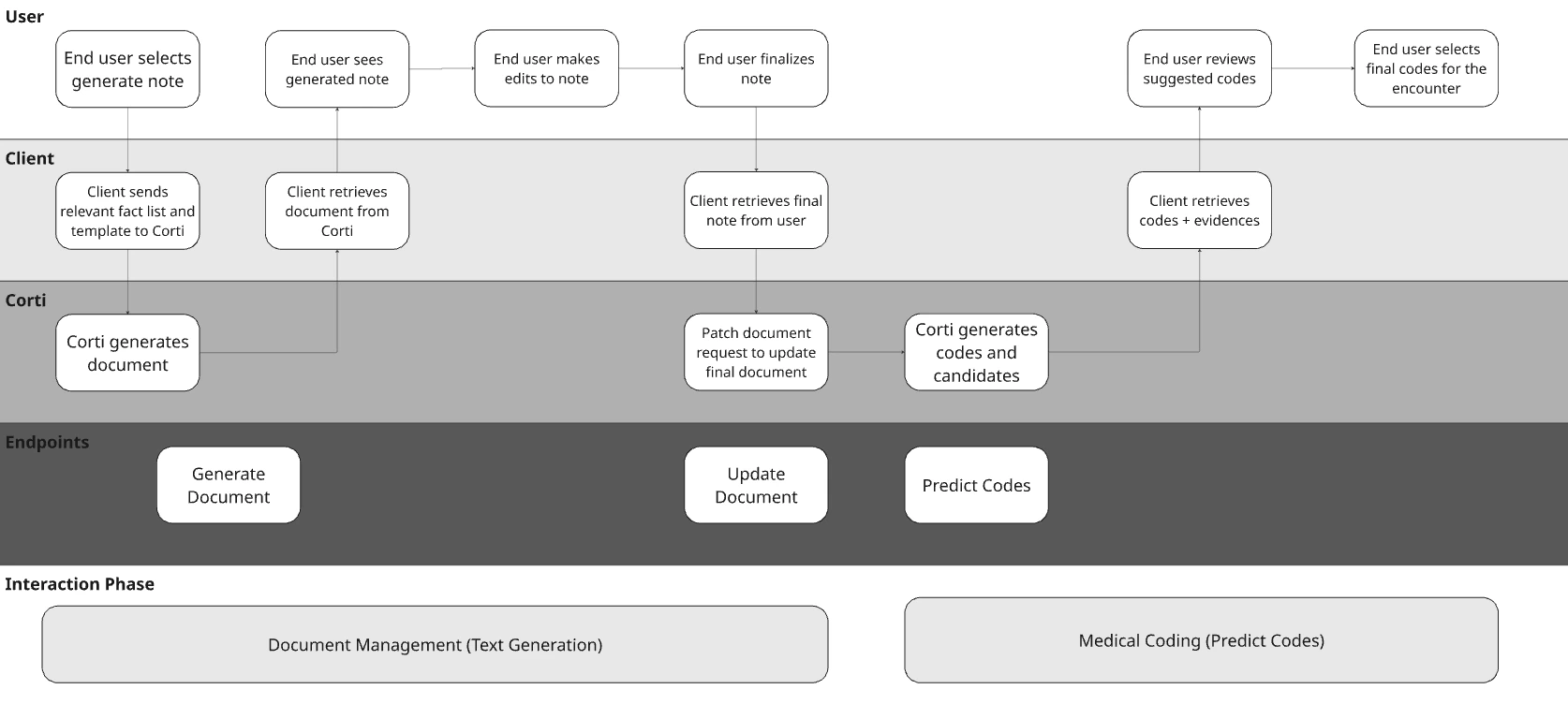
Visualize Your Core Workflows
To illustrate the concept with a hypothetical EHR, they may have made the following decisions for their design:
For the purposes of the full workflow diagram, we’re representing document generation using Corti’s Document Generation capabilities.
Determine Your Context Input
Corti’s coding endpoint supports two context input types:text and documentId.
This gives you flexibility in how you pass clinical context into the coding workflow. Some organizations prefer open, lightweight text-based input, while others rely on structured documents already created in Corti.
Before building, decide which model fits your workflow best.
Code by Text
Usetext when you want full control over what context is passed for code prediction.
This is typically the best fit when:
- You want to give providers flexibility to combine multiple pieces of clinical context into a single request
- You want to pass selected parts of a transcript, note, or supporting context
- You want to send a final note from your own system
Code By documentId
UsedocumentId when you want code prediction to be based on a document that already exists in Corti.
This is typically the best fit when:
- Your workflow already creates documents in Corti
- You want coding to run against the same document used elsewhere in the workflow
- You want a more controlled and traceable document-based process
Filter codes and code groups
For many healthcare applications, your users only interact with a subset of codes within the broader code set. For example, an orthopedic specialty physician would likely not use K21.9 (gastro-esophageal reflux disease without esophagitis) in the diagnosis of their patients. Restrict the set of codes a request can predict from using thefilter field, including attribute-based filtering such as restricting SNOMED predictions to a clinical category. See Code filtering for the filter contract and examples.
Retrieve Codes
Once you’ve submitted a request to the coding endpoint, you can control how much information is returned based on your workflow needs (and based on what your users want to see). Corti allows you to retrieve:- Final codes only
- Codes with candidates (alternatives)
- Codes with or without evidences (rationale)
Codes vs Candidates
You can choose between returning only the finalized codes or including additional candidate suggestions.- Codes only (recommended for production workflows)
-
- Returns the most likely ICD-10 and CPT codes, optimized for downstream use (e.g., billing or EHR integration).
- Codes + candidates
-
- Returns additional possible codes considered by the model.
-
- Helpful for more complex visit types.
Evidences (Model Rationale)
You can also choose whether to retrieve evidences alongside predicted codes. Evidences link each predicted code to the parts of the input (text or document) that support it. Corti recommends presenting evidences in provider coding workflows to help with code explainability and support clinical documentation improvement (CDI) efforts. Choosing the Right Output Your output configuration should align with your workflow. Corti recommends extracting the following based on your users and workflows:Tying it All Together: Building Encounter Coding into your Solution
Corti’s coding capabilities give you a flexible foundation to embed intelligent, workflow-aware coding (remember, we code like humans!) directly into your product. By aligning on workflows, context inputs, and output configurations, you can design a coding experience that fits naturally into your clinical and billing processes—whether that’s provider-assisted, coder-reviewed, or fully automated. From here, you can:- Choose how coding fits into your encounter lifecycle
- Define how context is passed (text or document-based)
- Configure outputs based on your users and workflows