

Getting Started
Before writing a single line of code, align on the fundamentals:Define Your Clinical Use Case
Define Your Clinical Use Case
Be explicit about who this scribe is for and what problem it solves. Is it primary care SOAP notes? Specialty consult documentation? Urgent care throughput optimization?The shape of your clinical output — structure, tone, length, required fields — will vary significantly based on specialty and workflow. A narrowly defined initial use case leads to faster iteration and stronger provider trust.
Choose Real-Time vs Post-Encounter Processing
Choose Real-Time vs Post-Encounter Processing
Decide whether documentation should update live during the visit or generate after the encounter ends:
- Real-time systems improve transparency, allow in-visit correction, and plan ahead for in consultation agents but if network is unstable (or non-existent) it may make for a more difficult first use case.
- Post-encounter generation can simplify UX and solve for offline periods, but you can lose the ability to intervene if user audio is poor quality.
Determine If Ambient is Enough, or if Dictation Is Also Needed
Determine If Ambient is Enough, or if Dictation Is Also Needed
Ambient is the new kid on the block and it solves for a lot with your user base. Some specialties or user groups are also used to using other classic speech technologies like dictation.Corti offers an API endpoint to support dictation workflows in addition to APIs for building out an ambient scribe. Choosing whether you support this from the start will help you to design the UX in an intuitive way so providers know when Ambient is the right way to go or if they want to go full Dictation. Design for the behaviors you want to drive.
Identify Integration Surface Area (EHR, Scheduling, Telephony, etc.)
Identify Integration Surface Area (EHR, Scheduling, Telephony, etc.)
Ambient scribes are most powerful when inside existing clinical workflows (we don’t want to change workflows, we want to support them!).
- Determine what systems you’ll pull context from (e.g. EHR demographics, scheduling system appointment reason) and where documentation will be written back (e.g. EHR note, After Visit Summary).
- Clarify whether you need deep EHR embedding, background API write-back, or a lightweight copy/paste workflow. Integration scope will heavily influence build complexity and timeline.
Plan for Human Review & Edit Controls
Plan for Human Review & Edit Controls
Clinicians must remain the final authority on documentation. Define how users will review extracted facts, edit generated sections, and approve the final note.
- Should providers be able to listen back to their cases?
- Will edits to documents be logged for your team to track common changes to then adjust prompts?
Establish your Success Metrics
Determining the best way to measure success for your scribe can be difficult. The true measure of success is workflow transformation. Before launch, define how you will quantify impact — operationally, clinically, and experientially.Provider trust and comfort
Provider trust and comfort
Provider trust and comfort are the leading indicators of long-term adoption.Measure:
- Overall satisfaction score (CSAT or NPS-style survey)
- Adoption Rates
Time Saved on Charting
Time Saved on Charting
If charting time is currently tracked, this becomes a powerful ROI metric.
Measure:
- Average documentation time per encounter
- After-hours charting (“pajama time”)
Patient Satisfaction
Patient Satisfaction
Ambient tools often shift clinician attention back to the patient.Measure:
- Patient-reported perception of provider attentiveness
- Visit quality ratings
Edit Rate & Modification Patterns
Edit Rate & Modification Patterns
Tracking the behaviors of end user modification can be a great proxy metric for time savings and even provider trust:Measure:
- % of sections edited
- Average word-level modification rate
- Most frequently rewritten sections
The Corti API Basics
Interactions
The interaction is the central hub for managing conversational sessions, letting you create and update interactions that drive clinical AI workflows.
Speech to Text Endpoints
Text Generation Endpoints
Agentic Endpoints
Transcribe
Real-time, stateless speech-to-text over WebSocket designed to power fluid dictation experiences with reliable medical language recognition.
Facts
Extract and retrieve clinically relevant facts from interactions to enhance insight and decision support.
Agents
Create and manage AI-driven agents that automate contextual messaging and task workflows with experts registry support.
Streams
Live WebSocket interaction streaming that concurrently produces transcripts and clinical facts to support ambient documentation workflows.
Templates
Define reusable document structures that ensure clarity and consistency in generated outputs.
Recordings
Upload and organize audio recordings tied to interactions to fuel downstream transcription and document generation.
Documents
Generate polished clinical documents from transcripts and templates for notes, summaries, or referrals.
Transcripts
Convert uploaded recordings into structured, usable text to support review and documentation.
How to Implement Your Ambient Scribe
1. Map Your Ambient Workflows
Ambient scribing is not just speech to text + summarization. It is a clinical workflow system. Before building, map the end-to-end experience:Questions to Align On
- Is this in-person, virtual, or both?
- Should facts be generated live? Or just documents at the end of the visit?
-
How should providers:
- Review extracted facts?
- Edit generated documents?
- Approve final documentation?
-
What documentation needs do your users have?
- Predefined structured SOAP notes?
- Specialty specific templates?
- User managed templates?
Visualize Your Core Workflows
To illustrate the concept with a hypothetical EHR, they may have made the following decisions for their design: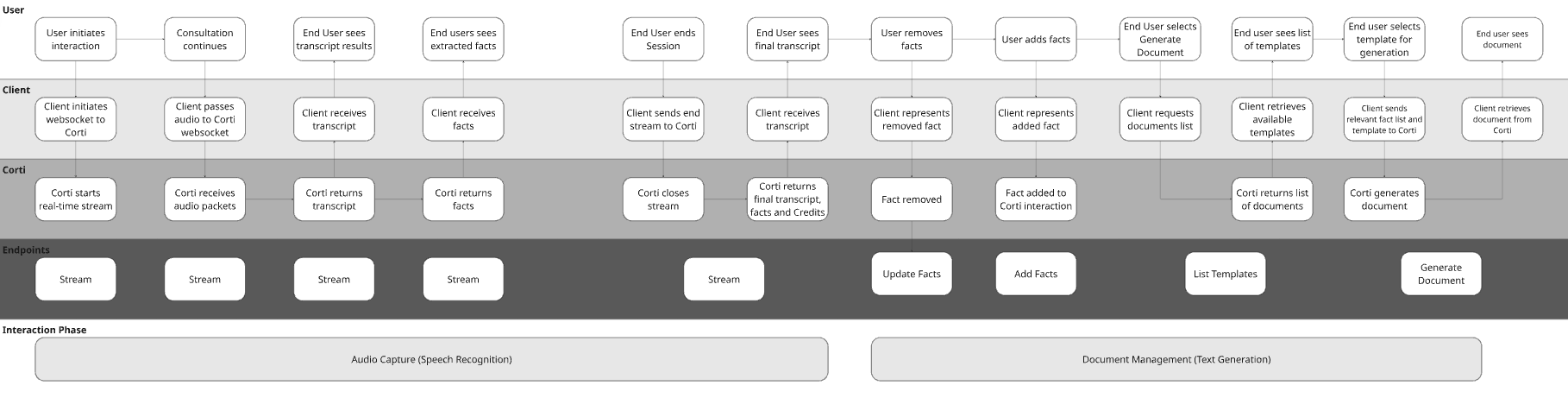
2. Determine Audio Capture Strategy
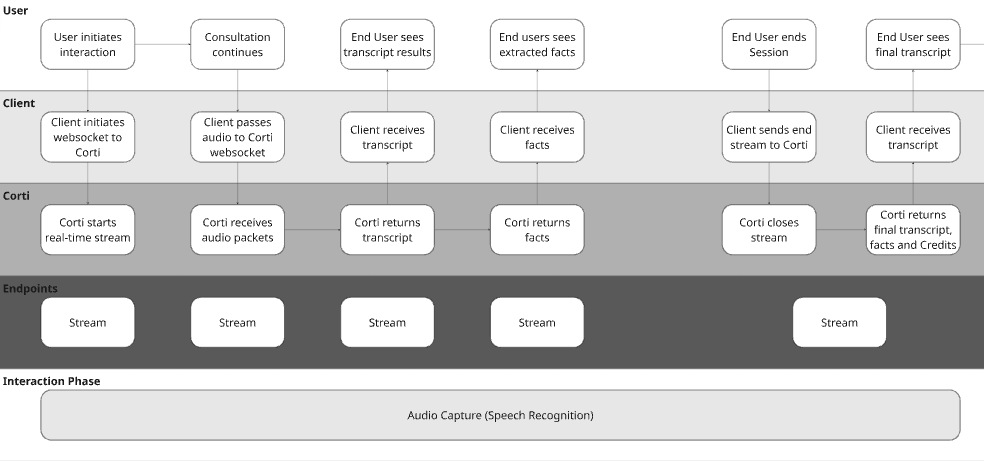
Ambient systems are only as strong as their audio layer. Corti provides multiple capture paths, including browser-based capture via the JS SDK.Option A: Realtime Scribe | Browser-Based Capture (JS SDK)
Real time audio capture is a game changer in the clinical world. This is important for two key reasons:- Builds trust - by capturing live audio, you can bring facts to clinicians live in the consultation. It brings trust to the provider to see the facts extracting in real time and knowing the scribe is following along.
- Intercepts issues - with live audio capture, you can use Corti’s Audio Health events to intercept areas where the audio being received isn’t clear. It’s easier to tell a user the audio isn’t clear in the session rather than after so they can correct it sooner.
- Web-based EHRs
- Telehealth platforms
- Embedded scribe widgets
Full working example (JavaScript · C# · Python)
Full working example (JavaScript · C# · Python)
A complete end-to-end script — create an interaction, open the stream, pipe audio in, handle transcript and facts
message events, and close the session.Option B: Async Scribe | External Capture + Send Audio
Sometimes conditions aren’t prime for real time audio transmission. That could be due to existing architecture constraints or because your customer base may not have reliable access to internet in the work that they do.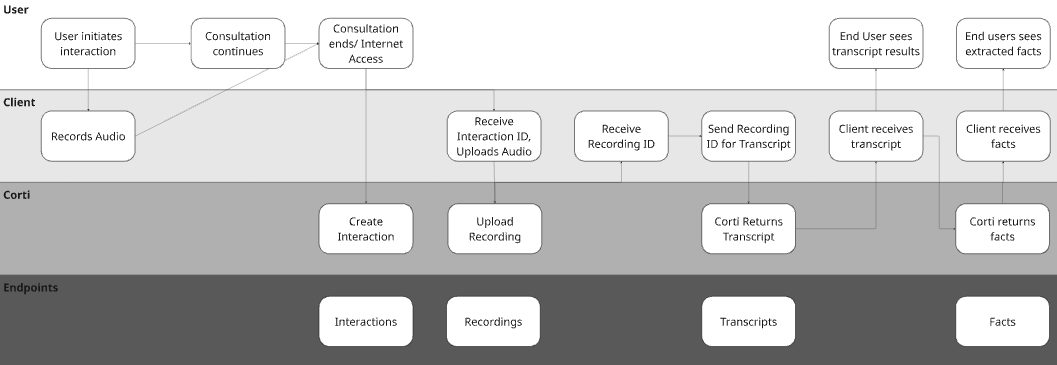
3. Use Facts to Keep Providers in the Loop
You see a lot about FactsR in our documentation. We’re proud of what we’ve built because we’ve found it to be a tool that reduces provider review time before document generation, increases provider adoption, reduces hallucinations in generated documentation. Do you have to use facts for your application? No. Do we recommend it from our experience? Absolutely.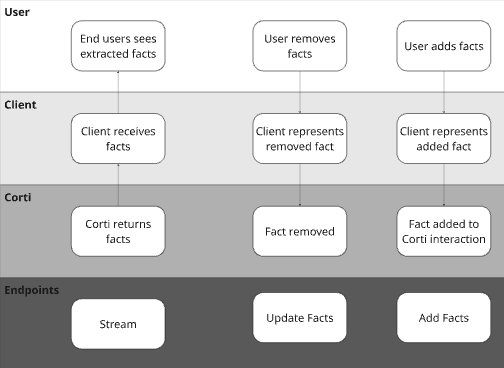
Why Add Facts?
Many Corti customers give their end users the ability to include relevant information from other data sources. For example, some organizations will opt to insert the patient’s problem list from the EHR as a fact to ensure inclusion in post consultation documentation even though they may not discuss each item in the consultation (or they want it to drive an in consultation agentic workflow!). Similarly, providers may want to dictate facts after a consultation or simply type in additional facts to add to the clinical context for the final document.Why Remove Facts?
Corti’s fact extraction will extract all medically relevant facts in a consultation. While this is great to make sure that all information is presented to the provider, not all facts may be relevant for all of the different documents you may generate (e.g. a referral letter might not need corti-emergency-situation-details facts). We have found giving users the ability to deselect facts keeps them in the loop and gives them more control over the documentation being generated.4. Determine Your Document Management Strategy
Corti supports multiple approaches to documentation generation. We recommend selecting based on your maturity, product goals, and need for speed.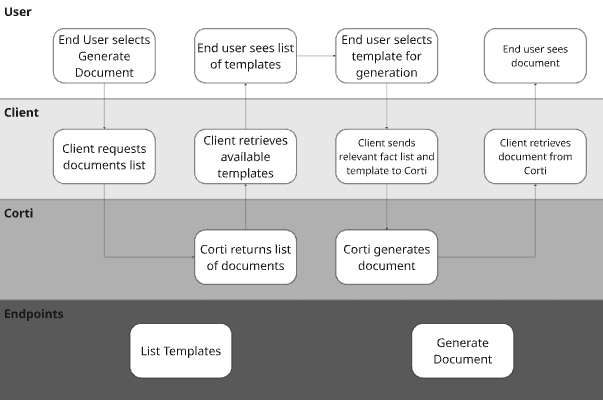
Corti’s Recommended Document Strategies
5. Integrate With Other Systems
Ambient scribing becomes powerful when integrated bi-directionally.Pull Context Before the Interaction
A common practice is organizations will build such that specific data points are able to be incorporated in the context of their document generation. Improve quality by pre-loading:- Chief complaint
- Appointment reason
- Patient demographics
- Medication lists
- Past medical history
Push Outputs After the Interaction
Send:- Structured sections
- Final narrative note
- EHR systems
- Practice management software
- Billing systems
- Quality tracking tools
Tying It All Together: Best Practices for Ambient Success
- Always keep clinician in control
- Design for action - don’t maximize content on the screen, maximize what you want actioned