

Before Building on Corti
Before writing a single line of code, align on the fundamentals:Define Your CDI Objectives
Define Your CDI Objectives
Start by clearly defining what “improvement” means in your context. CDI is not just about better notes—it’s about accuracy, completeness, and downstream impact.
Common CDI goals include:
- Improving documentation specificity (e.g., laterality, acuity, severity)
- Reducing missing or ambiguous clinical details
- Supporting more accurate coding and reimbursement
- Ensuring compliance and audit readiness
Identify Documentation Inputs
Identify Documentation Inputs
CDI depends heavily on the quality and timing of your input data. Corti allows flexibility in how you source documentation context.Common input sources include:
- Real-time transcript (via streaming or dictation)
- Extracted clinical facts (recommended for structured CDI insights)
- Draft clinical notes (pre-signature)
- Finalized notes (post-review)
- Do you want to guide documentation in real time or retrospectively?
- Should CDI operate on raw transcripts, structured facts, or composed documents?
Determine When CDI Intervenes
Determine When CDI Intervenes
CDI is most effective when it fits naturally into clinical workflows without disrupting care.Common intervention points include:
- During the encounter (real-time suggestions)
- During note creation (inline guidance while documenting)
- At note completion (pre-signature review)
- Post-encounter (retrospective CDI review workflows)
Determine How CDI Intervenes
Determine How CDI Intervenes
Unlike coding, CDI outputs are not just predictions—they are suggestions, gaps, and improvements.Common CDI outputs include:
- Missing detail suggestions (e.g., “Specify type of heart failure”)
- Clarification prompts (e.g., “Is this condition acute or chronic?”)
- Contradiction detection across documentation
- Structured fact enrichment
- Documentation quality scoring (optional)
Plan for Human-in-the-Loop Workflows
Plan for Human-in-the-Loop Workflows
CDI is inherently collaborative between AI, clinicians, and sometimes coders or CDI specialists.Common workflow patterns include:
- Provider-in-the-loop (real-time or during documentation)
- CDI specialist review (retrospective validation and queries)
- Who owns the final documentation?
- When and how feedback loops occur
- How CDI insights feed into coding and quality programs
Establish your Success Metrics
Clinical Documentation Improvement efforts are often rooted in driving revenue outcomes for your customers or your organization. At its core, CDI is about ensuring the clinical story is complete, accurate, and usable across workflows. It impacts everything from patient care to coding, compliance, and analytics.Documentation Completeness
Documentation Completeness
CDI is fundamentally about ensuring the clinical story is fully captured.Measure:
- CDI suggestion acceptance rate – Percentage of suggestions accepted by clinicians
- Missing detail rate - Frequency of incomplete documentation (e.g., unspecified diagnoses)
- Reduction in unspecified codes – Decrease in vague or non-specific documentation over time
Documentation Accuracy & Consistency
Documentation Accuracy & Consistency
Beyond completeness, CDI ensures that documentation is internally consistent and clinically sound.Measure:
- Error correction rate – Frequency of corrections made based on CDI suggestions
- Contradiction rate – Conflicting statements within a note (e.g., acute vs chronic)
- Audit findings – Reduction in documentation-related audit issues
Coding & Revenue Impact
Coding & Revenue Impact
Clinical Documentation Improvement directly influences coding quality and downstream reimbursement.Measure:
- Increase in average reimbursement per encounter
- Reduction in undercoding or missed specificity
- Denial rate related to documentation gaps
The Corti API Basics
Before we jump into building, we find it important to establish a shared language for the API endpoints we may reference later. Here’s a quick crash course with links out for further reading.Interactions
The interaction is the central hub for managing conversational sessions, letting you create and update interactions that drive clinical AI workflows.
Speech to Text Endpoints
Text Generation Endpoints
Agentic Endpoints
Transcribe
Real-time, stateless speech-to-text over WebSocket designed to power fluid dictation experiences with reliable medical language recognition.
Facts
Extract and retrieve clinically relevant facts from interactions to enhance insight and decision support.
Codes
Predict diagnosis and procedure codes to increase support and accuracy of your coding program.
Streams
Live WebSocket interaction streaming that concurrently produces transcripts and clinical facts to support ambient documentation workflows.
Templates
Define reusable document structures that ensure clarity and consistency in generated outputs.
Agents
Create and manage AI-driven agents that automate contextual messaging and task workflows with experts registry support.
Recordings
Upload and organize audio recordings tied to interactions to fuel downstream transcription and document generation.
Documents
Generate polished clinical documents from transcripts and templates for notes, summaries, or referrals.
Transcripts
Convert uploaded recordings into structured, usable text to support review and documentation.
Integrating Coding — Coding Endpoint vs Coding Agents
When using Corti to integrate Coding into your workflows, most organizations use one or two primary approaches in Corti: using the Predict Codes endpoint or using a Coding Expert within an agent. Both are powerful but it helps to know when to use each.Using Predict Codes
The Predict Codes endpoint is best when you are building a coding assembly line. You send it context, and it gives you back codes, along with supporting evidence. It’s predictable. It’s structured. And it’s easy to plug into downstream systems. If you’re building something where codes are the output this is usually the right place to start. You always know what you’re getting back, and you can rely on that shape in your application.Using a Coding Agent
A Coding Agent is useful when coding is not the end goal, but part of something larger. This includes reviewing documentation, generating summaries, supporting prior auth, or anything where codes inform the process rather than define it. It also opens the door to combining coding with other capabilities (think Agent/Expert Stacking). You can bring in clinical references, external data, or additional logic and let the agent tie it all together.How to Incorporate Clinical Documentation Into your Workflows
Map Your Coding Workflows
Before building, map how documentation is created, reviewed, and finalized in your system today. CDI should feel like a natural extension of that process, not a separate step or interruption. The most effective CDI implementations meet clinicians where they already work. You’ll want to determine the best time (and place) to insert CDI to provide timely, actionable guidance that improves both documentation quality and downstream outcomes. For CDI programs getting started, we typically recommend starting with something lightweight following the model of:
Before building, map the end-to-end experience:
Questions to Align On
Clinical Documentation Improvement can take many forms depending on the type of care, user base, and the intended objectives of your CDI program. The questions below can help to best configure your CDI workflow(s):- What care settings are you supporting? Inpatient? Outpatient? Emergency department? Specialty workflows?
- Who is the primary user of CDI outputs? Provider? CDI specialist? Coder?
- Should CDI operate in real-time or as a batch process?
- Real-time (inline suggestions as documentation happens)?
- Near real-time (triggered on note save/update)?
- Batch processing (e.g., periodically scanning open encounters)?
- What input context should CDI use?
- Transcript?
- Structured clinical facts?
- Draft note?
- Final note?
- When should CDI intervene in the workflow?
- During the encounter (real-time)?
- During documentation (while the note is being written or during inpatient encounter)?
- At note completion (pre-signature or at signature)?
- Post-encounter (retrospective review)?
Visualize Your Core Workflows
To illustrate the concept with a hypothetical EHR, they may have made the following decisions for their design: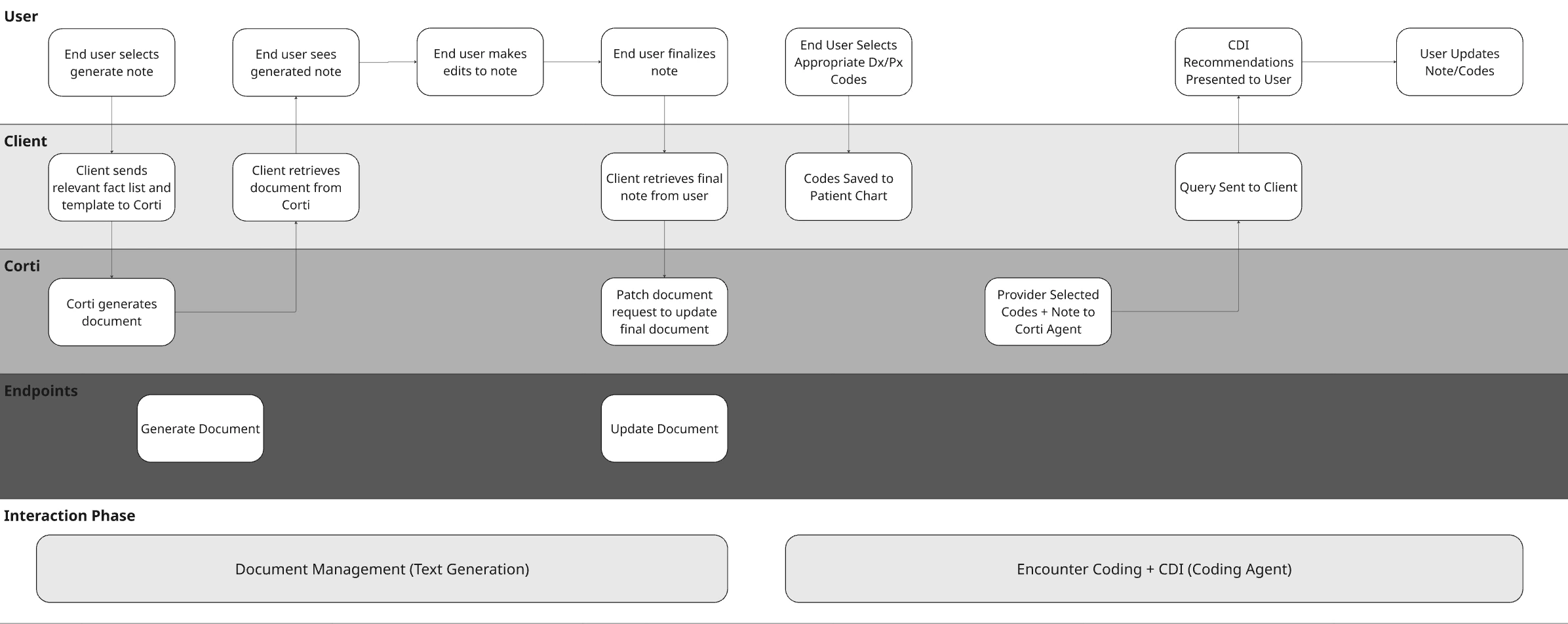
Stage 1 - Detection - Identify the Gap
At the core of your CDI workflow is your agent. This is where your logic lives—how documentation is interpreted, what gaps are identified, and how feedback is generated. Unlike traditional rule-based systems, Corti agents allow you to combine clinical reasoning, coding expertise, and structured workflows into a single orchestrated experience.Define Your Agent System Prompt with Intent
Most of the behavior of your agent will come from the system prompt. This is where you define how it thinks, what it’s allowed to do, and how it communicates. In practice, strong CDI agents tend to follow a consistent pattern. They read the chart, extract key elements, and then look for where specificity is missing or where something doesn’t line up. From there, they generate queries, but only when there is enough evidence to support it. What matters is clarity. The more explicit you are about constraints (don’t infer, don’t lead, always cite evidence), the more reliable your outputs will be. (I always remember the lesson in science class about how to guide someone how to make a peanut butter and jelly sandwich)Don’t Forget to Call in the Experts
One of the advantages of Corti’s agentic framework is that you can bring in specialized Experts—coding, clinical references, guidelines, calculators. The key is that your agent should orchestrate, not delegate.Medical Coding Expert
Helps identify specificity gaps and coding-relevant documentation issues
Web Search Expert
Retrieve current medical information from the public web while enforcing control over where that information comes from.
Clinical Reference Expert
Create your own clinical reference expert to call in your preferred source!
Create and Test the Agent
When you have a prompt, jump into the Corti Console for a quick and easy way to test your new Agent. You’ll be able to then quickly get the output code to create the agent for future use. Here’s what that looks like for Corti’s out of the box CDI Agent:Determine Your Context Input
CDI effectiveness is tightly tied to when you run it. The same context that works for a retrospective review will not work for real-time guidance, and vice versa. Start by aligning your context to your workflow timing:- If you’re running CDI during the encounter, your inputs will typically be a combination of transcript and early structured facts. This enables early detection of missing specificity, but you should expect incomplete context.
- If you’re running CDI during documentation or on note save, draft notes paired with structured facts tend to produce the most actionable suggestions. At this stage, clinician intent is clearer, and gaps can still be corrected before sign-off.
- If you’re running CDI post-encounter or as a batch process, finalized notes become the primary input. This is where completeness, compliance, and audit readiness matter most—especially for CDI specialist workflows.
Assembling Context for CDI
Unlike more rigid endpoints, Corti’s agentic workflows do not require heavily structured inputs. This gives you flexibility, but it also means you should be intentional about how you construct your context. A simple and effective pattern is to concatenate multiple sources of context into a single, well-labeled input string. The goal is not just to pass data, but to provide context for the context!Pass the Context into a CDI Agent
Once your context is assembled, you pass it directly into your CDI agent as the message input. Using your CDI agent setup:Stage 2 - Action - User Response
CDI only works if something changes. At this stage, your agent that you built has returned structured output. This could be documentation gaps, supporting evidence, or proposed queries. The job now is simple: present that back to the provider in a way that they can act on quickly. In an outpatient workflow, this is not a deep review step. It’s a quick moment during documentation where the provider decides whether to adjust the chart before moving on.Driving Provider Response
Most interactions at this stage fall into a few simple patterns. Sometimes the provider will update their documentation directly. A gap like “heart failure without specificity” turns into a quick edit in the note to clarify type or acuity. Other times, the provider may accept a suggestion conceptually but reword it to match their documentation style. The important part is that the missing detail gets added, not that the exact phrasing is preserved. In some cases, the provider will ignore the suggestion entirely. This will happen (and when it does, it’s useful to know). Not every gap is relevant, and these signals help refine the system over time. Track them!Keep the interaction lightweight
The biggest risk at this stage is slowing the provider down. This should feel like a quick pass, not a task. Think within the lines of:- suggestions are visible but not overwhelming
- edits happen directly in the note
- no separate workflow or queue is required
Stage 3 - Resolution - Update the Source of Truth
Once the provider makes a change, think back to your workflow to consider where else those changes need to propagate. This is where CDI moves from suggestion → actual system impact.What Might Need Updating
When a provider updates their documentation, a few things should happen behind the scenes. The most immediate is the clinical document itself. The note now reflects the clarified diagnosis, added specificity, or corrected detail. From there, you can optionally update structured layers:- The Corti Document. Did you use Corti to generate the note? If so you should update the document.
- Downstream codes. With the improved specificity, you may need to retrigger automated coding from the document.
Updating the Corti Document
If using a document generated from Corti as part of your context, you’ll want to make sure that you commit any updates to the document back to the original document ID. This will make sure that you have consistency through your workflows and your documents if they’re stored both in Corti as well as in your EHR.Update Downstream Codes
Now that your document has the desired specificity, it’s time to make sure any updates to codes are made. If using Corti for assistance in coding (this could be either from an Encounter Based Coding Solution or just the Predict Codes endpoint), make sure you introduce a trigger to update codes upon document updates. If your providers are manually selecting codes, we recommend considering prompting the provider to review codes with the added specificity.Stage 4 - Re-Evaluation - Close the Loop
Once updates are made, it’s worth taking one final pass. This step mirrors what you did in detection (just with better input thanks to your solution!). The updated note, any other updated context, and (optionally) updated codes now represent the most complete version of the encounter. At this point, you can:- re-run the agent to confirm gaps were resolved
- catch anything newly introduced during edits
- ensure the final note is complete before sign-off