

How to keep your tokens safe
1. Use environment variables and a proper secret store
Never hardcode yourclient_secret in source files. Use environment variables and a secure secret manager provided by your cloud platform or infrastructure. Rotate secrets if exposure is suspected.
2. Never expose credentials in frontend or untrusted environments
Client credentials must only live on trusted servers. Do not embed them in browser code, mobile apps, desktop apps, or any environment you cannot fully control. Instead, your backend should request access tokens, validate requests, and decide what your users can do.3. Use a backend proxy to handle all Corti API calls from frontends
When you need a frontend to be able to call the Corti API, it is advised to use a proxy. This means all requests are through a proxy that you control. The proxy injects authentication, performs validation, and enforces user-level rules.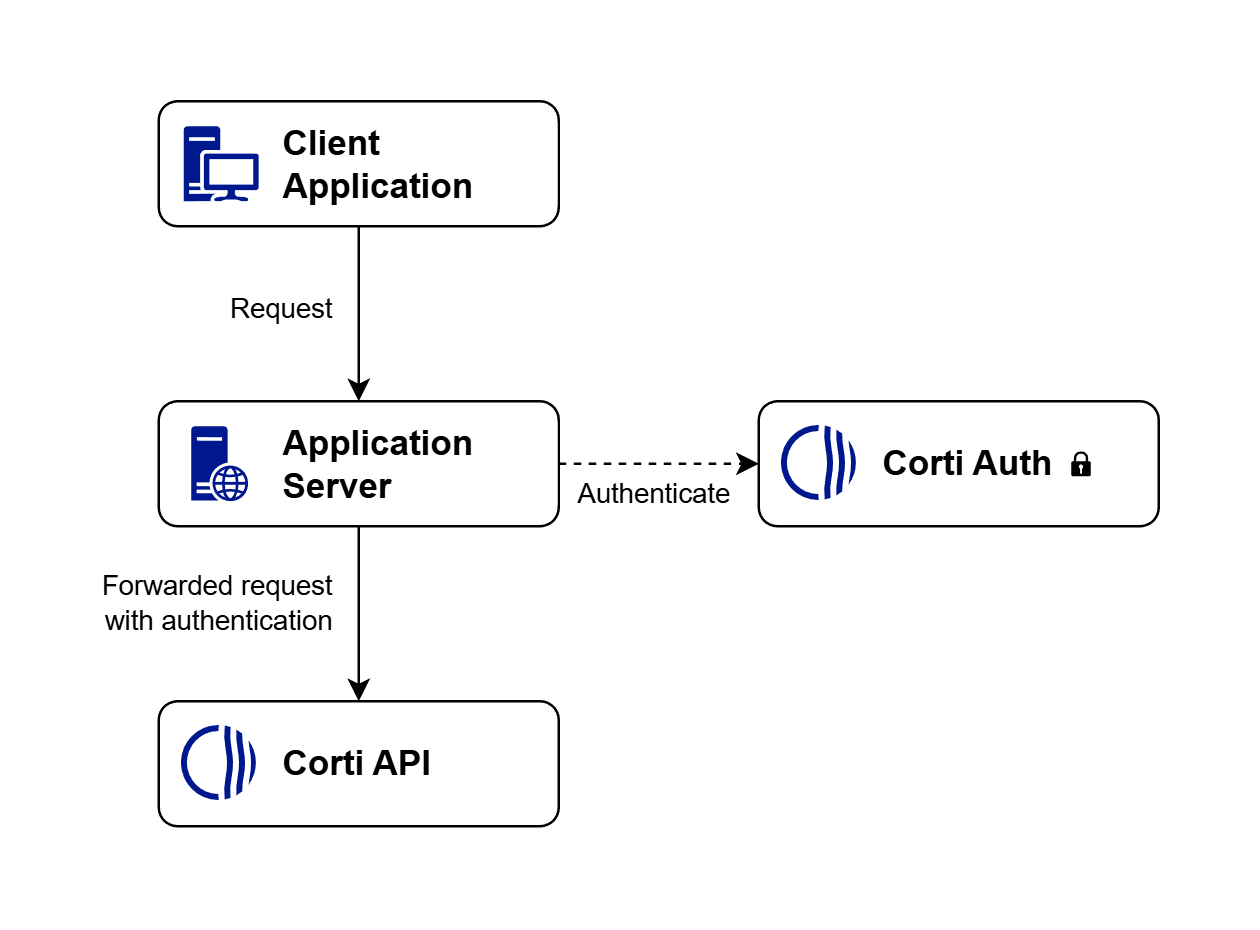
How your proxy authenticates and forwards requests between the client and the Corti API.
4. If you must use tokens in special cases, use limited-scope credentials
Some scenarios — most commonly browser-based real-time speech-to-text — make it impractical to keep every token on the backend. For these cases, Corti supports limited-scope tokens that restrict the access token to the streaming APIs only. If such a token is intercepted, it cannot be used to call any other endpoint or to read or modify your data. Available streaming scopes:
The
openid scope is always required alongside the streaming scope(s).
Request a limited-scope token from your backend using the standard OAuth 2.0 client credentials grant — only the scope parameter changes:
Limited-scope token (transcribe + streams)
scopes: ["transcribe"] and/or scopes: ["streams"] to auth.getToken(...) — see Scoped tokens in the JavaScript SDK for full examples.
Recommended pattern:
- Frontend asks your backend to start a streaming session.
- Backend authenticates the user, then calls Corti Auth with
scope=openid transcribe,scope=openid streams, or both, depending on which streaming API the frontend needs. - For
/transcribe, the backend returns the resulting short-livedaccess_tokento the frontend, and the frontend uses it to open the/transcribeWebSocket. - For
/streams, the backend must also create an interaction via the interactions API and return the resultingwebsocketUrlto the frontend. The browser then connects using thatwebsocketUrlrather than constructing a/streamsWebSocket URL itself. - Refresh by repeating the same backend flow before expiry: issue a new limited-scope token, and for
/streamscreate a new interaction if a newwebsocketUrlis required.
Related guides
- Authentication overview — OAuth 2.0 client credentials and how to use access tokens.
- JavaScript SDK – Scoped tokens — issuing and using scoped tokens from the SDK.
- Dictation Web Component – Authentication — passing tokens (including scoped tokens) to the Dictation component.
- Streams endpoint and Transcribe endpoint — the streaming APIs that accept limited-scope tokens.