> ## Documentation Index
> Fetch the complete documentation index at: https://docs.corti.ai/llms.txt
> Use this file to discover all available pages before exploring further.
# Documentation Modes
> Learn more about differences in documentation mode
## Overview
This guide explains the differences between documentation modes. A documentation mode is the combination of the approach and system prompt that governs how the task of document generation is carried out by the LLM.
Documents can be generated utilizing two different modes:
1. Global Sequential: the current default if nothing specified
2. Routed Parallel: the new, improved documentation generation mode
**All you need to do to generate a document with the new mode, is to set `documentationMode: routed_parallel` in your POST /documents request and reference a [supported template or supported sections](#template-and-section-requirements).**
See the API specification for the [documentationMode property here](/api-reference/documents-classic/generate-document#body-one-of-0-documentation-mode).
Routed Parallel currently only supports facts as input context.
| Context Type | global\_sequential | routed\_parallel |
| ------------ | :--------------------------: | ----------------------------------------------------------------------- |
| facts | | |
| transcript | | In closed Beta |
| string | | 2026 H1 Roadmap for bigger improvements to summarize existing documents |
This feature requires human oversight of its outputs
**Faster document generation**
Increases in document generation up to 35% 1
**Increased completeness**
Especially for use cases that involve a very high amount of facts, this method ensures the section generation step receives all relevant facts as input. Then the section-specific instructions govern the level of details, condensing or omissions for the synthesizing summary.
**More robust**
Variability of outputs, and content misplacement in irrelevant sections is significantly reduced.
This method might slightly increase input token consumption. In most production cases this will have a very slim effect on credit consumption, as input tokens to a large degree will be cached and are discounted. We will bring increased transparency and more detailed metadata related to document generation requests in the coming months.
**Notes:**
1 Depending on input size and complexity of section instructions.
## How it works
To better understand the differences, let's have a look what's happening under the hood and the differences between the documentation modes.
### Routed Parallel
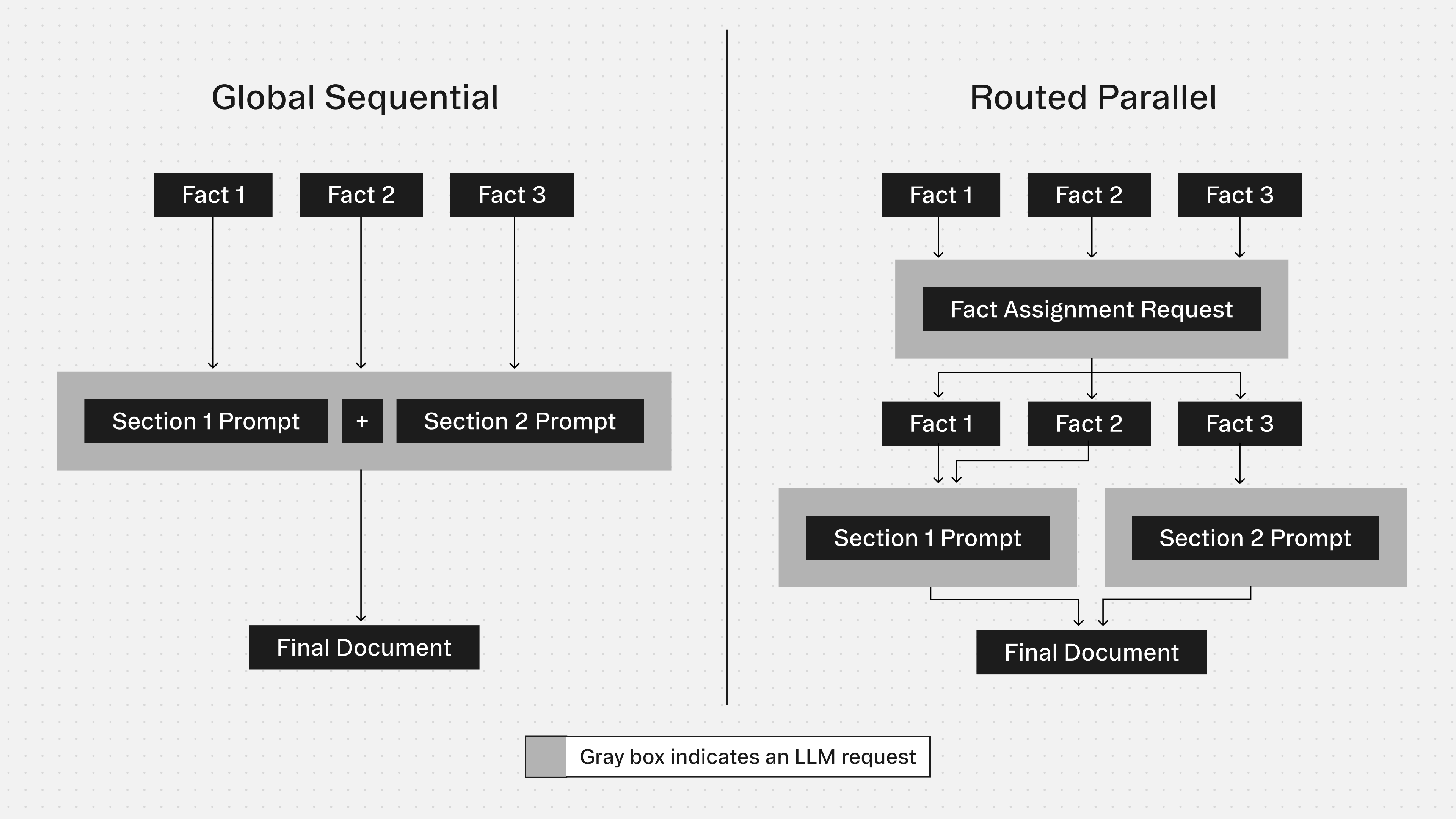
When specifying `documentationMode: routed_parallel` in the request with facts as input, this is what the Corti API and LLM do behind the scenes:
Based on each template section's `content` or `contentOverride` instructions, the LLM batch-assigns each fact to the relevant section(s).
If the `content` or `contentOverride` field for a section is empty, the API will fail the request. Utilize the [GET template](/api-reference/templates-classic/get-template) or [GET templateSections](/api-reference/templates-classic/list-template-sections) endpoints to verify this field is populated, and ensure in case you use `contentOverride` this is not setting it as empty.
Now each section has only the relevant facts as input and all sections are generated in parallel based on each individual section's instructions, plus potential template-level global instructions.
Unless disabled in the request, documentation guardrails verify in parallel each section and, where relevant, replace indexed content segments with its corrected content.
### Global Sequential
When specifying `documentationMode: global_sequential`, this is what the Corti API and LLM do behind the scenes:
The API passes the entire context from the request (all facts, full transcript, string) to the LLM.
Each section is generated sequentially processing the relevant aspects of the globally available context.
Unless disabled in the request, documentation guardrails verify in parallel each section and, where relevant, replace indexed content segments with its corrected content.
### Visual flow comparison
 ## Template and section requirements
`documentationMode: routed_parallel` requires the `content` field on each section used in a template to be set. The API will return an error if this is not the case.
For clarity and backwards-compatibility, please check via [GET /template(s)](/api-reference/templates-classic/get-template#response-documentation-mode) and [GET /templateSections](/api-reference/templates-classic/list-template-sections#response-data-items-documentation-mode) the response property `documentationMode`.
`global_sequential` templates and sections are only configured for `global_sequential`.
`routed_parallel` templates and sections are optimized towards this documentation mode but can also be used with the `global_sequential` documentationMode.
## Template and section requirements
`documentationMode: routed_parallel` requires the `content` field on each section used in a template to be set. The API will return an error if this is not the case.
For clarity and backwards-compatibility, please check via [GET /template(s)](/api-reference/templates-classic/get-template#response-documentation-mode) and [GET /templateSections](/api-reference/templates-classic/list-template-sections#response-data-items-documentation-mode) the response property `documentationMode`.
`global_sequential` templates and sections are only configured for `global_sequential`.
`routed_parallel` templates and sections are optimized towards this documentation mode but can also be used with the `global_sequential` documentationMode.