> ## Documentation Index
> Fetch the complete documentation index at: https://docs.corti.ai/llms.txt
> Use this file to discover all available pages before exploring further.
# Automate Encounter Based Coding
> Automatically generate diagnosis codes and procedure codes from clinical encounter context.
An implementation handbook for product and engineering teams incorporating coding workflows into your solution using the Corti platform.
Modeled after structured use-case guides, this document is designed to help you move from concept → workflow → implementation → integration.
## Before Building on Corti
Before writing a single line of code, align on the fundamentals:
Start by defining which encounter types your solution will support. The encounter type will help define the needed output as well as guide you for what available context can be used for coding.
Common options include:
* Outpatient visits (most common starting point)
* Inpatient encounters
* Emergency department visits
* Telehealth consultations
Most teams begin with outpatient workflows due to their lower complexity and more standardized documentation.
Corti's Predict Codes endpoint is stateless and allows you to take control of what context you (and our users) provide for code prediction. Most organizations look to use one of the following:
Options include:
* Final clinical note (recommended) - Provides the most structured and complete context. It typically has multiple human in the loop points to ensure accuracy.
* Transcript (raw conversation) - Enables earlier coding but may introduce noise.
* Hybrid approach - Use transcript for early predictions and the final note for finalized coding.
You should also consider the workflow. Some common considerations:
* Should the provider explicitly select context (e.g. allow the provider to select a note)
* Should your solution automatically uses the latest available version of the note?
Corti's API allows for flexibility in when and how you code an encounter. Coding should be intuitive in your workflows. Common workflow triggers include:
* On Note Submission - Ensures the note is complete and reviewed before coding.
* On Demand - Give the provider/user the ability to trigger code prediction when they need to.
* At encounter completion - Automatically trigger coding once the session ends.
Help providers understand why a code was predicted. Not only does this help with provider trust, but this becomes an early guide to Clinical Documentation Integrity efforts.
Corti recommends using the evidences returned by the endpoint to surface the model rationale for a predicted code.
Plan your workflows and determine how clinicians and coders interact with the generated codes.
Common options include:
* Provider-in-the-loop - Clinicians review and adjust codes before submission.
* Coder review workflow- Codes are sent to professional coders for validation.
* Fully automated (with audit) - Codes are auto-submitted but monitored for compliance.
### Establish your Success Metrics
Accuracy in initial predictions of codes is a heavy indicator of the success of both the deployed model and the quality of the input to the model.
Measure:
Code accuracy rate - Percentage of codes accepted without changes
Coder override rate - How often human coders modify or replace suggested codes
Decreasing the time from the encounter date to a billed encounter allows for more efficient coding workflow
Measure:
Time from note completion → coded encounter
Reduction in manual coding time per encounter
Turnaround time for billing readiness
Providers wear a lot of hats and often coding is one of those hats. Helping them to code fast allows them to focus more time to be with patients.
Measure:
Time spent on coding per encounter
Number of manual edits per encounter
Documentation-to-coding workflow interruptions
Rejected claims or undercoded encounters cost a practice significant revenue. Ensuring coding accuracy helps to make sure providers are paid for the services they provide.
Measure:
Denial rate related to coding errors
Reduction in undercoding or missed codes
Change in average reimbursement per encounter
# The Corti API Basics
The interaction is the central hub for managing conversational sessions, letting you create and update interactions that drive clinical AI workflows.
Real-time, stateless speech-to-text over WebSocket designed to power fluid dictation experiences with reliable medical language recognition.
Extract and retrieve clinically relevant facts from interactions to enhance insight and decision support.
Predict diagnosis and procedure codes to increase support and accuracy of your coding program.
Live WebSocket interaction streaming that concurrently produces transcripts and clinical facts to support ambient documentation workflows.
Define reusable document structures that ensure clarity and consistency in generated outputs.
Create and manage AI-driven agents that automate contextual messaging and task workflows with experts registry support.
Upload and organize audio recordings tied to interactions to fuel downstream transcription and document generation.
Generate polished clinical documents from transcripts and templates for notes, summaries, or referrals.
Convert uploaded recordings into structured, usable text to support review and documentation.
## How to Implement Encounter Coding
### 1. Map Your Coding Workflows
Encounter coding is not just code generation. It is a clinical and revenue cycle workflow.
Before building, map the end-to-end experience:
#### Questions to Align On
* When should coding happen?
* On note submission?
* On demand by the provider?
* Automatically at encounter completion?
* What input context should be used for coding?
* Final clinical note?
* Transcript (raw conversation)?
* Something else?
* Who controls the input?
* Does the provider explicitly choose what gets coded (e.g., select a note)?
* Or does the system automatically use the latest available context?
* How should providers interact with suggested codes?
* How should model rationale be surfaced?
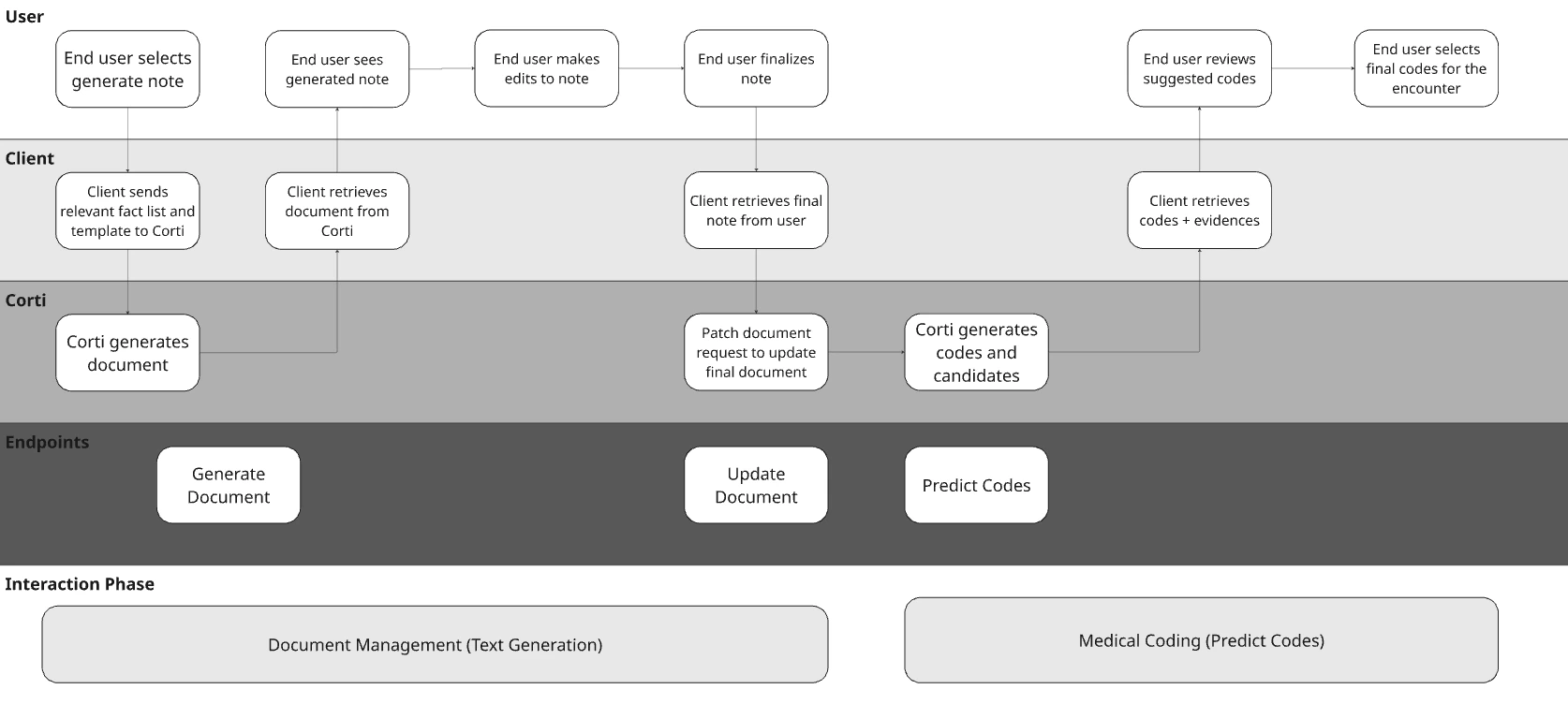
#### Visualize Your Core Workflows
To illustrate the concept with a hypothetical EHR, they may have made the following decisions for their design:
| Question | Answer | Justification |
| --------------------------------------------------- | --------------------- | -------------------------------------------------------------------------------------------------------------------------------------------------- |
| When should coding happen? | At Note Submission | In this example workflow, the note is generated using Corti's documents endpoint, edits are made, and the note is submitted. |
| What input context should be used for coding? | Encounter Note | We will use a fixed note template with the note content editable by the provider as context. |
| Who controls the input? | Fixed Note Template | To minimize variance across providers, we have a single note template used as context for codes. |
| How should providers interact with suggested codes? | Opt In | While not explicitly pictured in the workflow, the example workflow allows providers to select from suggested codes as well as search other codes. |
| How should model rationale be surfaced? | Presented to provider | In addition to showing suggested codes, my solution will show evidences behind the codes as well. |
For the purposes of the full workflow diagram, we're representing document generation using Corti's Document Generation capabilities.
 ## Determine Your Context Input
Corti’s coding endpoint supports two context input types: `text` and `documentId`.
This gives you flexibility in how you pass clinical context into the coding workflow. Some organizations prefer open, lightweight text-based input, while others rely on structured documents already created in Corti.
Before building, decide which model fits your workflow best.
### Code by Text
Use `text` when you want full control over what context is passed for code prediction.
This is typically the best fit when:
* You want to give providers flexibility to combine multiple pieces of clinical context into a single request
* You want to pass selected parts of a transcript, note, or supporting context
* You want to send a final note from your own system
Text input is often the most flexible option because it allows you to shape the exact context provided to the model. This is especially useful when your source data does not already exist as a Corti document, or when you want to further curate the content before prediction.
**Formatting text for open context passing**
You'll need to concatenate all desired context to pass into the Predict Codes endpoint.
```ts title="JavaScript" expandable theme={null}
// Multiple sources of clinical context
const finalNote = `
Assessment:
Acute otitis media of the right ear.
Plan:
Start amoxicillin for 7 days. Follow up if symptoms worsen.
`.trim();
const transcriptExcerpt = `
Patient reports right ear pain for 3 days, mild fever at home,
and decreased hearing on the right side.
`.trim();
const supportingContext = `
Encounter type: outpatient
Specialty: family medicine
`.trim();
// 1) Concatenate multiple contexts into a single text string
const combinedContext = [
"FINAL NOTE",
finalNote,
"TRANSCRIPT EXCERPT",
transcriptExcerpt,
"SUPPORTING CONTEXT",
supportingContext,
].join("\n\n");
// 2) Pass the combined text into Predict Codes
const response = await client.codes.predict({
system: ["icd10cm-outpatient", "cpt"],
context: [{ type: "text", text: combinedContext }],
});
```
```csharp title="C# .NET" expandable theme={null}
// Multiple sources of clinical context
var finalNote = """
Assessment:
Acute otitis media of the right ear.
Plan:
Start amoxicillin for 7 days. Follow up if symptoms worsen.
""".Trim();
var transcriptExcerpt = """
Patient reports right ear pain for 3 days, mild fever at home,
and decreased hearing on the right side.
""".Trim();
var supportingContext = """
Encounter type: outpatient
Specialty: family medicine
""".Trim();
// 1) Concatenate multiple contexts into a single text string
var combinedContext = string.Join(
"\n\n",
"FINAL NOTE",
finalNote,
"TRANSCRIPT EXCERPT",
transcriptExcerpt,
"SUPPORTING CONTEXT",
supportingContext
);
// 2) Pass the combined text into Predict Codes
var response = await client.Codes.PredictAsync(new CodesGeneralPredictRequest
{
System = [CommonCodingSystemEnum.Icd10CmOutpatient, CommonCodingSystemEnum.Cpt],
Context =
[
new CommonTextContext
{
Type = new CommonTextContext.TypeLiteral(),
Text = combinedContext,
},
],
});
```
```python title="Python" expandable theme={null}
import requests
# Replace these with your values
ENVIRONMENT = ""
TENANT = ""
TOKEN = ""
# Multiple sources of clinical context
final_note = """
Assessment:
Acute otitis media of the right ear.
Plan:
Start amoxicillin for 7 days. Follow up if symptoms worsen.
""".strip()
transcript_excerpt = """
Patient reports right ear pain for 3 days, mild fever at home,
and decreased hearing on the right side.
""".strip()
supporting_context = """
Encounter type: outpatient
Specialty: family medicine
""".strip()
# 1) Concatenate multiple contexts into a single text string
combined_context = "\n\n".join(
[
"FINAL NOTE",
final_note,
"TRANSCRIPT EXCERPT",
transcript_excerpt,
"SUPPORTING CONTEXT",
supporting_context,
]
)
# 2) Pass the combined text into Predict Codes
headers = {
"Authorization": f"Bearer {TOKEN}",
"Tenant-Name": TENANT,
"Content-Type": "application/json",
}
payload = {
"system": ["icd10cm-outpatient", "cpt"],
"context": [{"type": "text", "text": combined_context}],
}
response = requests.post(
f"https://api.{ENVIRONMENT}.corti.app/v2/tools/coding/",
headers=headers,
json=payload,
)
response.raise_for_status()
result = response.json()
print(result)
```
```bash title="cURL" expandable theme={null}
# Replace these with your values
ENVIRONMENT=""
TENANT=""
TOKEN=""
curl -X POST "https://api.${ENVIRONMENT}.corti.app/v2/tools/coding/" \
-H "Authorization: Bearer ${TOKEN}" \
-H "Tenant-Name: ${TENANT}" \
-H "Content-Type: application/json" \
-d '{
"system": ["icd10cm-outpatient", "cpt"],
"context": [
{
"type": "text",
"text": "FINAL NOTE\n\nAssessment:\nAcute otitis media of the right ear.\n\nPlan:\nStart amoxicillin for 7 days. Follow up if symptoms worsen.\n\nTRANSCRIPT EXCERPT\n\nPatient reports right ear pain for 3 days, mild fever at home, and decreased hearing on the right side.\n\nSUPPORTING CONTEXT\n\nEncounter type: outpatient\nSpecialty: family medicine"
}
]
}'
```
### Code By documentId
Use `documentId` when you want code prediction to be based on a document that already exists in Corti.
This is typically the best fit when:
* Your workflow already creates documents in Corti
* You want coding to run against the same document used elsewhere in the workflow
* You want a more controlled and traceable document-based process
This approach is a strong fit for workflows where note generation, document review, and coding all happen within the same Corti-powered experience.
**Creating a document to get the document ID**
Corti's text generation endpoints allow for flexibility in creating a document specific to your users needs. Because of the more custom feel of created documents, many organizations find it perfect to create a document both for clinical documentation as well as for coding purposes.
Below you'll find sample code for our example case of an organization generating an HPI note for coding.
```ts title="JavaScript" expandable theme={null}
// 1) Generate a document to get its id
const document = await client.documents.create(interactionId, {
templateKey: "corti-h-and-p",
outputLanguage: "en",
context: [
{
type: "string",
data: `Chief complaint: Chest pain.
History of present illness:
54-year-old patient with intermittent chest discomfort for 2 days,
worse with exertion, associated with mild shortness of breath.
Past medical history:
Hypertension, hyperlipidemia.
Medications:
Lisinopril, atorvastatin.
Allergies:
No known drug allergies.
Physical exam:
Patient appears comfortable. Heart regular rate and rhythm.
Lungs clear to auscultation.
Assessment:
Chest pain, rule out cardiac etiology.
Plan:
Obtain ECG, troponins, chest x-ray, and monitor closely.`,
},
],
});
// 2) Pass that documentId into Predict Codes
const codes = await client.codes.predict({
system: ["icd10cm-outpatient", "cpt"],
context: [{ type: "documentId", documentId: document.id }],
});
```
```csharp title="C# .NET" expandable theme={null}
// 1) Generate a document to get its id
var document = await client.Documents.CreateAsync(
interactionId,
new DocumentsCreateRequestWithTemplateKey
{
TemplateKey = "corti-h-and-p",
OutputLanguage = "en",
Context =
[
new DocumentsContextWithString
{
Type = DocumentsContextWithStringType.String,
Data =
"Chief complaint: Chest pain.\n\nHistory of present illness:\n54-year-old patient with intermittent chest discomfort for 2 days,\nworse with exertion, associated with mild shortness of breath.\n\nPast medical history:\nHypertension, hyperlipidemia.\n\nMedications:\nLisinopril, atorvastatin.\n\nAllergies:\nNo known drug allergies.\n\nPhysical exam:\nPatient appears comfortable. Heart regular rate and rhythm.\nLungs clear to auscultation.\n\nAssessment:\nChest pain, rule out cardiac etiology.\n\nPlan:\nObtain ECG, troponins, chest x-ray, and monitor closely.",
},
],
}
);
// 2) Pass that documentId into Predict Codes
var codes = await client.Codes.PredictAsync(new CodesGeneralPredictRequest
{
System = [CommonCodingSystemEnum.Icd10CmOutpatient, CommonCodingSystemEnum.Cpt],
Context =
[
new CommonDocumentIdContext
{
Type = CommonDocumentIdContextType.DocumentId,
DocumentId = document.Id,
},
],
});
```
```python title="Python" expandable theme={null}
import requests
# Replace these with your values
ENVIRONMENT = ""
INTERACTION_ID = ""
TENANT = ""
TOKEN = ""
headers = {
"Authorization": f"Bearer {TOKEN}",
"Tenant-Name": TENANT,
"Content-Type": "application/json",
}
document_payload = {
"templateKey": "corti-h-and-p",
"outputLanguage": "en",
"context": [
{
"type": "string",
"data": """
Chief complaint: Chest pain.
History of present illness:
54-year-old patient with intermittent chest discomfort for 2 days,
worse with exertion, associated with mild shortness of breath.
Past medical history:
Hypertension, hyperlipidemia.
Medications:
Lisinopril, atorvastatin.
Allergies:
No known drug allergies.
Physical exam:
Patient appears comfortable. Heart regular rate and rhythm.
Lungs clear to auscultation.
Assessment:
Chest pain, rule out cardiac etiology.
Plan:
Obtain ECG, troponins, chest x-ray, and monitor closely.
""".strip(),
}
],
}
# 1) Generate a document to get its id
document_response = requests.post(
f"https://api.{ENVIRONMENT}.corti.app/v2/interactions/{INTERACTION_ID}/documents",
headers=headers,
json=document_payload,
)
document_response.raise_for_status()
document = document_response.json()
document_id = document["id"]
# 2) Pass that documentId into Predict Codes
coding_payload = {
"system": ["icd10cm-outpatient", "cpt"],
"context": [
{
"type": "documentId",
"documentId": document_id,
}
],
}
codes_response = requests.post(
f"https://api.{ENVIRONMENT}.corti.app/v2/tools/coding/",
headers=headers,
json=coding_payload,
)
codes_response.raise_for_status()
codes_result = codes_response.json()
print(codes_result)
```
```bash title="cURL" expandable theme={null}
# Replace these with your values
ENVIRONMENT=""
INTERACTION_ID=""
TENANT=""
TOKEN=""
# 1) Generate a document to get its id
DOCUMENT_ID=$(curl -s --request POST \
--url "https://api.${ENVIRONMENT}.corti.app/v2/interactions/${INTERACTION_ID}/documents" \
--header "Authorization: Bearer ${TOKEN}" \
--header "Tenant-Name: ${TENANT}" \
--header "Content-Type: application/json" \
--data '{"templateKey": "corti-h-and-p", "outputLanguage": "en", "context": [{"type": "string", "data": "Chief complaint: Chest pain..."}]}' \
| jq -r '.id')
# 2) Pass that documentId into Predict Codes
curl --request POST \
--url "https://api.${ENVIRONMENT}.corti.app/v2/tools/coding/" \
--header "Authorization: Bearer ${TOKEN}" \
--header "Tenant-Name: ${TENANT}" \
--header "Content-Type: application/json" \
--data "{\"system\": [\"icd10cm-outpatient\", \"cpt\"], \"context\": [{\"type\": \"documentId\", \"documentId\": \"${DOCUMENT_ID}\"}]}"
```
## Filter Codes and Code Groups
For some healthcare applications, having the full set of tens of thousands of ICD-10 codes to be able to search from is needed. For many healthcare applications, your users will only interact with a subset of codes within the broader code set. For example, an orthopedic specialty physician would likely not use K21.9 (Gastro-esophageal reflux disease (GERD) without esophagitis) in the diagnosis of their patients.
## Determine Your Context Input
Corti’s coding endpoint supports two context input types: `text` and `documentId`.
This gives you flexibility in how you pass clinical context into the coding workflow. Some organizations prefer open, lightweight text-based input, while others rely on structured documents already created in Corti.
Before building, decide which model fits your workflow best.
### Code by Text
Use `text` when you want full control over what context is passed for code prediction.
This is typically the best fit when:
* You want to give providers flexibility to combine multiple pieces of clinical context into a single request
* You want to pass selected parts of a transcript, note, or supporting context
* You want to send a final note from your own system
Text input is often the most flexible option because it allows you to shape the exact context provided to the model. This is especially useful when your source data does not already exist as a Corti document, or when you want to further curate the content before prediction.
**Formatting text for open context passing**
You'll need to concatenate all desired context to pass into the Predict Codes endpoint.
```ts title="JavaScript" expandable theme={null}
// Multiple sources of clinical context
const finalNote = `
Assessment:
Acute otitis media of the right ear.
Plan:
Start amoxicillin for 7 days. Follow up if symptoms worsen.
`.trim();
const transcriptExcerpt = `
Patient reports right ear pain for 3 days, mild fever at home,
and decreased hearing on the right side.
`.trim();
const supportingContext = `
Encounter type: outpatient
Specialty: family medicine
`.trim();
// 1) Concatenate multiple contexts into a single text string
const combinedContext = [
"FINAL NOTE",
finalNote,
"TRANSCRIPT EXCERPT",
transcriptExcerpt,
"SUPPORTING CONTEXT",
supportingContext,
].join("\n\n");
// 2) Pass the combined text into Predict Codes
const response = await client.codes.predict({
system: ["icd10cm-outpatient", "cpt"],
context: [{ type: "text", text: combinedContext }],
});
```
```csharp title="C# .NET" expandable theme={null}
// Multiple sources of clinical context
var finalNote = """
Assessment:
Acute otitis media of the right ear.
Plan:
Start amoxicillin for 7 days. Follow up if symptoms worsen.
""".Trim();
var transcriptExcerpt = """
Patient reports right ear pain for 3 days, mild fever at home,
and decreased hearing on the right side.
""".Trim();
var supportingContext = """
Encounter type: outpatient
Specialty: family medicine
""".Trim();
// 1) Concatenate multiple contexts into a single text string
var combinedContext = string.Join(
"\n\n",
"FINAL NOTE",
finalNote,
"TRANSCRIPT EXCERPT",
transcriptExcerpt,
"SUPPORTING CONTEXT",
supportingContext
);
// 2) Pass the combined text into Predict Codes
var response = await client.Codes.PredictAsync(new CodesGeneralPredictRequest
{
System = [CommonCodingSystemEnum.Icd10CmOutpatient, CommonCodingSystemEnum.Cpt],
Context =
[
new CommonTextContext
{
Type = new CommonTextContext.TypeLiteral(),
Text = combinedContext,
},
],
});
```
```python title="Python" expandable theme={null}
import requests
# Replace these with your values
ENVIRONMENT = ""
TENANT = ""
TOKEN = ""
# Multiple sources of clinical context
final_note = """
Assessment:
Acute otitis media of the right ear.
Plan:
Start amoxicillin for 7 days. Follow up if symptoms worsen.
""".strip()
transcript_excerpt = """
Patient reports right ear pain for 3 days, mild fever at home,
and decreased hearing on the right side.
""".strip()
supporting_context = """
Encounter type: outpatient
Specialty: family medicine
""".strip()
# 1) Concatenate multiple contexts into a single text string
combined_context = "\n\n".join(
[
"FINAL NOTE",
final_note,
"TRANSCRIPT EXCERPT",
transcript_excerpt,
"SUPPORTING CONTEXT",
supporting_context,
]
)
# 2) Pass the combined text into Predict Codes
headers = {
"Authorization": f"Bearer {TOKEN}",
"Tenant-Name": TENANT,
"Content-Type": "application/json",
}
payload = {
"system": ["icd10cm-outpatient", "cpt"],
"context": [{"type": "text", "text": combined_context}],
}
response = requests.post(
f"https://api.{ENVIRONMENT}.corti.app/v2/tools/coding/",
headers=headers,
json=payload,
)
response.raise_for_status()
result = response.json()
print(result)
```
```bash title="cURL" expandable theme={null}
# Replace these with your values
ENVIRONMENT=""
TENANT=""
TOKEN=""
curl -X POST "https://api.${ENVIRONMENT}.corti.app/v2/tools/coding/" \
-H "Authorization: Bearer ${TOKEN}" \
-H "Tenant-Name: ${TENANT}" \
-H "Content-Type: application/json" \
-d '{
"system": ["icd10cm-outpatient", "cpt"],
"context": [
{
"type": "text",
"text": "FINAL NOTE\n\nAssessment:\nAcute otitis media of the right ear.\n\nPlan:\nStart amoxicillin for 7 days. Follow up if symptoms worsen.\n\nTRANSCRIPT EXCERPT\n\nPatient reports right ear pain for 3 days, mild fever at home, and decreased hearing on the right side.\n\nSUPPORTING CONTEXT\n\nEncounter type: outpatient\nSpecialty: family medicine"
}
]
}'
```
### Code By documentId
Use `documentId` when you want code prediction to be based on a document that already exists in Corti.
This is typically the best fit when:
* Your workflow already creates documents in Corti
* You want coding to run against the same document used elsewhere in the workflow
* You want a more controlled and traceable document-based process
This approach is a strong fit for workflows where note generation, document review, and coding all happen within the same Corti-powered experience.
**Creating a document to get the document ID**
Corti's text generation endpoints allow for flexibility in creating a document specific to your users needs. Because of the more custom feel of created documents, many organizations find it perfect to create a document both for clinical documentation as well as for coding purposes.
Below you'll find sample code for our example case of an organization generating an HPI note for coding.
```ts title="JavaScript" expandable theme={null}
// 1) Generate a document to get its id
const document = await client.documents.create(interactionId, {
templateKey: "corti-h-and-p",
outputLanguage: "en",
context: [
{
type: "string",
data: `Chief complaint: Chest pain.
History of present illness:
54-year-old patient with intermittent chest discomfort for 2 days,
worse with exertion, associated with mild shortness of breath.
Past medical history:
Hypertension, hyperlipidemia.
Medications:
Lisinopril, atorvastatin.
Allergies:
No known drug allergies.
Physical exam:
Patient appears comfortable. Heart regular rate and rhythm.
Lungs clear to auscultation.
Assessment:
Chest pain, rule out cardiac etiology.
Plan:
Obtain ECG, troponins, chest x-ray, and monitor closely.`,
},
],
});
// 2) Pass that documentId into Predict Codes
const codes = await client.codes.predict({
system: ["icd10cm-outpatient", "cpt"],
context: [{ type: "documentId", documentId: document.id }],
});
```
```csharp title="C# .NET" expandable theme={null}
// 1) Generate a document to get its id
var document = await client.Documents.CreateAsync(
interactionId,
new DocumentsCreateRequestWithTemplateKey
{
TemplateKey = "corti-h-and-p",
OutputLanguage = "en",
Context =
[
new DocumentsContextWithString
{
Type = DocumentsContextWithStringType.String,
Data =
"Chief complaint: Chest pain.\n\nHistory of present illness:\n54-year-old patient with intermittent chest discomfort for 2 days,\nworse with exertion, associated with mild shortness of breath.\n\nPast medical history:\nHypertension, hyperlipidemia.\n\nMedications:\nLisinopril, atorvastatin.\n\nAllergies:\nNo known drug allergies.\n\nPhysical exam:\nPatient appears comfortable. Heart regular rate and rhythm.\nLungs clear to auscultation.\n\nAssessment:\nChest pain, rule out cardiac etiology.\n\nPlan:\nObtain ECG, troponins, chest x-ray, and monitor closely.",
},
],
}
);
// 2) Pass that documentId into Predict Codes
var codes = await client.Codes.PredictAsync(new CodesGeneralPredictRequest
{
System = [CommonCodingSystemEnum.Icd10CmOutpatient, CommonCodingSystemEnum.Cpt],
Context =
[
new CommonDocumentIdContext
{
Type = CommonDocumentIdContextType.DocumentId,
DocumentId = document.Id,
},
],
});
```
```python title="Python" expandable theme={null}
import requests
# Replace these with your values
ENVIRONMENT = ""
INTERACTION_ID = ""
TENANT = ""
TOKEN = ""
headers = {
"Authorization": f"Bearer {TOKEN}",
"Tenant-Name": TENANT,
"Content-Type": "application/json",
}
document_payload = {
"templateKey": "corti-h-and-p",
"outputLanguage": "en",
"context": [
{
"type": "string",
"data": """
Chief complaint: Chest pain.
History of present illness:
54-year-old patient with intermittent chest discomfort for 2 days,
worse with exertion, associated with mild shortness of breath.
Past medical history:
Hypertension, hyperlipidemia.
Medications:
Lisinopril, atorvastatin.
Allergies:
No known drug allergies.
Physical exam:
Patient appears comfortable. Heart regular rate and rhythm.
Lungs clear to auscultation.
Assessment:
Chest pain, rule out cardiac etiology.
Plan:
Obtain ECG, troponins, chest x-ray, and monitor closely.
""".strip(),
}
],
}
# 1) Generate a document to get its id
document_response = requests.post(
f"https://api.{ENVIRONMENT}.corti.app/v2/interactions/{INTERACTION_ID}/documents",
headers=headers,
json=document_payload,
)
document_response.raise_for_status()
document = document_response.json()
document_id = document["id"]
# 2) Pass that documentId into Predict Codes
coding_payload = {
"system": ["icd10cm-outpatient", "cpt"],
"context": [
{
"type": "documentId",
"documentId": document_id,
}
],
}
codes_response = requests.post(
f"https://api.{ENVIRONMENT}.corti.app/v2/tools/coding/",
headers=headers,
json=coding_payload,
)
codes_response.raise_for_status()
codes_result = codes_response.json()
print(codes_result)
```
```bash title="cURL" expandable theme={null}
# Replace these with your values
ENVIRONMENT=""
INTERACTION_ID=""
TENANT=""
TOKEN=""
# 1) Generate a document to get its id
DOCUMENT_ID=$(curl -s --request POST \
--url "https://api.${ENVIRONMENT}.corti.app/v2/interactions/${INTERACTION_ID}/documents" \
--header "Authorization: Bearer ${TOKEN}" \
--header "Tenant-Name: ${TENANT}" \
--header "Content-Type: application/json" \
--data '{"templateKey": "corti-h-and-p", "outputLanguage": "en", "context": [{"type": "string", "data": "Chief complaint: Chest pain..."}]}' \
| jq -r '.id')
# 2) Pass that documentId into Predict Codes
curl --request POST \
--url "https://api.${ENVIRONMENT}.corti.app/v2/tools/coding/" \
--header "Authorization: Bearer ${TOKEN}" \
--header "Tenant-Name: ${TENANT}" \
--header "Content-Type: application/json" \
--data "{\"system\": [\"icd10cm-outpatient\", \"cpt\"], \"context\": [{\"type\": \"documentId\", \"documentId\": \"${DOCUMENT_ID}\"}]}"
```
## Filter Codes and Code Groups
For some healthcare applications, having the full set of tens of thousands of ICD-10 codes to be able to search from is needed. For many healthcare applications, your users will only interact with a subset of codes within the broader code set. For example, an orthopedic specialty physician would likely not use K21.9 (Gastro-esophageal reflux disease (GERD) without esophagitis) in the diagnosis of their patients.
Symphony for Medical Coding supports a restricted code system mode where you pass a predefined list of codes and the model will only return predictions from within that set. Similarly, you can rule by omission and explicitly tell Symphony for Medical Coding to NOT use specific codes or categories.
Use the filter.include attribute to pass a string of codes/categories to exclusively search across these for your coding solution.
Use the filter.exclude attribute to pass a string of codes/categories to NOT search across these for your coding solution.
### Why Use Code Filtering?
There's a few quick reasons why organizations use these attributes when configuring their solution:
1. Increased Accuracy - Many organizations manage a list of specific codes that their end users use. This can easily be passed to Corti to ensure the codes that you receive from Corti is on the allowed list.
2. Provider Trust - Providers will adopt a solution more readily if they know the solution acts within the bounds of their practice.
The model still applies full clinical reasoning and coding rules within that scope, so you get the same accuracy and auditability as the full system, just bounded to the codes that matter for your use case. When your code set changes, there is no retraining required.
## Retrieve Codes
Once you’ve submitted a request to the coding endpoint, you can control how much information is returned based on your workflow needs (and based on what your users want to see).
Corti allows you to retrieve:
* Final codes only
* Codes with candidates (alternatives)
* Codes with or without evidences (rationale)
Before building, decide how much detail your users need and where it will be used.
### Codes vs Candidates
You can choose between returning only the finalized codes or including additional candidate suggestions.
* Codes only (recommended for production workflows)
* * Returns the most likely ICD-10 and CPT codes, optimized for downstream use (e.g., billing or EHR integration).
* Codes + candidates
* * Returns additional possible codes considered by the model.
* * Helpful for more complex visit types.
Consider the users that you are presenting codes to, who is associating diagnosis codes with procedure codes, and who needs to be actionable in your coding workflows.
### Evidences (Model Rationale)
You can also choose whether to retrieve evidences alongside predicted codes. Evidences link each predicted code to the parts of the input (text or document) that support it.
Corti recommends presenting evidences in provider coding workflows to help with code explainability and support clinical documentation improvement (CDI) efforts.
Choosing the Right Output
Your output configuration should align with your workflow. Corti recommends extracting the following based on your users and workflows:
| Workflow | Codes | Candidates | Evidences |
| --------------------------- | :--------------------------: | :--------------------------: | :--------------------------: |
| Provider Facing Workflows | | | |
| Coder Review Workflows | | | |
| Automated Billing Workflows | | | |
## Tying it All Together: Building Encounter Coding into your Solution
Corti’s coding capabilities give you a flexible foundation to embed intelligent, workflow-aware coding (remember, [we code like humans!](https://arxiv.org/abs/2509.05378)) directly into your product.
By aligning on workflows, context inputs, and output configurations, you can design a coding experience that fits naturally into your clinical and billing processes—whether that’s provider-assisted, coder-reviewed, or fully automated.
From here, you can:
* Choose how coding fits into your encounter lifecycle
* Define how context is passed (text or document-based)
* Configure outputs based on your users and workflows
Continue to the API reference and implementation guides to start integrating coding into your application.