> ## Documentation Index
> Fetch the complete documentation index at: https://docs.corti.ai/llms.txt
> Use this file to discover all available pages before exploring further.
# Building Your Dictation Solution
> Dictation implementation guide
An implementation handbook for product and engineering teams building dictation tools using the Corti platform.
Modeled after structured use-case guides, this document is designed to help you move from concept → workflow → implementation → integration.
## Before Building on Corti
Before writing a single line of code, align on the fundamentals:
Be explicit about who this dictation experience is for and what problem it solves.
Is it for:
Primary care note creation?
Specialist assessment dictation?
Referral letters and follow-up summaries?
Procedure notes or discharge documentation?
The shape of your clinical output (structure, editing needs, and final destination) will vary significantly depending on the workflow. A narrowly defined initial use case leads to faster iteration and stronger provider trust.
Ambient and dictation solve different problems.
Ambient is ideal when you want the system to listen to a clinical conversation and assist in generating documentation from the encounter. Dictation is ideal when the provider wants to directly control the exact content, wording, structure, and pace of documentation.
Most organizations will want both. Design the UX intentionally so providers understand:
when to start an ambient workflow
when to switch into dictation
when to use dictation to supplement or correct ambient-generated content
Clear boundaries between these modes reduce confusion and drive better adoption.
Dictation is most powerful when it sits directly inside existing documentation workflows.
Determine where providers will dictate, where text should appear, and where the final text should be written back.
For some products, this means deep embedding inside an EHR note editor. For others, it may mean a mobile workflow, a browser-based dictation window, or a lightweight copy/paste experience. Integration scope will heavily influence build complexity and timeline.
Clinicians should always remain the final authority on documentation.
Define how users will review dictated text, correct transcription errors, and ultimately approve final documentation
Think carefully about edit controls, cursor placement, undo patterns, and how providers recover from mistakes. A strong dictation experience is not only about recognition quality. It is also about making correction feel fast and low-friction.
### Establish your Success Metrics
Identifying the best way to measure success for your dictation workflow can be difficult. The true measure of success is not just transcript quality, it is whether providers document faster, with less friction, and with more confidence.
Before launch, define how you will quantify impact operationally, experientially, and behaviorally.
Provider trust and comfort are the leading indicators of long-term adoption.
Measure:
Overall satisfaction score (CSAT or NPS-style survey)
Adoption Rates
Dictation tools fail when they feel unpredictable, overly rigid, or too expensive to correct. Regular pulse surveys can help detect friction early.
If charting time is currently tracked, this becomes one of the clearest ROI metrics.
Measure:
Average documentation time per note
After-hours charting ("pajama time")
Time spent typing vs speaking
A reduction in manual documentation time can materially improve provider experience and throughput.
Ambient tools often shift clinician attention back to the patient.
Measure:
Patient-reported perception of provider attentiveness
Visit quality ratings
Improved patient satisfaction can be a secondary but meaningful outcome of successful ambient implementation.
Track how frequently providers modify dictated text and where those edits occur.
Measure:
Word Error Rate (WER)
Percentage of dictated text accepted with minimal changes
Edits are a normal part of adoption. What matters is identifying the trends, the repeated friction points, and the outliers.
Providers notice immediately when the system struggles with medications, diagnoses, anatomy, and specialty phrasing..
Measure:
Medical Term Recall (WER)
Custom vocabulary success in target specialties
For clinical dictation, terminology performance is not a “nice to have.” It is central to trust.
# The Corti API Basics
The interaction is the central hub for managing conversational sessions, letting you create and update interactions that drive clinical AI workflows.
Real-time, stateless speech-to-text over WebSocket designed to power fluid dictation experiences with reliable medical language recognition.
Extract and retrieve clinically relevant facts from interactions to enhance insight and decision support.
Create and manage AI-driven agents that automate contextual messaging and task workflows with experts registry support.
Live WebSocket interaction streaming that concurrently produces transcripts and clinical facts to support ambient documentation workflows.
Define reusable document structures that ensure clarity and consistency in generated outputs.
Upload and organize audio recordings tied to interactions to fuel downstream transcription and document generation.
Generate polished clinical documents from transcripts and templates for notes, summaries, or referrals.
Convert uploaded recordings into structured, usable text to support review and documentation.
# How to Implement Your Dictation Tool
## 1. Map Your Dictation Workflows
Dictation is not just ASR in a microphone. It is part of your clinical workflow system.
Before building, map the end-to-end experience:
### Questions to Align On
* Is this for desktop, mobile, or both?
* Is the provider dictating into a free-text editor, a sectioned note, or a template-based form?
* How should providers navigate through the chart when dictating?
* How should providers:
* * start and stop dictation?
* * review dictated text?
* * correct errors quickly?
* * approve final documentation?
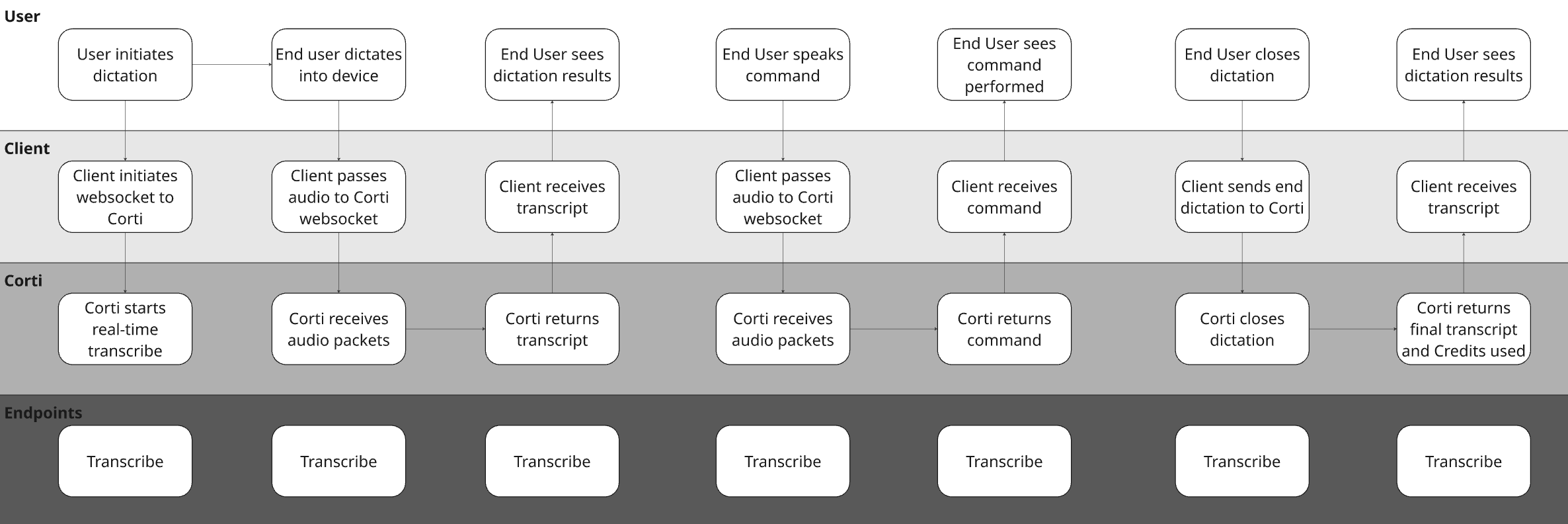
### Sense Check Your Core Workflows with a Diagram
To illustrate the concept with a hypothetical EHR, they may have made the following decisions for their design:
| Question | Answer | Justification |
| ---------------------------------------------------------------------------------------------- | ----------------------- | ------------------------------------------------------------------------------------------------------------------------------------- |
| Is this desktop, mobile, or both? | Both | Providers may dictate in different environments and expect a consistent workflow. |
| Is the provider dictating into a free-text editor, a sectioned note, or a template-based form? | All | We want to build a lightweight dictation component that is available throughout the chart |
| How should providers navigate through the chart when dictating? | Voice Commands | We want to minimize clicks in the system and we want to build a flexible tool that allows providers to use commands to move sections. |
| How should providers review output? | In-editor, in real time | Providers should be able to correct text as it appears rather than waiting until the end. |
 ## 2. Perfect Your Audio Stream
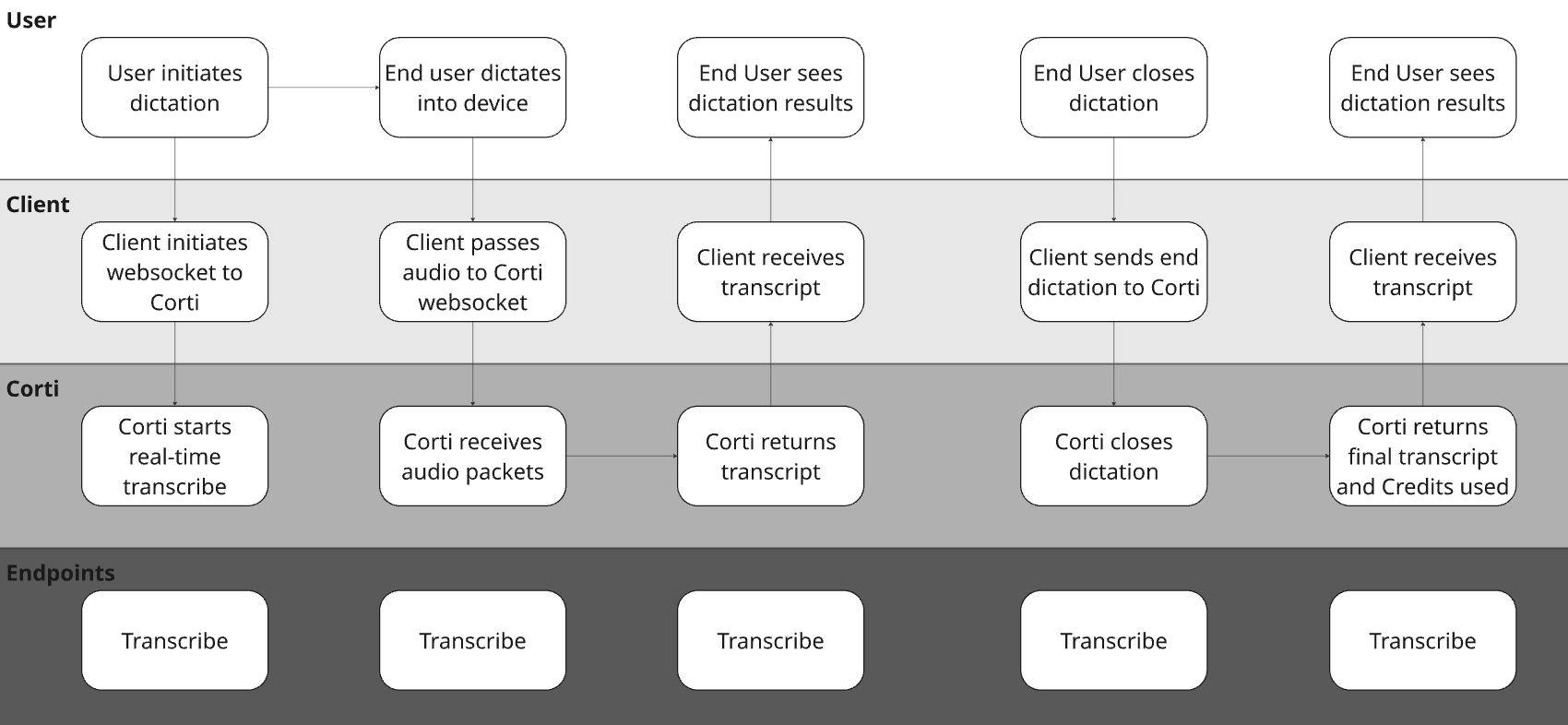
As with any speech tool, good audio is paramount to its success. The first thing to focus on is a straightforward workflow that gets crisp, clean audio straight from your users to Corti for immediate transcription.
For dictation workflows, real time audio capture is a must have. We find it important for a number of reasons:
Builds trust - by capturing live audio, clinicians see their dictations in real time. It's key to efficiency and trust.
Intercepts issues - with live audio capture, you can use Corti’s Audio Health events to intercept areas where the audio being received isn’t clear. It’s easier to tell a user the audio isn’t clear in the session rather than after so they can correct it sooner.
## 2. Perfect Your Audio Stream
As with any speech tool, good audio is paramount to its success. The first thing to focus on is a straightforward workflow that gets crisp, clean audio straight from your users to Corti for immediate transcription.
For dictation workflows, real time audio capture is a must have. We find it important for a number of reasons:
Builds trust - by capturing live audio, clinicians see their dictations in real time. It's key to efficiency and trust.
Intercepts issues - with live audio capture, you can use Corti’s Audio Health events to intercept areas where the audio being received isn’t clear. It’s easier to tell a user the audio isn’t clear in the session rather than after so they can correct it sooner.
 {/* Dictation session: connect with formatting config, handle transcripts/commands */}
```ts title="JavaScript" expandable theme={null}
import fs from "fs";
import { CortiClient } from "@corti/sdk";
// Replace these with your values
const ACCESS_TOKEN = "";
const client = new CortiClient({
auth: {
accessToken: ACCESS_TOKEN,
},
});
let socket;
try {
// Step 1: Connect and send config — SDK waits for CONFIG_ACCEPTED before resolving
socket = await client.transcribe.connect({
configuration: {
primaryLanguage: "en",
automaticPunctuation: true,
formatting: {
numbers: "numerals_above_nine",
measurements: "abbreviated",
},
},
});
console.log("✅ Connected — session ready");
socket.on("message", (msg) => {
switch (msg.type) {
case "transcript":
if (msg.data.isFinal) {
console.log(`🗣 [${msg.data.start}s → ${msg.data.end}s] ${msg.data.text}`);
} else {
console.log(`💬 Interim: ${msg.data.text}`);
}
break;
case "command":
console.log(`🎙 Command detected [${msg.data.id}]:`, msg.data.variables);
break;
case "flushed":
console.log("🔄 Buffer flushed");
break;
case "usage":
console.log(`💳 Credits used: ${msg.credits}`);
break;
case "ended":
console.log("🏁 Session ended — server closing socket");
break;
case "error":
console.error("❌ Runtime error:", msg.error);
break;
}
});
socket.on("close", (code, reason) => {
console.log(`🔌 Connection closed [${code}]: ${reason}`);
});
socket.on("error", (err) => console.error("🚨 Connection error:", err.message));
// Step 2: Start sending audio now that config is accepted
sendAudio();
} catch (err) {
// CONFIG_DENIED, CONFIG_TIMEOUT, or connection failure
console.error("❌ Failed to connect:", err);
throw err;
}
// --- Audio sending ---
function sendAudio() {
const AUDIO_FILE = "./sample.webm"; // swap with your audio file path
if (!fs.existsSync(AUDIO_FILE)) {
console.warn("⚠️ No audio file found — sending silence simulation");
simulateAudioAndEnd();
return;
}
const audioBuffer = fs.readFileSync(AUDIO_FILE);
const CHUNK_SIZE = 8192; // ~250–500ms per chunk
for (let i = 0; i < audioBuffer.length; i += CHUNK_SIZE) {
socket.sendAudio(audioBuffer.slice(i, i + CHUNK_SIZE));
}
// Signal end of audio stream
socket.sendEnd({ type: "end" });
console.log("📤 Audio sent — end signal dispatched");
}
function simulateAudioAndEnd() {
socket.sendAudio(Buffer.alloc(8192));
socket.sendEnd({ type: "end" });
}
```
{/* Dictation session: connect with formatting config, handle transcripts/commands */}
```csharp title="C# .NET" expandable theme={null}
using Corti;
// Replace these with your values
const string ACCESS_TOKEN = "";
var client = new CortiClient(
auth: CortiClientAuth.Bearer(accessToken: ACCESS_TOKEN)
);
var transcribe = await client.CreateTranscribeApiAsync();
// Register handlers before connecting
transcribe.TranscribeTranscriptMessage.Subscribe(msg =>
{
if (msg.Data.IsFinal)
Console.WriteLine($"🗣 [{msg.Data.Start}s → {msg.Data.End}s] {msg.Data.Text}");
else
Console.WriteLine($"💬 Interim: {msg.Data.Text}");
});
transcribe.TranscribeCommandMessage.Subscribe(msg =>
Console.WriteLine($"🎙 Command detected [{msg.Data.Id}]: {msg.Data.Variables}"));
transcribe.TranscribeFlushedMessage.Subscribe(_ =>
Console.WriteLine("🔄 Buffer flushed"));
transcribe.TranscribeUsageMessage.Subscribe(msg =>
Console.WriteLine($"💳 Credits used: {msg.Credits}"));
transcribe.TranscribeEndedMessage.Subscribe(_ =>
// Server closes the connection after sending "ended" — no need to close manually
Console.WriteLine("🏁 Session ended — server closing socket"));
transcribe.TranscribeErrorMessage.Subscribe(msg =>
Console.Error.WriteLine($"❌ Server error: {msg.Error.Title}"));
transcribe.ExceptionOccurred.Subscribe(ex =>
Console.Error.WriteLine($"🚨 Connection error: {ex.Message}"));
transcribe.Closed.Subscribe(info =>
Console.WriteLine($"🔌 Connection closed [{info.Code}]: {info.Reason}"));
try
{
// Step 1: Connect and send config — ConnectAsync waits for CONFIG_ACCEPTED before returning
await transcribe.ConnectAsync(new TranscribeConfig
{
PrimaryLanguage = "en",
AutomaticPunctuation = true,
Formatting = new TranscribeFormatting
{
Numbers = TranscribeFormattingNumbers.NumeralsAboveNine,
Measurements = TranscribeFormattingMeasurements.Abbreviated,
},
});
Console.WriteLine("✅ Connected — session ready");
// Step 2: Start sending audio now that config is accepted
const string audioFile = "./sample.webm"; // swap with your audio file path
const int chunkSize = 8192; // ~250–500ms per chunk
if (!File.Exists(audioFile))
{
Console.WriteLine("⚠️ No audio file found — sending silence simulation");
await transcribe.Send(new byte[chunkSize]);
await transcribe.Send(new TranscribeEndMessage());
}
else
{
var audioBytes = await File.ReadAllBytesAsync(audioFile);
for (int i = 0; i < audioBytes.Length; i += chunkSize)
{
var chunk = audioBytes.AsMemory(i, Math.Min(chunkSize, audioBytes.Length - i));
await transcribe.Send(chunk.ToArray());
}
// Signal end of audio stream
await transcribe.Send(new TranscribeEndMessage());
Console.WriteLine("📤 Audio sent — end signal dispatched");
}
}
catch (Exception ex)
{
// CONFIG_DENIED, CONFIG_TIMEOUT, or connection failure
Console.Error.WriteLine($"❌ Failed to connect: {ex.Message}");
throw;
}
```
```javascript Raw JavaScript expandable theme={null}
import WebSocket from "ws";
import fs from "fs";
// Replace these with your values
const ACCESS_TOKEN = "";
const ENVIRONMENT = "";
const TENANT = "";
const CHUNK_SIZE = 8192; // ~250–500ms per chunk
const WSS_URL = `wss://api.${ENVIRONMENT}.corti.app/audio-bridge/v2/transcribe?tenant-name=${TENANT}&token=Bearer%20${ACCESS_TOKEN}`;
const ws = new WebSocket(WSS_URL);
ws.on("open", () => {
console.log("✅ WebSocket connected");
// Step 1: Send config immediately (must be within 10 seconds)
const config = {
type: "config",
configuration: {
primaryLanguage: "en",
automaticPunctuation: true,
formatting: {
numbers: "numerals_above_nine",
measurements: "abbreviated",
},
},
};
ws.send(JSON.stringify(config));
console.log("📤 Sent config");
});
ws.on("message", (data) => {
// Audio binary frames come back as Buffer — skip those
if (Buffer.isBuffer(data) && !isJson(data)) return;
const message = JSON.parse(data.toString());
console.log("📨 Received:", JSON.stringify(message, null, 2));
switch (message.type) {
case "CONFIG_ACCEPTED":
console.log("✅ Config accepted — session:", message.sessionId);
// Step 2: Start sending audio now that config is accepted
sendAudio();
break;
case "CONFIG_DENIED":
case "CONFIG_TIMEOUT":
console.error("❌ Config error:", message);
ws.close();
break;
case "transcript":
if (message.data.isFinal) {
console.log(`🗣 [${message.data.start}s → ${message.data.end}s] ${message.data.text}`);
} else {
console.log(`💬 Interim: ${message.data.text}`);
}
break;
case "command":
console.log(`🎙 Command detected [${message.data.id}]:`, message.data.variables);
break;
case "flushed":
console.log("🔄 Buffer flushed");
break;
case "usage":
console.log(`💳 Credits used: ${message.credits}`);
break;
case "ended":
console.log("🏁 Session ended — server closing socket");
break;
case "error":
console.error("❌ Runtime error:", message.error);
break;
}
});
ws.on("close", (code, reason) => {
console.log(`🔌 Connection closed [${code}]: ${reason}`);
});
ws.on("error", (err) => {
console.error("🚨 WebSocket error:", err.message);
});
// --- Audio sending ---
function sendAudio() {
const AUDIO_FILE = "./sample.webm"; // swap with your audio file path
if (!fs.existsSync(AUDIO_FILE)) {
console.warn("⚠️ No audio file found — sending silence simulation");
simulateAudioAndEnd();
return;
}
const audioBuffer = fs.readFileSync(AUDIO_FILE);
for (let i = 0; i < audioBuffer.length; i += CHUNK_SIZE) {
ws.send(audioBuffer.slice(i, i + CHUNK_SIZE));
}
// Signal end of audio stream
ws.send(JSON.stringify({ type: "end" }));
console.log("📤 Audio sent — end signal dispatched");
}
function simulateAudioAndEnd() {
// Send a short silence buffer then end the session
ws.send(Buffer.alloc(CHUNK_SIZE));
ws.send(JSON.stringify({ type: "end" }));
}
function isJson(buffer) {
try {
JSON.parse(buffer.toString());
return true;
} catch {
return false;
}
}
```
## 3. Define your Dictation Commands
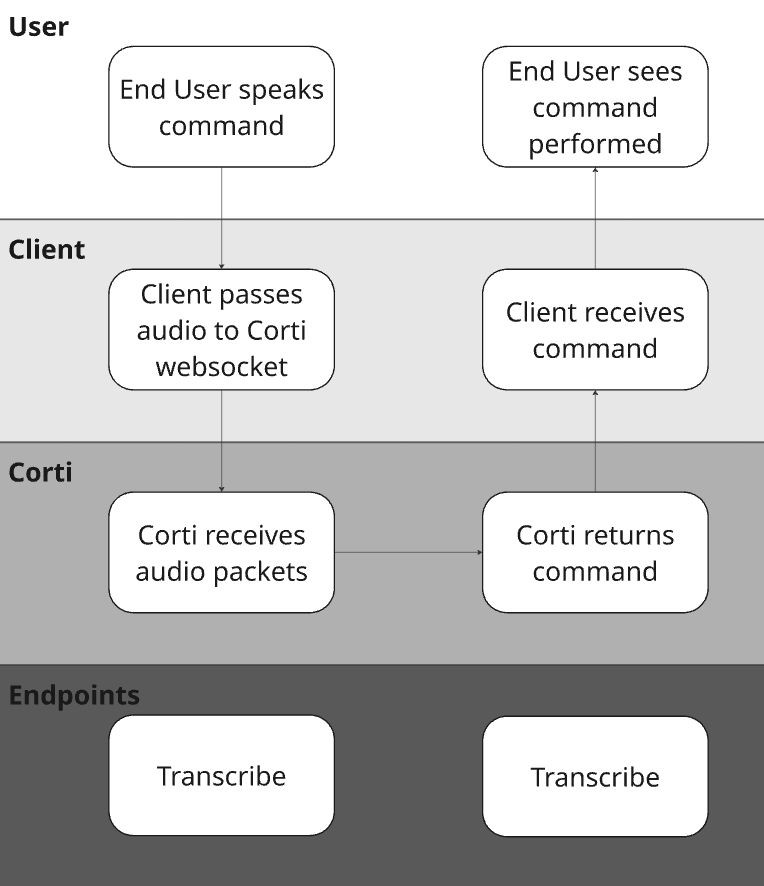
Dictation is so much more than just simple speech to text. When implemented well, dictation allows for providers to execute fully hands free workflows. They can jump sections in the system they are working with, select specific text, delete text, etc.
### Define Supported Dictation Commands
Tying this back to the questions to consider, It's important to understand what system(s) you are building into and what/how they support:
1. First identify which systems you're integrating into - Is it a desktop application? A mobile app? Both?
2. Next, map out the commands you will be supporting - Read more tips/best practices [here](https://docs.corti.ai/stt/best-practices-commands)
3. If building into multiple platforms, identify how commands may need to vary based on system the provider is working from.
{/* Dictation session: connect with formatting config, handle transcripts/commands */}
```ts title="JavaScript" expandable theme={null}
import fs from "fs";
import { CortiClient } from "@corti/sdk";
// Replace these with your values
const ACCESS_TOKEN = "";
const client = new CortiClient({
auth: {
accessToken: ACCESS_TOKEN,
},
});
let socket;
try {
// Step 1: Connect and send config — SDK waits for CONFIG_ACCEPTED before resolving
socket = await client.transcribe.connect({
configuration: {
primaryLanguage: "en",
automaticPunctuation: true,
formatting: {
numbers: "numerals_above_nine",
measurements: "abbreviated",
},
},
});
console.log("✅ Connected — session ready");
socket.on("message", (msg) => {
switch (msg.type) {
case "transcript":
if (msg.data.isFinal) {
console.log(`🗣 [${msg.data.start}s → ${msg.data.end}s] ${msg.data.text}`);
} else {
console.log(`💬 Interim: ${msg.data.text}`);
}
break;
case "command":
console.log(`🎙 Command detected [${msg.data.id}]:`, msg.data.variables);
break;
case "flushed":
console.log("🔄 Buffer flushed");
break;
case "usage":
console.log(`💳 Credits used: ${msg.credits}`);
break;
case "ended":
console.log("🏁 Session ended — server closing socket");
break;
case "error":
console.error("❌ Runtime error:", msg.error);
break;
}
});
socket.on("close", (code, reason) => {
console.log(`🔌 Connection closed [${code}]: ${reason}`);
});
socket.on("error", (err) => console.error("🚨 Connection error:", err.message));
// Step 2: Start sending audio now that config is accepted
sendAudio();
} catch (err) {
// CONFIG_DENIED, CONFIG_TIMEOUT, or connection failure
console.error("❌ Failed to connect:", err);
throw err;
}
// --- Audio sending ---
function sendAudio() {
const AUDIO_FILE = "./sample.webm"; // swap with your audio file path
if (!fs.existsSync(AUDIO_FILE)) {
console.warn("⚠️ No audio file found — sending silence simulation");
simulateAudioAndEnd();
return;
}
const audioBuffer = fs.readFileSync(AUDIO_FILE);
const CHUNK_SIZE = 8192; // ~250–500ms per chunk
for (let i = 0; i < audioBuffer.length; i += CHUNK_SIZE) {
socket.sendAudio(audioBuffer.slice(i, i + CHUNK_SIZE));
}
// Signal end of audio stream
socket.sendEnd({ type: "end" });
console.log("📤 Audio sent — end signal dispatched");
}
function simulateAudioAndEnd() {
socket.sendAudio(Buffer.alloc(8192));
socket.sendEnd({ type: "end" });
}
```
{/* Dictation session: connect with formatting config, handle transcripts/commands */}
```csharp title="C# .NET" expandable theme={null}
using Corti;
// Replace these with your values
const string ACCESS_TOKEN = "";
var client = new CortiClient(
auth: CortiClientAuth.Bearer(accessToken: ACCESS_TOKEN)
);
var transcribe = await client.CreateTranscribeApiAsync();
// Register handlers before connecting
transcribe.TranscribeTranscriptMessage.Subscribe(msg =>
{
if (msg.Data.IsFinal)
Console.WriteLine($"🗣 [{msg.Data.Start}s → {msg.Data.End}s] {msg.Data.Text}");
else
Console.WriteLine($"💬 Interim: {msg.Data.Text}");
});
transcribe.TranscribeCommandMessage.Subscribe(msg =>
Console.WriteLine($"🎙 Command detected [{msg.Data.Id}]: {msg.Data.Variables}"));
transcribe.TranscribeFlushedMessage.Subscribe(_ =>
Console.WriteLine("🔄 Buffer flushed"));
transcribe.TranscribeUsageMessage.Subscribe(msg =>
Console.WriteLine($"💳 Credits used: {msg.Credits}"));
transcribe.TranscribeEndedMessage.Subscribe(_ =>
// Server closes the connection after sending "ended" — no need to close manually
Console.WriteLine("🏁 Session ended — server closing socket"));
transcribe.TranscribeErrorMessage.Subscribe(msg =>
Console.Error.WriteLine($"❌ Server error: {msg.Error.Title}"));
transcribe.ExceptionOccurred.Subscribe(ex =>
Console.Error.WriteLine($"🚨 Connection error: {ex.Message}"));
transcribe.Closed.Subscribe(info =>
Console.WriteLine($"🔌 Connection closed [{info.Code}]: {info.Reason}"));
try
{
// Step 1: Connect and send config — ConnectAsync waits for CONFIG_ACCEPTED before returning
await transcribe.ConnectAsync(new TranscribeConfig
{
PrimaryLanguage = "en",
AutomaticPunctuation = true,
Formatting = new TranscribeFormatting
{
Numbers = TranscribeFormattingNumbers.NumeralsAboveNine,
Measurements = TranscribeFormattingMeasurements.Abbreviated,
},
});
Console.WriteLine("✅ Connected — session ready");
// Step 2: Start sending audio now that config is accepted
const string audioFile = "./sample.webm"; // swap with your audio file path
const int chunkSize = 8192; // ~250–500ms per chunk
if (!File.Exists(audioFile))
{
Console.WriteLine("⚠️ No audio file found — sending silence simulation");
await transcribe.Send(new byte[chunkSize]);
await transcribe.Send(new TranscribeEndMessage());
}
else
{
var audioBytes = await File.ReadAllBytesAsync(audioFile);
for (int i = 0; i < audioBytes.Length; i += chunkSize)
{
var chunk = audioBytes.AsMemory(i, Math.Min(chunkSize, audioBytes.Length - i));
await transcribe.Send(chunk.ToArray());
}
// Signal end of audio stream
await transcribe.Send(new TranscribeEndMessage());
Console.WriteLine("📤 Audio sent — end signal dispatched");
}
}
catch (Exception ex)
{
// CONFIG_DENIED, CONFIG_TIMEOUT, or connection failure
Console.Error.WriteLine($"❌ Failed to connect: {ex.Message}");
throw;
}
```
```javascript Raw JavaScript expandable theme={null}
import WebSocket from "ws";
import fs from "fs";
// Replace these with your values
const ACCESS_TOKEN = "";
const ENVIRONMENT = "";
const TENANT = "";
const CHUNK_SIZE = 8192; // ~250–500ms per chunk
const WSS_URL = `wss://api.${ENVIRONMENT}.corti.app/audio-bridge/v2/transcribe?tenant-name=${TENANT}&token=Bearer%20${ACCESS_TOKEN}`;
const ws = new WebSocket(WSS_URL);
ws.on("open", () => {
console.log("✅ WebSocket connected");
// Step 1: Send config immediately (must be within 10 seconds)
const config = {
type: "config",
configuration: {
primaryLanguage: "en",
automaticPunctuation: true,
formatting: {
numbers: "numerals_above_nine",
measurements: "abbreviated",
},
},
};
ws.send(JSON.stringify(config));
console.log("📤 Sent config");
});
ws.on("message", (data) => {
// Audio binary frames come back as Buffer — skip those
if (Buffer.isBuffer(data) && !isJson(data)) return;
const message = JSON.parse(data.toString());
console.log("📨 Received:", JSON.stringify(message, null, 2));
switch (message.type) {
case "CONFIG_ACCEPTED":
console.log("✅ Config accepted — session:", message.sessionId);
// Step 2: Start sending audio now that config is accepted
sendAudio();
break;
case "CONFIG_DENIED":
case "CONFIG_TIMEOUT":
console.error("❌ Config error:", message);
ws.close();
break;
case "transcript":
if (message.data.isFinal) {
console.log(`🗣 [${message.data.start}s → ${message.data.end}s] ${message.data.text}`);
} else {
console.log(`💬 Interim: ${message.data.text}`);
}
break;
case "command":
console.log(`🎙 Command detected [${message.data.id}]:`, message.data.variables);
break;
case "flushed":
console.log("🔄 Buffer flushed");
break;
case "usage":
console.log(`💳 Credits used: ${message.credits}`);
break;
case "ended":
console.log("🏁 Session ended — server closing socket");
break;
case "error":
console.error("❌ Runtime error:", message.error);
break;
}
});
ws.on("close", (code, reason) => {
console.log(`🔌 Connection closed [${code}]: ${reason}`);
});
ws.on("error", (err) => {
console.error("🚨 WebSocket error:", err.message);
});
// --- Audio sending ---
function sendAudio() {
const AUDIO_FILE = "./sample.webm"; // swap with your audio file path
if (!fs.existsSync(AUDIO_FILE)) {
console.warn("⚠️ No audio file found — sending silence simulation");
simulateAudioAndEnd();
return;
}
const audioBuffer = fs.readFileSync(AUDIO_FILE);
for (let i = 0; i < audioBuffer.length; i += CHUNK_SIZE) {
ws.send(audioBuffer.slice(i, i + CHUNK_SIZE));
}
// Signal end of audio stream
ws.send(JSON.stringify({ type: "end" }));
console.log("📤 Audio sent — end signal dispatched");
}
function simulateAudioAndEnd() {
// Send a short silence buffer then end the session
ws.send(Buffer.alloc(CHUNK_SIZE));
ws.send(JSON.stringify({ type: "end" }));
}
function isJson(buffer) {
try {
JSON.parse(buffer.toString());
return true;
} catch {
return false;
}
}
```
## 3. Define your Dictation Commands
Dictation is so much more than just simple speech to text. When implemented well, dictation allows for providers to execute fully hands free workflows. They can jump sections in the system they are working with, select specific text, delete text, etc.
### Define Supported Dictation Commands
Tying this back to the questions to consider, It's important to understand what system(s) you are building into and what/how they support:
1. First identify which systems you're integrating into - Is it a desktop application? A mobile app? Both?
2. Next, map out the commands you will be supporting - Read more tips/best practices [here](https://docs.corti.ai/stt/best-practices-commands)
3. If building into multiple platforms, identify how commands may need to vary based on system the provider is working from.
 We have a whole page dedicated to setting up Dictation Commands [here](https://docs.corti.ai/stt/commands)
Additionally, read more about Dictation Command Best Practices [here](https://docs.corti.ai/stt/best-practices-commands)
For an example, here is a code snippet for a command to delete text. The command includes a defined list of words that can be recognized for the `delete_range` variable. Your application can define different delete actions for each of the options!
```javascript Command config: Delete text icon="square-js" expandable theme={null}
commands: [
{
id: "delete_range",
phrases: ["delete {delete_range}"],
variables: [
{
key: "delete_range",
type: "enum",
enum: ["everything", "the last word", "the last sentence", "that"]
}
]
}
]
```
```javascript Server response theme={null}
{
"type": "command",
"data": {
"id": "delete_range",
"variables": {
"delete_range": "that"
},
"rawTranscriptText": "Delete that.",
"start": 7.19,
"end": 8.01
}
}
```
## 4. Determine Your Punctuation Strategy
Most dictation tools on the market today have punctuation support baked into their solution. To make sure that we keep feature parity with legacy approaches to dictation, we offer a vast number of punctuation commands for providers to use (We also can use our models to formate/punctuate dictations instead!). We recommend consistency in your approach here. There are few things more frustrating than trying to dictate commands into a field that doesn't support it!
| Parameter | Description | Recommendation |
| :--------------------- | :------------------------------------------------------------------------------------------------------------------------------------------------------------------------------------------- | :--------------------------------------------------------------------------- |
| `spokenPunctuation` | Enable users to control when punctuation is inserted in the document output, having punctuation symbols and line breaks added to the document instead of transcribed text, as defined below. | Use for dictation and transcription workflows (not available for `/streams`) |
| `automaticPunctuation` | STT model automatically inserts limited punctuation (e.g., period, comma, question mark) based on context and dictation cadence. | Use for conversational transcript workflows (on by default for `/streams`) |
If supporting spoken punctuation, make sure you know what we support out of the box below:
| Punctuation | | Spoken forms supported |
| :--------------- | :----: | :---------------------------------------------------------------------------------------------------------------------------------- |
| Period | `.` | "period", "full stop", "dot" |
| Comma | `,` | "comma" |
| New line | `\n` | "new line", "next line" |
| New paragraph | `\n\n` | "new paragraph", "next paragraph" |
| Exclamation mark | `!` | "exclamation mark", "exclamation point" |
| Question mark | `?` | "question mark" |
| Colon | `:` | "colon" |
| Semicolon | `;` | "semicolon" |
| Hyphen | `-` | "hyphen", "dash" |
| Slash | `/` | "slash", "forward slash" |
| Quotation marks | `" "` | "open quote", "open quotation"
We have a whole page dedicated to setting up Dictation Commands [here](https://docs.corti.ai/stt/commands)
Additionally, read more about Dictation Command Best Practices [here](https://docs.corti.ai/stt/best-practices-commands)
For an example, here is a code snippet for a command to delete text. The command includes a defined list of words that can be recognized for the `delete_range` variable. Your application can define different delete actions for each of the options!
```javascript Command config: Delete text icon="square-js" expandable theme={null}
commands: [
{
id: "delete_range",
phrases: ["delete {delete_range}"],
variables: [
{
key: "delete_range",
type: "enum",
enum: ["everything", "the last word", "the last sentence", "that"]
}
]
}
]
```
```javascript Server response theme={null}
{
"type": "command",
"data": {
"id": "delete_range",
"variables": {
"delete_range": "that"
},
"rawTranscriptText": "Delete that.",
"start": 7.19,
"end": 8.01
}
}
```
## 4. Determine Your Punctuation Strategy
Most dictation tools on the market today have punctuation support baked into their solution. To make sure that we keep feature parity with legacy approaches to dictation, we offer a vast number of punctuation commands for providers to use (We also can use our models to formate/punctuate dictations instead!). We recommend consistency in your approach here. There are few things more frustrating than trying to dictate commands into a field that doesn't support it!
| Parameter | Description | Recommendation |
| :--------------------- | :------------------------------------------------------------------------------------------------------------------------------------------------------------------------------------------- | :--------------------------------------------------------------------------- |
| `spokenPunctuation` | Enable users to control when punctuation is inserted in the document output, having punctuation symbols and line breaks added to the document instead of transcribed text, as defined below. | Use for dictation and transcription workflows (not available for `/streams`) |
| `automaticPunctuation` | STT model automatically inserts limited punctuation (e.g., period, comma, question mark) based on context and dictation cadence. | Use for conversational transcript workflows (on by default for `/streams`) |
If supporting spoken punctuation, make sure you know what we support out of the box below:
| Punctuation | | Spoken forms supported |
| :--------------- | :----: | :---------------------------------------------------------------------------------------------------------------------------------- |
| Period | `.` | "period", "full stop", "dot" |
| Comma | `,` | "comma" |
| New line | `\n` | "new line", "next line" |
| New paragraph | `\n\n` | "new paragraph", "next paragraph" |
| Exclamation mark | `!` | "exclamation mark", "exclamation point" |
| Question mark | `?` | "question mark" |
| Colon | `:` | "colon" |
| Semicolon | `;` | "semicolon" |
| Hyphen | `-` | "hyphen", "dash" |
| Slash | `/` | "slash", "forward slash" |
| Quotation marks | `" "` | "open quote", "open quotation"
"close quote", "close quotation" |
| Parentheses | `( )` | "open parenthesis", "open paren", "open bracket(s)"
"close parenthesis", "closed paren", "close bracket(s)", "end bracket(s)" |
| Punctuation | | Spoken forms supported |
| :--------------- | :----: | :------------------------------------------------------------------------------------- |
| Period | `.` | "punktum", "punktom", "og punktum" |
| Comma | `,` | "komma" |
| New line | `\n` | "ny linje", "næste linje", "og næste linje", "og ny linje" |
| New paragraph | `\n\n` | "nyt afsnit", "ny afsnit", "og nyt afsnit", "og ny afsnit" |
| Exclamation mark | `!` | "udråbstegn" |
| Question mark | `?` | "spørgsmålstegn" |
| Colon | `:` | "kolon" |
| Semicolon | `;` | "semikolon" |
| Hyphen | `-` | "bindestreg" |
| Slash | `/` | "skråstreg" |
| Quotation marks | `" "` | "åbn anførselstegn", "anførselstegn"
"luk anførselstegn", "anførselstegn slut" |
| Parentheses | `( )` | "parentes begynd", "parentes", "parentes start"
"parentes slut", "parentes stop" |
| Punctuation | | Spoken forms supported |
| :--------------- | :----: | :--------------------------------------------------------------------------------------------------------------- |
| Period | `.` | "punt", "dot", "puntje", "eindpunt" |
| Comma | `,` | "komma" |
| New line | `\n` | "nieuwe regel", "volgende regel" |
| New paragraph | `\n\n` | "nieuwe alinea", "volgende alinea" |
| Exclamation mark | `!` | "uitroepteken" |
| Question mark | `?` | "vraagteken" |
| Colon | `:` | "dubbele punt" |
| Semicolon | `;` | "puntkomma" |
| Hyphen | `-` | "koppelteken", "streepje", "minteken" |
| Slash | `/` | "schuine streep", "slash" |
| Quotation marks | `" "` | "open aanhalingsteken", "open quote", "open citaat"
"sluit aanhalingsteken", "sluit quote", "sluit citaat" |
| Parentheses | `( )` | "open haakje", "open haak", "open ronde haakje"
"sluit haakje", "sluit haak", "sluit ronde haakje" |
| Punctuation | | Spoken forms supported |
| :--------------- | :----: | :------------------------------------------------------------------------------------------------ |
| Period | `.` | "point" |
| Comma | `,` | "virgule" |
| New line | `\n` | "à la ligne" |
| New paragraph | `\n\n` | "nouveau paragraphe", "paragraphe" |
| Exclamation mark | `!` | "point d'exclamation" |
| Question mark | `?` | "point d'interrogation" |
| Colon | `:` | "deux points" |
| Semicolon | `;` | "point virgule" |
| Hyphen | `-` | "tiret", "trait d'union" |
| Slash | `/` | "slash", "barre oblique" |
| Quotation marks | `" "` | "ouvrir les guillemets"
"fermer les guillemets" |
| Parentheses | `( )` | "ouvrir la parenthèse", "parenthèse ouvrante"
"fermer la parenthèse", "parenthèse fermante" |
| Punctuation | | Spoken forms supported |
| :--------------- | :----: | :-------------------------------------------------------------- |
| Period | `.` | "Punkt" |
| Comma | `,` | "Komma" |
| New line | `\n` | "neue Zeile" |
| New paragraph | `\n\n` | "neuer Absatz" |
| Exclamation mark | `!` | "Ausrufezeichen" |
| Question mark | `?` | "Fragezeichen" |
| Colon | `:` | "Doppelpunkt" |
| Semicolon | `;` | "Semikolon", "Strichpunkt" |
| Hyphen | `-` | "Bindestrich" |
| Slash | `/` | "Schrägstrich" |
| Quotation marks | `" "` | "Anführungszeichen öffnen"
"Anführungszeichen schliessen" |
| Parentheses | `( )` | "Klammer auf"
"Klammer zu" |
| Punctuation | | Spoken forms supported |
| :--------------- | :----: | :----------------------------------------------------------------------------------- |
| Period | `.` | "pont", "pontjel" |
| Comma | `,` | "vessző" |
| New line | `\n` | "új sor", "következő sor" |
| New paragraph | `\n\n` | "új bekezdés" |
| Exclamation mark | `!` | "felkiáltójel" |
| Question mark | `?` | "kérdőjel" |
| Colon | `:` | "kettőspont" |
| Semicolon | `;` | "pontosvessző" |
| Hyphen | `-` | "kötőjel", "mínusz jel" |
| Slash | `/` | "perjel", "törtvonal" |
| Quotation marks | `" "` | "idézőjel", "idézet nyitása"
"idézőjel zár", "idézet zárása", "idézőjel bezár" |
| Parentheses | `( )` | "zárójel", "zárójel nyit", "nyitó zárójel"
"zárójel zár", "zárójel bezár" |
| Punctuation | | Spoken forms supported |
| :--------------- | :----: | :--------------------------------------------------------------------------------------------------------------------------------------------------------- |
| Period | `.` | "punktum", "prikk", "full stopp" |
| Comma | `,` | "komma" |
| New line | `\n` | "ny linje", "neste linje" |
| New paragraph | `\n\n` | "nytt avsnitt", "neste avsnitt" |
| Exclamation mark | `!` | "utropstegn", "utrop" |
| Question mark | `?` | "spørsmålstegn" |
| Colon | `:` | "kolon" |
| Semicolon | `;` | "semikolon" |
| Hyphen | `-` | "bindestrek", "strek", "dash" |
| Slash | `/` | "skråstrek", "slash", "fremoverskråstrek" |
| Quotation marks | `" "` | "åpne anførselstegn", "åpne sitat"
"lukk anførselstegn", "lukk sitat" |
| Parentheses | `( )` | "åpne parentes", "åpne paren", "åpne bracket", "åpne parenteser"
"lukk parentes", "lukk paren", "slutt parentes", "lukk parenteser", "slutt bracket" |
| Punctuation | | Spoken forms supported |
| :--------------- | :----: | :-------------------------------------------------------------------------------------------------------------------- |
| Period | `.` | "punkt" |
| Comma | `,` | "kommatecken", "komma" |
| New line | `\n` | "ny rad" |
| New paragraph | `\n\n` | "nytt stycke" |
| Exclamation mark | `!` | "utropstecken" |
| Question mark | `?` | "frågetecken" |
| Colon | `:` | "kolon" |
| Semicolon | `;` | "semikolon" |
| Hyphen | `-` | "bindestreck" |
| Slash | `/` | "snedstreck" |
| Quotation marks | `" "` | "citattecken", "öppna citattecken", "citationstecken", "citat", "start citat"
"slut citat", "stäng citattecken" |
| Parentheses | `( )` | "start parentes", "öppna parentes"
"slutparentes", "stäng parentes" |
Punctuation is key to making your dictations readable and easily actionable. We recommend sharing tip sheets with providers so they know the various punctuations available along with the spoken commands you choose to support.
## Tying It All Together
Between medical grade speech to text , the configurable spoken command support, and punctuation capabilities, there's a lot to piece together. But using the above steps and considerations, you should have a good idea of how to piece tha puzzle together in the best way for your organziation and your platform(s). As a refresher, in the above we discussed:
* Start with great audio - This means optimizing the stream as well as microphones.
* Design Time Saving Commands - Workflows like navigation and editing can save providers time (and clicks) if you design dictation to help.
* Add Punctuation Support - This helps your data to look clean and make it more easily actionable by other users.