> ## Documentation Index
> Fetch the complete documentation index at: https://docs.corti.ai/llms.txt
> Use this file to discover all available pages before exploring further.
# Building Your Ambient Scribe
> Implementation guide for building an ambient scribe application
An implementation handbook for product and engineering teams building ambient clinical documentation using the Corti platform.
Modeled after structured use-case guides, this document is designed to help you move from concept → workflow → implementation → integration.
## Getting Started
Before writing a single line of code, align on the fundamentals:
Be explicit about *who* this scribe is for and *what* problem it solves. Is it primary care SOAP notes? Specialty consult documentation? Urgent care throughput optimization?
The shape of your clinical output — structure, tone, length, required fields — will vary significantly based on specialty and workflow. A narrowly defined initial use case leads to faster iteration and stronger provider trust.
Decide whether documentation should update live during the visit or generate after the encounter ends:
* Real-time systems improve transparency, allow in-visit correction, and plan ahead for in consultation agents but if network is unstable (or non-existent) it may make for a more difficult first use case.
* Post-encounter generation can simplify UX and solve for offline periods, but you can lose the ability to intervene if user audio is poor quality.
Your choice affects architecture, infrastructure requirements, and provider behavior.
Ambient is the new kid on the block and it solves for a lot with your user base. Some specialties or user groups are also used to using other classic speech technologies like dictation.
Corti offers an API endpoint to support dictation workflows in addition to APIs for building out an ambient scribe. Choosing whether you support this from the start will help you to design the UX in an intuitive way so providers know when Ambient is the right way to go or if they want to go full Dictation. Design for the behaviors you want to drive.
Ambient scribes are most powerful when inside existing clinical workflows (we don’t want to change workflows, we want to support them!).
* Determine what systems you’ll pull context from (e.g. EHR demographics, scheduling system appointment reason) and where documentation will be written back (e.g. EHR note, After Visit Summary).
* Clarify whether you need deep EHR embedding, background API write-back, or a lightweight copy/paste workflow. Integration scope will heavily influence build complexity and timeline.
Clinicians must remain the final authority on documentation. Define how users will review extracted facts, edit generated sections, and approve the final note.
* Should providers be able to listen back to their cases?
* Will edits to documents be logged for your team to track common changes to then adjust prompts?
Designing thoughtful review controls builds trust, supports compliance, and improves long-term accuracy through feedback loops.
### Establish your Success Metrics
Determining the best way to measure success for your scribe can be difficult. The true measure of success is workflow transformation. Before launch, define how you will quantify impact — operationally, clinically, and experientially.
Provider trust and comfort are the leading indicators of long-term adoption.
Measure:
* Overall satisfaction score (CSAT or NPS-style survey)
* Adoption Rates
Ambient tools fail not because they are inaccurate, but because they are cognitively burdensome or unpredictable. Regular pulse surveys (2–4 weeks post-rollout) help detect friction early.
If charting time is currently tracked, this becomes a powerful ROI metric.
Measure:
* Average documentation time per encounter
* After-hours charting ("pajama time")
Even a 20–30% reduction in post-visit documentation time materially improves provider well-being and operational efficiency. Remember, it takes time to see some of these impacts as new tools take time to learn.
Ambient tools often shift clinician attention back to the patient.
Measure:
* Patient-reported perception of provider attentiveness
* Visit quality ratings
Improved patient satisfaction can be a secondary but meaningful outcome of successful ambient implementation.
Tracking the behaviors of end user modification can be a great proxy metric for time savings and even provider trust:
Measure:
* % of sections edited
* Average word-level modification rate
* Most frequently rewritten sections
Don’t be afraid of seeing the edits though! Edits show adoption of tools. What you should focus on is where are the trends in edits and where are the outliers.
***
## The Corti API Basics
The interaction is the central hub for managing conversational sessions, letting you create and update interactions that drive clinical AI workflows.
Real-time, stateless speech-to-text over WebSocket designed to power fluid dictation experiences with reliable medical language recognition.
Extract and retrieve clinically relevant facts from interactions to enhance insight and decision support.
Create and manage AI-driven agents that automate contextual messaging and task workflows with experts registry support.
Live WebSocket interaction streaming that concurrently produces transcripts and clinical facts to support ambient documentation workflows.
Define reusable document structures that ensure clarity and consistency in generated outputs.
Upload and organize audio recordings tied to interactions to fuel downstream transcription and document generation.
Generate polished clinical documents from transcripts and templates for notes, summaries, or referrals.
Convert uploaded recordings into structured, usable text to support review and documentation.
***
## How to Implement Your Ambient Scribe
### 1. Map Your Ambient Workflows
Ambient scribing is not just speech to text + summarization. It is a **clinical workflow system**.
Before building, map the end-to-end experience:
#### Questions to Align On
* Is this **in-person**, **virtual**, or both?
* Should facts be generated live? Or just documents at the end of the visit?
* How should providers:
* Review extracted facts?
* Edit generated documents?
* Approve final documentation?
* What documentation needs do your users have?
* Predefined structured SOAP notes?
* Specialty specific templates?
* User managed templates?
#### Visualize Your Core Workflows
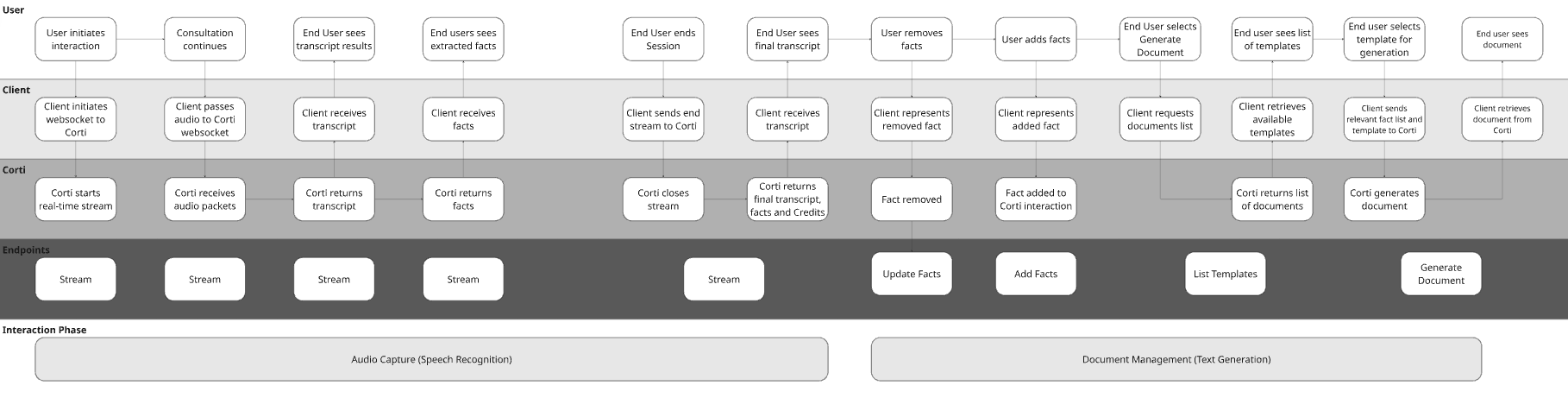
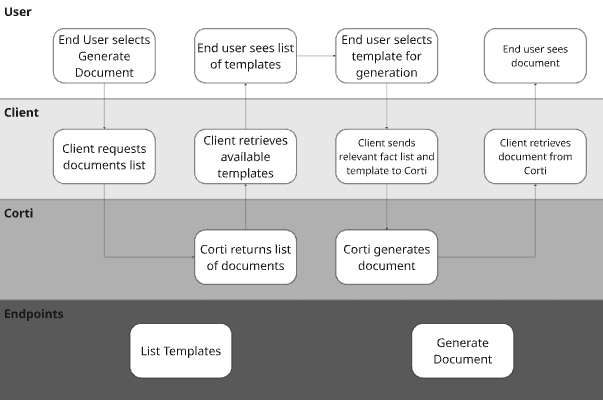
To illustrate the concept with a hypothetical EHR, they may have made the following decisions for their design:
| Question | Answer | Justification |
| ------------------------------------------------------------------------------ | ---------------------------- | ------------------------------------------------------------------------------------------------------------------------------------------------------------------- |
| Is this in-person, virtual, or both? | Both | The below workflow doesn’t highlight this, but this would impact the UI design for sharing audio either from an attached microphone or a browser tab. |
| Should facts be generated live? Or just documents at the end of the visit? | Live | We’re using the Streams endpoint which is optimized for real time fact generation. |
| How should providers review facts? | In/Post Consultation | In the workflow, we’re presenting facts to providers to edit before submitting for document generation. |
| How should providers edit generated documents and approve final documentation? | Edit in app | The workflow shows the document being presented to the end user after generation. They should make necessary edits before exiting the chart or saving the document. |
| What documentation needs do your users have? | Corti Standard Template List | In the workflow, you’ll see calling the List Templates endpoint which will return the Corti standard list. |
 ### 2. Determine Audio Capture Strategy
Ambient systems are only as strong as their audio layer. Corti provides multiple capture paths, including browser-based capture via the [JS SDK](/sdk/js/overview).
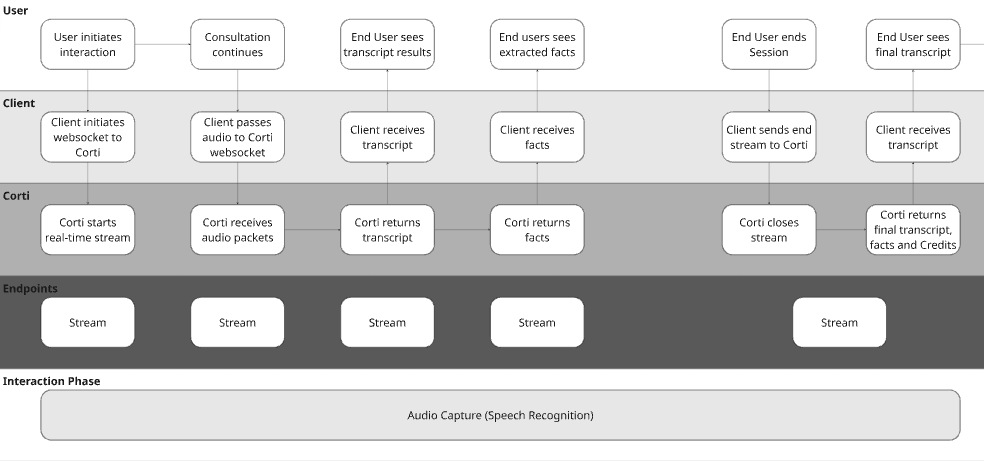
#### Option A: Realtime Scribe | Browser-Based Capture (JS SDK)
Real time audio capture is a game changer in the clinical world. This is important for two key reasons:
1. **Builds trust** - by capturing live audio, you can bring facts to clinicians live in the consultation. It brings trust to the provider to see the facts extracting in real time and knowing the scribe is following along.
2. **Intercepts issues** - with live audio capture, you can use Corti’s Audio Health events to intercept areas where the audio being received isn’t clear. It’s easier to tell a user the audio isn’t clear in the session rather than after so they can correct it sooner.
### 2. Determine Audio Capture Strategy
Ambient systems are only as strong as their audio layer. Corti provides multiple capture paths, including browser-based capture via the [JS SDK](/sdk/js/overview).
#### Option A: Realtime Scribe | Browser-Based Capture (JS SDK)
Real time audio capture is a game changer in the clinical world. This is important for two key reasons:
1. **Builds trust** - by capturing live audio, you can bring facts to clinicians live in the consultation. It brings trust to the provider to see the facts extracting in real time and knowing the scribe is following along.
2. **Intercepts issues** - with live audio capture, you can use Corti’s Audio Health events to intercept areas where the audio being received isn’t clear. It’s easier to tell a user the audio isn’t clear in the session rather than after so they can correct it sooner.
 This is ideal for:
* Web-based EHRs
* Telehealth platforms
* Embedded scribe widgets
{/* Ambient stream session: connect with transcription + facts config, handle all messages */}
```ts title="JavaScript" expandable theme={null}
import fs from "fs";
import { CortiClient } from "@corti/sdk";
// Replace these with your values
const ACCESS_TOKEN = "";
const INTERACTION_ID = "";
const client = new CortiClient({
auth: {
accessToken: ACCESS_TOKEN,
},
});
let socket;
try {
// Step 1: Connect and send config — SDK waits for CONFIG_ACCEPTED before resolving
socket = await client.stream.connect({
id: INTERACTION_ID,
configuration: {
transcription: {
primaryLanguage: "en",
diarize: false,
isMultichannel: false,
participants: [{ channel: 0, role: "multiple" }],
},
mode: {
type: "facts", // or "transcription" if you don't need facts
outputLocale: "en",
},
},
});
console.log("✅ Connected — session ready");
socket.on("message", (msg) => {
switch (msg.type) {
case "transcript":
// Segments can arrive out of order across speakers — order by time.start
[...msg.data]
.sort((a, b) => a.time.start - b.time.start)
.forEach((seg) => {
console.log(`🗣 [${seg.time.start}s → ${seg.time.end}s] ${seg.transcript}`);
});
break;
case "facts":
msg.fact.forEach((fact) => {
console.log(`💡 Fact [${fact.group}]: ${fact.text}`);
});
break;
case "flushed":
console.log("🔄 Buffer flushed");
break;
case "usage":
console.log(`💳 Credits used: ${msg.credits}`);
break;
case "ENDED":
console.log("🏁 Session ended — server closing socket");
break;
case "error":
console.error("❌ Runtime error:", msg.error);
break;
}
});
socket.on("close", (code, reason) => {
console.log(`🔌 Connection closed [${code}]: ${reason}`);
});
socket.on("error", (err) => console.error("🚨 Connection error:", err.message));
// Step 2: Start sending audio now that config is accepted
sendAudio();
} catch (err) {
// CONFIG_DENIED, CONFIG_TIMEOUT, or connection failure
console.error("❌ Failed to connect:", err);
throw err;
}
// --- Audio sending ---
function sendAudio() {
const AUDIO_FILE = "./sample.webm"; // swap with your audio file path
if (!fs.existsSync(AUDIO_FILE)) {
console.warn("⚠️ No audio file found — sending silence simulation");
simulateAudioAndEnd();
return;
}
const audioBuffer = fs.readFileSync(AUDIO_FILE);
const CHUNK_SIZE = 8192; // ~250–500ms chunks recommended
let offset = 0;
console.log(`🎙 Streaming ${audioBuffer.length} bytes of audio...`);
const interval = setInterval(() => {
if (offset >= audioBuffer.length) {
clearInterval(interval);
console.log("✅ All audio sent");
endSession();
return;
}
socket.sendAudio(audioBuffer.slice(offset, offset + CHUNK_SIZE));
offset += CHUNK_SIZE;
}, 300); // send a chunk every 300ms
}
function simulateAudioAndEnd() {
setTimeout(() => endSession(), 2000);
}
// --- Optional: flush the audio buffer mid-session ---
function flushBuffer() {
socket.sendFlush({ type: "flush" });
console.log("📤 Sent flush");
}
// --- End the session ---
function endSession() {
socket.sendEnd({ type: "end" });
console.log("📤 Sent end — waiting for ENDED...");
}
```
{/* Ambient stream session: connect with transcription + facts config, handle all messages */}
```csharp title="C# .NET" expandable theme={null}
using Corti;
// Replace these with your values
const string ACCESS_TOKEN = "";
const string INTERACTION_ID = "";
var client = new CortiClient(
auth: CortiClientAuth.Bearer(accessToken: ACCESS_TOKEN)
);
// Interaction must be created via REST before opening a stream
const string interactionId = INTERACTION_ID;
var stream = await client.CreateStreamApiAsync(interactionId);
// Register handlers before connecting
stream.StreamTranscriptMessage.Subscribe(msg =>
{
foreach (var seg in msg.Data)
Console.WriteLine($"🗣 [{seg.Time.Start}s → {seg.Time.End}s] {seg.Transcript}");
});
stream.StreamFactsMessage.Subscribe(msg =>
{
foreach (var fact in msg.Fact)
Console.WriteLine($"💡 Fact [{fact.Group}]: {fact.Text}");
});
stream.StreamFlushedMessage.Subscribe(_ =>
Console.WriteLine("🔄 Buffer flushed"));
stream.StreamUsageMessage.Subscribe(msg =>
Console.WriteLine($"💳 Credits used: {msg.Credits}"));
stream.StreamEndedMessage.Subscribe(_ =>
// Server closes the connection after sending "ENDED" — no need to close manually
Console.WriteLine("🏁 Session ended — server closing socket"));
stream.StreamErrorMessage.Subscribe(msg =>
Console.Error.WriteLine($"❌ Server error: {msg.Error.Title}"));
stream.ExceptionOccurred.Subscribe(ex =>
Console.Error.WriteLine($"🚨 Connection error: {ex.Message}"));
stream.Closed.Subscribe(info =>
Console.WriteLine($"🔌 Connection closed [{info.Code}]: {info.Reason}"));
try
{
// Step 1: Connect and send config — ConnectAsync waits for CONFIG_ACCEPTED before returning
await stream.ConnectAsync(new StreamConfig
{
Transcription = new StreamConfigTranscription
{
PrimaryLanguage = "en",
diarize = false,
IsMultichannel = false,
Participants = new[]
{
new StreamConfigParticipant { Channel = 0, Role = StreamConfigParticipantRole.Multiple },
},
},
Mode = new StreamConfigMode
{
Type = StreamConfigModeType.Facts, // or StreamConfigModeType.Transcription
OutputLocale = "en",
},
});
Console.WriteLine("✅ Connected — session ready");
// Step 2: Start sending audio now that config is accepted
const string audioFile = "./sample.webm"; // swap with your audio file path
const int chunkSize = 8192; // ~250–500ms chunks recommended
if (!File.Exists(audioFile))
{
Console.WriteLine("⚠️ No audio file found — sending silence simulation");
await Task.Delay(2000);
await stream.Send(new StreamEndMessage());
}
else
{
var audioBytes = await File.ReadAllBytesAsync(audioFile);
Console.WriteLine($"🎙 Streaming {audioBytes.Length} bytes of audio...");
for (int i = 0; i < audioBytes.Length; i += chunkSize)
{
var chunk = audioBytes.AsMemory(i, Math.Min(chunkSize, audioBytes.Length - i));
await stream.Send(chunk.ToArray());
await Task.Delay(300); // send a chunk every 300ms
}
Console.WriteLine("✅ All audio sent");
// Signal end of audio stream
await stream.Send(new StreamEndMessage());
Console.WriteLine("📤 Sent end — waiting for ENDED...");
}
}
catch (Exception ex)
{
// CONFIG_DENIED, CONFIG_TIMEOUT, or connection failure
Console.Error.WriteLine($"❌ Failed to connect: {ex.Message}");
throw;
}
```
```javascript Sample code expandable theme={null}
import WebSocket from "ws";
import fs from "fs";
// Replace these with your values
const ACCESS_TOKEN = "";
const ENVIRONMENT = "";
const INTERACTION_ID = ""; // must be created via REST first
const TENANT = "";
const WSS_URL = `wss://api.${ENVIRONMENT}.corti.app/v2/interactions/${INTERACTION_ID}/streams?tenant-name=${TENANT}&token=Bearer%20${ACCESS_TOKEN}`;
const ws = new WebSocket(WSS_URL);
ws.on("open", () => {
console.log("✅ WebSocket connected");
// Step 1: Send config immediately (must be within 10 seconds)
const config = {
type: "config",
configuration: {
transcription: {
primaryLanguage: "en",
diarize: false,
isMultichannel: false,
participants: [
{ channel: 0, role: "multiple" }
]
},
mode: {
type: "facts", // or "transcription" if you don't need facts
outputLocale: "en"
}
}
};
ws.send(JSON.stringify(config));
console.log("📤 Sent config");
});
ws.on("message", (data) => {
// Audio binary frames come back as Buffer — skip those
if (Buffer.isBuffer(data) && !isJson(data)) return;
const message = JSON.parse(data.toString());
console.log("📨 Received:", JSON.stringify(message, null, 2));
switch (message.type) {
case "CONFIG_ACCEPTED":
console.log("✅ Config accepted — session:", message.sessionId);
// Step 2: Start sending audio now that config is accepted
sendAudio();
break;
case "CONFIG_DENIED":
case "CONFIG_MISSING":
case "CONFIG_NOT_PROVIDED":
case "CONFIG_TIMEOUT":
console.error("❌ Config error:", message);
ws.close();
break;
case "transcript":
// Segments can arrive out of order across speakers — order by time.start
[...message.data]
.sort((a, b) => a.time.start - b.time.start)
.forEach((seg) => {
console.log(`🗣 [${seg.time.start}s → ${seg.time.end}s] ${seg.transcript}`);
});
break;
case "facts":
message.fact.forEach((fact) => {
console.log(`💡 Fact [${fact.group}]: ${fact.text}`);
});
break;
case "flushed":
console.log("🔄 Buffer flushed");
break;
case "usage":
console.log(`💳 Credits used: ${message.credits}`);
break;
case "ENDED":
console.log("🏁 Session ended — server closing socket");
// ws closes automatically after this
break;
case "error":
console.error("❌ Runtime error:", message.error);
break;
}
});
ws.on("close", (code, reason) => {
console.log(`🔌 Connection closed [${code}]: ${reason}`);
});
ws.on("error", (err) => {
console.error("🚨 WebSocket error:", err.message);
});
// --- Audio sending ---
function sendAudio() {
const AUDIO_FILE = "./sample.webm"; // swap with your audio file path
if (!fs.existsSync(AUDIO_FILE)) {
console.warn("⚠️ No audio file found — sending silence simulation");
simulateAudioAndEnd();
return;
}
const audioBuffer = fs.readFileSync(AUDIO_FILE);
const CHUNK_SIZE = 8192; // ~250–500ms chunks recommended
let offset = 0;
console.log(`🎙 Streaming ${audioBuffer.length} bytes of audio...`);
const interval = setInterval(() => {
if (ws.readyState !== WebSocket.OPEN) {
clearInterval(interval);
return;
}
if (offset >= audioBuffer.length) {
clearInterval(interval);
console.log("✅ All audio sent");
endSession();
return;
}
const chunk = audioBuffer.slice(offset, offset + CHUNK_SIZE);
ws.send(chunk); // send raw binary — no JSON wrapping
offset += CHUNK_SIZE;
}, 300); // send a chunk every 300ms
}
function simulateAudioAndEnd() {
// Demo: just wait a moment then end
setTimeout(() => endSession(), 2000);
}
// --- Optional: flush the audio buffer mid-session ---
function flushBuffer() {
if (ws.readyState === WebSocket.OPEN) {
ws.send(JSON.stringify({ type: "flush" }));
console.log("📤 Sent flush");
}
}
// --- End the session ---
function endSession() {
if (ws.readyState === WebSocket.OPEN) {
ws.send(JSON.stringify({ type: "end" }));
console.log("📤 Sent end — waiting for ENDED...");
}
}
// Helper: check if a Buffer looks like JSON
function isJson(buf) {
try {
JSON.parse(buf.toString());
return true;
} catch {
return false;
}
}
```
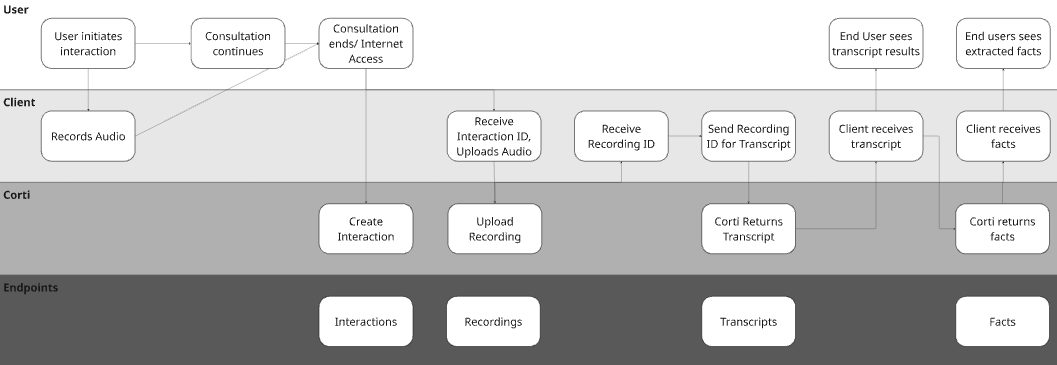
#### Option B: Async Scribe | External Capture + Send Audio
Sometimes conditions aren’t prime for real time audio transmission. That could be due to existing architecture constraints or because your customer base may not have reliable access to internet in the work that they do.
This is ideal for:
* Web-based EHRs
* Telehealth platforms
* Embedded scribe widgets
{/* Ambient stream session: connect with transcription + facts config, handle all messages */}
```ts title="JavaScript" expandable theme={null}
import fs from "fs";
import { CortiClient } from "@corti/sdk";
// Replace these with your values
const ACCESS_TOKEN = "";
const INTERACTION_ID = "";
const client = new CortiClient({
auth: {
accessToken: ACCESS_TOKEN,
},
});
let socket;
try {
// Step 1: Connect and send config — SDK waits for CONFIG_ACCEPTED before resolving
socket = await client.stream.connect({
id: INTERACTION_ID,
configuration: {
transcription: {
primaryLanguage: "en",
diarize: false,
isMultichannel: false,
participants: [{ channel: 0, role: "multiple" }],
},
mode: {
type: "facts", // or "transcription" if you don't need facts
outputLocale: "en",
},
},
});
console.log("✅ Connected — session ready");
socket.on("message", (msg) => {
switch (msg.type) {
case "transcript":
// Segments can arrive out of order across speakers — order by time.start
[...msg.data]
.sort((a, b) => a.time.start - b.time.start)
.forEach((seg) => {
console.log(`🗣 [${seg.time.start}s → ${seg.time.end}s] ${seg.transcript}`);
});
break;
case "facts":
msg.fact.forEach((fact) => {
console.log(`💡 Fact [${fact.group}]: ${fact.text}`);
});
break;
case "flushed":
console.log("🔄 Buffer flushed");
break;
case "usage":
console.log(`💳 Credits used: ${msg.credits}`);
break;
case "ENDED":
console.log("🏁 Session ended — server closing socket");
break;
case "error":
console.error("❌ Runtime error:", msg.error);
break;
}
});
socket.on("close", (code, reason) => {
console.log(`🔌 Connection closed [${code}]: ${reason}`);
});
socket.on("error", (err) => console.error("🚨 Connection error:", err.message));
// Step 2: Start sending audio now that config is accepted
sendAudio();
} catch (err) {
// CONFIG_DENIED, CONFIG_TIMEOUT, or connection failure
console.error("❌ Failed to connect:", err);
throw err;
}
// --- Audio sending ---
function sendAudio() {
const AUDIO_FILE = "./sample.webm"; // swap with your audio file path
if (!fs.existsSync(AUDIO_FILE)) {
console.warn("⚠️ No audio file found — sending silence simulation");
simulateAudioAndEnd();
return;
}
const audioBuffer = fs.readFileSync(AUDIO_FILE);
const CHUNK_SIZE = 8192; // ~250–500ms chunks recommended
let offset = 0;
console.log(`🎙 Streaming ${audioBuffer.length} bytes of audio...`);
const interval = setInterval(() => {
if (offset >= audioBuffer.length) {
clearInterval(interval);
console.log("✅ All audio sent");
endSession();
return;
}
socket.sendAudio(audioBuffer.slice(offset, offset + CHUNK_SIZE));
offset += CHUNK_SIZE;
}, 300); // send a chunk every 300ms
}
function simulateAudioAndEnd() {
setTimeout(() => endSession(), 2000);
}
// --- Optional: flush the audio buffer mid-session ---
function flushBuffer() {
socket.sendFlush({ type: "flush" });
console.log("📤 Sent flush");
}
// --- End the session ---
function endSession() {
socket.sendEnd({ type: "end" });
console.log("📤 Sent end — waiting for ENDED...");
}
```
{/* Ambient stream session: connect with transcription + facts config, handle all messages */}
```csharp title="C# .NET" expandable theme={null}
using Corti;
// Replace these with your values
const string ACCESS_TOKEN = "";
const string INTERACTION_ID = "";
var client = new CortiClient(
auth: CortiClientAuth.Bearer(accessToken: ACCESS_TOKEN)
);
// Interaction must be created via REST before opening a stream
const string interactionId = INTERACTION_ID;
var stream = await client.CreateStreamApiAsync(interactionId);
// Register handlers before connecting
stream.StreamTranscriptMessage.Subscribe(msg =>
{
foreach (var seg in msg.Data)
Console.WriteLine($"🗣 [{seg.Time.Start}s → {seg.Time.End}s] {seg.Transcript}");
});
stream.StreamFactsMessage.Subscribe(msg =>
{
foreach (var fact in msg.Fact)
Console.WriteLine($"💡 Fact [{fact.Group}]: {fact.Text}");
});
stream.StreamFlushedMessage.Subscribe(_ =>
Console.WriteLine("🔄 Buffer flushed"));
stream.StreamUsageMessage.Subscribe(msg =>
Console.WriteLine($"💳 Credits used: {msg.Credits}"));
stream.StreamEndedMessage.Subscribe(_ =>
// Server closes the connection after sending "ENDED" — no need to close manually
Console.WriteLine("🏁 Session ended — server closing socket"));
stream.StreamErrorMessage.Subscribe(msg =>
Console.Error.WriteLine($"❌ Server error: {msg.Error.Title}"));
stream.ExceptionOccurred.Subscribe(ex =>
Console.Error.WriteLine($"🚨 Connection error: {ex.Message}"));
stream.Closed.Subscribe(info =>
Console.WriteLine($"🔌 Connection closed [{info.Code}]: {info.Reason}"));
try
{
// Step 1: Connect and send config — ConnectAsync waits for CONFIG_ACCEPTED before returning
await stream.ConnectAsync(new StreamConfig
{
Transcription = new StreamConfigTranscription
{
PrimaryLanguage = "en",
diarize = false,
IsMultichannel = false,
Participants = new[]
{
new StreamConfigParticipant { Channel = 0, Role = StreamConfigParticipantRole.Multiple },
},
},
Mode = new StreamConfigMode
{
Type = StreamConfigModeType.Facts, // or StreamConfigModeType.Transcription
OutputLocale = "en",
},
});
Console.WriteLine("✅ Connected — session ready");
// Step 2: Start sending audio now that config is accepted
const string audioFile = "./sample.webm"; // swap with your audio file path
const int chunkSize = 8192; // ~250–500ms chunks recommended
if (!File.Exists(audioFile))
{
Console.WriteLine("⚠️ No audio file found — sending silence simulation");
await Task.Delay(2000);
await stream.Send(new StreamEndMessage());
}
else
{
var audioBytes = await File.ReadAllBytesAsync(audioFile);
Console.WriteLine($"🎙 Streaming {audioBytes.Length} bytes of audio...");
for (int i = 0; i < audioBytes.Length; i += chunkSize)
{
var chunk = audioBytes.AsMemory(i, Math.Min(chunkSize, audioBytes.Length - i));
await stream.Send(chunk.ToArray());
await Task.Delay(300); // send a chunk every 300ms
}
Console.WriteLine("✅ All audio sent");
// Signal end of audio stream
await stream.Send(new StreamEndMessage());
Console.WriteLine("📤 Sent end — waiting for ENDED...");
}
}
catch (Exception ex)
{
// CONFIG_DENIED, CONFIG_TIMEOUT, or connection failure
Console.Error.WriteLine($"❌ Failed to connect: {ex.Message}");
throw;
}
```
```javascript Sample code expandable theme={null}
import WebSocket from "ws";
import fs from "fs";
// Replace these with your values
const ACCESS_TOKEN = "";
const ENVIRONMENT = "";
const INTERACTION_ID = ""; // must be created via REST first
const TENANT = "";
const WSS_URL = `wss://api.${ENVIRONMENT}.corti.app/v2/interactions/${INTERACTION_ID}/streams?tenant-name=${TENANT}&token=Bearer%20${ACCESS_TOKEN}`;
const ws = new WebSocket(WSS_URL);
ws.on("open", () => {
console.log("✅ WebSocket connected");
// Step 1: Send config immediately (must be within 10 seconds)
const config = {
type: "config",
configuration: {
transcription: {
primaryLanguage: "en",
diarize: false,
isMultichannel: false,
participants: [
{ channel: 0, role: "multiple" }
]
},
mode: {
type: "facts", // or "transcription" if you don't need facts
outputLocale: "en"
}
}
};
ws.send(JSON.stringify(config));
console.log("📤 Sent config");
});
ws.on("message", (data) => {
// Audio binary frames come back as Buffer — skip those
if (Buffer.isBuffer(data) && !isJson(data)) return;
const message = JSON.parse(data.toString());
console.log("📨 Received:", JSON.stringify(message, null, 2));
switch (message.type) {
case "CONFIG_ACCEPTED":
console.log("✅ Config accepted — session:", message.sessionId);
// Step 2: Start sending audio now that config is accepted
sendAudio();
break;
case "CONFIG_DENIED":
case "CONFIG_MISSING":
case "CONFIG_NOT_PROVIDED":
case "CONFIG_TIMEOUT":
console.error("❌ Config error:", message);
ws.close();
break;
case "transcript":
// Segments can arrive out of order across speakers — order by time.start
[...message.data]
.sort((a, b) => a.time.start - b.time.start)
.forEach((seg) => {
console.log(`🗣 [${seg.time.start}s → ${seg.time.end}s] ${seg.transcript}`);
});
break;
case "facts":
message.fact.forEach((fact) => {
console.log(`💡 Fact [${fact.group}]: ${fact.text}`);
});
break;
case "flushed":
console.log("🔄 Buffer flushed");
break;
case "usage":
console.log(`💳 Credits used: ${message.credits}`);
break;
case "ENDED":
console.log("🏁 Session ended — server closing socket");
// ws closes automatically after this
break;
case "error":
console.error("❌ Runtime error:", message.error);
break;
}
});
ws.on("close", (code, reason) => {
console.log(`🔌 Connection closed [${code}]: ${reason}`);
});
ws.on("error", (err) => {
console.error("🚨 WebSocket error:", err.message);
});
// --- Audio sending ---
function sendAudio() {
const AUDIO_FILE = "./sample.webm"; // swap with your audio file path
if (!fs.existsSync(AUDIO_FILE)) {
console.warn("⚠️ No audio file found — sending silence simulation");
simulateAudioAndEnd();
return;
}
const audioBuffer = fs.readFileSync(AUDIO_FILE);
const CHUNK_SIZE = 8192; // ~250–500ms chunks recommended
let offset = 0;
console.log(`🎙 Streaming ${audioBuffer.length} bytes of audio...`);
const interval = setInterval(() => {
if (ws.readyState !== WebSocket.OPEN) {
clearInterval(interval);
return;
}
if (offset >= audioBuffer.length) {
clearInterval(interval);
console.log("✅ All audio sent");
endSession();
return;
}
const chunk = audioBuffer.slice(offset, offset + CHUNK_SIZE);
ws.send(chunk); // send raw binary — no JSON wrapping
offset += CHUNK_SIZE;
}, 300); // send a chunk every 300ms
}
function simulateAudioAndEnd() {
// Demo: just wait a moment then end
setTimeout(() => endSession(), 2000);
}
// --- Optional: flush the audio buffer mid-session ---
function flushBuffer() {
if (ws.readyState === WebSocket.OPEN) {
ws.send(JSON.stringify({ type: "flush" }));
console.log("📤 Sent flush");
}
}
// --- End the session ---
function endSession() {
if (ws.readyState === WebSocket.OPEN) {
ws.send(JSON.stringify({ type: "end" }));
console.log("📤 Sent end — waiting for ENDED...");
}
}
// Helper: check if a Buffer looks like JSON
function isJson(buf) {
try {
JSON.parse(buf.toString());
return true;
} catch {
return false;
}
}
```
#### Option B: Async Scribe | External Capture + Send Audio
Sometimes conditions aren’t prime for real time audio transmission. That could be due to existing architecture constraints or because your customer base may not have reliable access to internet in the work that they do.
 {/* Async ambient workflow: create interaction → upload recording → generate transcript → extract facts */}
```ts title="JavaScript" expandable theme={null}
import { createReadStream } from "fs";
import { CortiClient } from "@corti/sdk";
// Replace these with your values
const ACCESS_TOKEN = "";
const client = new CortiClient({
auth: {
accessToken: ACCESS_TOKEN,
},
});
// ─── STEP 1 · Create Interaction ────────────────────────────────────────────
const { interactionId } = await client.interactions.create({
encounter: {
identifier: crypto.randomUUID(),
status: "planned",
type: "first_consultation",
period: { startedAt: new Date().toISOString() },
},
});
console.log("✅ Interaction created:", interactionId);
// ─── STEP 2 · Upload Recording ───────────────────────────────────────────────
const { recordingId } = await client.recordings.upload(
createReadStream("recording.mp3", { autoClose: true }),
interactionId
);
console.log("✅ Recording uploaded:", recordingId);
// ─── STEP 3 · Generate Transcript ───────────────────────────────────────────
const transcript = await client.transcripts.create(interactionId, {
recordingId,
primaryLanguage: "en",
diarize: true, // separate speakers
isMultichannel: false,
});
console.log("✅ Transcript generated");
// ─── STEP 4 · Extract Facts ─────────────────────────────────────────────────
const context = [
{
type: "text" as const,
text: (transcript.transcripts ?? []).map((t) => t.text).join(" "),
},
];
const { facts } = await client.facts.extract({
context,
outputLanguage: "en",
});
console.log(`✅ Facts extracted: ${facts.length} found`);
facts.forEach((fact) => {
console.log(`💡 [${fact.group}]: ${fact.text}`);
});
```
{/* Async ambient workflow: create interaction → upload recording → generate transcript → extract facts */}
```csharp title="C# .NET" expandable theme={null}
using Corti;
// Replace these with your values
const string ACCESS_TOKEN = "";
var client = new CortiClient(
auth: CortiClientAuth.Bearer(accessToken: ACCESS_TOKEN)
);
// ─── STEP 1 · Create Interaction ────────────────────────────────────────────
var interaction = await client.Interactions.CreateAsync(
new InteractionsCreateRequest
{
Encounter = new InteractionsEncounterCreateRequest
{
Identifier = Guid.NewGuid().ToString(),
Status = InteractionsEncounterStatusEnum.Planned,
Type = InteractionsEncounterTypeEnum.FirstConsultation,
Period = new InteractionsEncounterPeriod { StartedAt = DateTime.UtcNow },
},
}
);
Console.WriteLine($"✅ Interaction created: {interaction.InteractionId}");
// ─── STEP 2 · Upload Recording ───────────────────────────────────────────────
await using var audioStream = File.OpenRead("recording.mp3");
var recording = await client.Recordings.UploadAsync(interaction.InteractionId, audioStream);
Console.WriteLine($"✅ Recording uploaded: {recording.RecordingId}");
// ─── STEP 3 · Generate Transcript ───────────────────────────────────────────
var transcript = await client.Transcripts.CreateAsync(
interaction.InteractionId,
new TranscriptsCreateRequest
{
RecordingId = recording.RecordingId,
PrimaryLanguage = "en",
Diarize = true, // separate speakers
IsMultichannel = false,
}
);
Console.WriteLine("✅ Transcript generated");
// ─── STEP 4 · Extract Facts ─────────────────────────────────────────────────
var context = new[]
{
new CommonTextContext
{
Type = new CommonTextContext.TypeLiteral(),
Text = string.Join(" ", (transcript.Transcripts ?? Enumerable.Empty()).Select(t => t.Text)),
},
};
var factsResponse = await client.Facts.ExtractAsync(new FactsExtractRequest
{
Context = context,
OutputLanguage = "en",
});
Console.WriteLine($"✅ Facts extracted: {factsResponse.Facts.Count()} found");
foreach (var fact in factsResponse.Facts)
{
Console.WriteLine($"💡 [{fact.Group}]: {fact.Text}");
}
```
```python title="Python" expandable theme={null}
# Corti API – Async Workflow (Python)
# 1. Create Interaction 2. Upload Recording 3. Generate Transcript 4. Extract Facts
import requests
import uuid
from datetime import datetime, timezone
# Replace these with your values
ENVIRONMENT = ""
TENANT = ""
TOKEN = ""
BASE_URL = f"https://api.{ENVIRONMENT}.corti.app/v2"
HEADERS = {
"Authorization": f"Bearer {TOKEN}",
"Tenant-Name": TENANT,
"Content-Type": "application/json",
}
# ─── STEP 1 · Create Interaction ────────────────────────────────────────────
now = datetime.now(timezone.utc).isoformat()
res = requests.post(f"{BASE_URL}/interactions", headers=HEADERS, json={
"encounter": {
"identifier": str(uuid.uuid4()),
"status": "planned",
"type": "first_consultation",
"period": {"startedAt": now},
},
})
res.raise_for_status()
interaction_id = res.json()["interactionId"]
print(f"✅ Interaction created: {interaction_id}")
# ─── STEP 2 · Upload Recording ──────────────────────────────────────────────
upload_headers = {
"Authorization": f"Bearer {TOKEN}",
"Tenant-Name": TENANT,
"Content-Type": "application/octet-stream",
}
with open("recording.mp3", "rb") as f:
res = requests.post(
f"{BASE_URL}/interactions/{interaction_id}/recordings/",
headers=upload_headers,
data=f,
)
res.raise_for_status()
recording_id = res.json()["recordingId"]
print(f"✅ Recording uploaded: {recording_id}")
# ─── STEP 3 · Generate Transcript ───────────────────────────────────────────
res = requests.post(
f"{BASE_URL}/interactions/{interaction_id}/transcripts/",
headers=HEADERS,
json={
"recordingId": recording_id,
"primaryLanguage": "en",
"diarize": True, # separate speakers
"isMultichannel": False,
},
)
res.raise_for_status()
transcript = res.json()
print("✅ Transcript generated")
# ─── STEP 4 · Extract Facts ─────────────────────────────────────────────────
transcript_text = " ".join(
t["text"] for t in (transcript.get("transcripts") or [])
)
res = requests.post(
f"{BASE_URL}/tools/extract-facts",
headers=HEADERS,
json={
"context": [{"type": "text", "text": transcript_text}],
"outputLanguage": "en",
},
)
res.raise_for_status()
facts = res.json().get("facts", [])
print(f"✅ Facts extracted: {len(facts)} found")
for fact in facts:
print(f"💡 [{fact.get('group')}]: {fact.get('text')}")
```
```javascript Raw JavaScript expandable theme={null}
// Corti API – Async Workflow
// 1. Create Interaction 2. Upload Recording 3. Generate Transcript 4. Extract Facts
// Replace these with your values
const ENVIRONMENT = "";
const TENANT = "";
const TOKEN = "";
const BASE_URL = `https://api.${ENVIRONMENT}.corti.app/v2`;
const headers = {
"Authorization": `Bearer ${TOKEN}`,
"Tenant-Name": TENANT,
"Content-Type": "application/json",
};
// ─── STEP 1 · Create Interaction ────────────────────────────────────────────
async function createInteraction(): Promise {
const res = await fetch(`${BASE_URL}/interactions`, {
method: "POST",
headers,
body: JSON.stringify({
encounter: {
identifier: crypto.randomUUID(),
status: "planned",
type: "first_consultation",
period: { startedAt: new Date().toISOString() },
},
}),
});
if (!res.ok) throw new Error(`Create interaction failed: ${res.status}`);
const data = await res.json();
const interactionId: string = data.interactionId;
console.log("✅ Interaction created:", interactionId);
return interactionId;
}
// ─── STEP 2 · Upload Recording (full file as octet-stream) ──────────────────
async function uploadRecording(
interactionId: string,
audioBuffer: ArrayBuffer // full recording file contents
): Promise {
const res = await fetch(`${BASE_URL}/interactions/${interactionId}/recordings/`, {
method: "POST",
headers: {
"Authorization": `Bearer ${TOKEN}`,
"Tenant-Name": TENANT,
"Content-Type": "application/octet-stream",
},
body: audioBuffer,
});
if (!res.ok) throw new Error(`Upload recording failed: ${res.status}`);
const data = await res.json();
const recordingId: string = data.recordingId;
console.log("✅ Recording uploaded:", recordingId);
return recordingId;
}
// ─── STEP 3 · Generate Transcript ───────────────────────────────────────────
async function createTranscript(
interactionId: string,
recordingId: string
): Promise {
const res = await fetch(`${BASE_URL}/interactions/${interactionId}/transcripts/`, {
method: "POST",
headers,
body: JSON.stringify({
recordingId,
primaryLanguage: "en",
diarize: true, // separate speakers
isMultichannel: false,
}),
});
if (!res.ok) throw new Error(`Create transcript failed: ${res.status}`);
const data = await res.json();
console.log("✅ Transcript generated");
return data;
}
// ─── STEP 4 · Extract Facts ─────────────────────────────────────────────────
async function extractFacts(transcriptData: any): Promise {
// Build context from transcript segments
const context = [
{
type: "text",
text: (transcriptData.transcripts ?? []).map((t: any) => t.text).join(" "),
},
];
const res = await fetch(`${BASE_URL}/tools/extract-facts`, {
method: "POST",
headers,
body: JSON.stringify({ context, outputLanguage: "en" }),
});
if (!res.ok) throw new Error(`Extract facts failed: ${res.status}`);
const data = await res.json();
const facts: object[] = data.facts ?? [];
console.log(`✅ Facts extracted: ${facts.length} found`);
return facts;
}
// ─── Orchestrate the full async workflow ────────────────────────────────────
async function runAsyncWorkflow(audioBuffer: ArrayBuffer) {
try {
const interactionId = await createInteraction();
const recordingId = await uploadRecording(interactionId, audioBuffer);
const transcriptData = await createTranscript(interactionId, recordingId);
const facts = await extractFacts(transcriptData);
return { interactionId, recordingId, facts };
} catch (err) {
console.error("Workflow error:", err);
throw err;
}
}
// ─── Example usage ──────────────────────────────────────────────────────────
// Load your audio file however is appropriate for your environment, e.g.:
// const audioBuffer = await fs.readFile("recording.mp3").then(b => b.buffer);
// runAsyncWorkflow(audioBuffer).then(result => console.log(result));
```
### 3. Use Facts to Keep Providers in the Loop
You see a lot about FactsR in our documentation. We’re proud of what we’ve built because we’ve found it to be a tool that reduces provider review time before document generation, increases provider adoption, reduces hallucinations in generated documentation.
Do you have to use facts for your application? *No.*
Do we recommend it from our experience? *Absolutely.*
{/* Async ambient workflow: create interaction → upload recording → generate transcript → extract facts */}
```ts title="JavaScript" expandable theme={null}
import { createReadStream } from "fs";
import { CortiClient } from "@corti/sdk";
// Replace these with your values
const ACCESS_TOKEN = "";
const client = new CortiClient({
auth: {
accessToken: ACCESS_TOKEN,
},
});
// ─── STEP 1 · Create Interaction ────────────────────────────────────────────
const { interactionId } = await client.interactions.create({
encounter: {
identifier: crypto.randomUUID(),
status: "planned",
type: "first_consultation",
period: { startedAt: new Date().toISOString() },
},
});
console.log("✅ Interaction created:", interactionId);
// ─── STEP 2 · Upload Recording ───────────────────────────────────────────────
const { recordingId } = await client.recordings.upload(
createReadStream("recording.mp3", { autoClose: true }),
interactionId
);
console.log("✅ Recording uploaded:", recordingId);
// ─── STEP 3 · Generate Transcript ───────────────────────────────────────────
const transcript = await client.transcripts.create(interactionId, {
recordingId,
primaryLanguage: "en",
diarize: true, // separate speakers
isMultichannel: false,
});
console.log("✅ Transcript generated");
// ─── STEP 4 · Extract Facts ─────────────────────────────────────────────────
const context = [
{
type: "text" as const,
text: (transcript.transcripts ?? []).map((t) => t.text).join(" "),
},
];
const { facts } = await client.facts.extract({
context,
outputLanguage: "en",
});
console.log(`✅ Facts extracted: ${facts.length} found`);
facts.forEach((fact) => {
console.log(`💡 [${fact.group}]: ${fact.text}`);
});
```
{/* Async ambient workflow: create interaction → upload recording → generate transcript → extract facts */}
```csharp title="C# .NET" expandable theme={null}
using Corti;
// Replace these with your values
const string ACCESS_TOKEN = "";
var client = new CortiClient(
auth: CortiClientAuth.Bearer(accessToken: ACCESS_TOKEN)
);
// ─── STEP 1 · Create Interaction ────────────────────────────────────────────
var interaction = await client.Interactions.CreateAsync(
new InteractionsCreateRequest
{
Encounter = new InteractionsEncounterCreateRequest
{
Identifier = Guid.NewGuid().ToString(),
Status = InteractionsEncounterStatusEnum.Planned,
Type = InteractionsEncounterTypeEnum.FirstConsultation,
Period = new InteractionsEncounterPeriod { StartedAt = DateTime.UtcNow },
},
}
);
Console.WriteLine($"✅ Interaction created: {interaction.InteractionId}");
// ─── STEP 2 · Upload Recording ───────────────────────────────────────────────
await using var audioStream = File.OpenRead("recording.mp3");
var recording = await client.Recordings.UploadAsync(interaction.InteractionId, audioStream);
Console.WriteLine($"✅ Recording uploaded: {recording.RecordingId}");
// ─── STEP 3 · Generate Transcript ───────────────────────────────────────────
var transcript = await client.Transcripts.CreateAsync(
interaction.InteractionId,
new TranscriptsCreateRequest
{
RecordingId = recording.RecordingId,
PrimaryLanguage = "en",
Diarize = true, // separate speakers
IsMultichannel = false,
}
);
Console.WriteLine("✅ Transcript generated");
// ─── STEP 4 · Extract Facts ─────────────────────────────────────────────────
var context = new[]
{
new CommonTextContext
{
Type = new CommonTextContext.TypeLiteral(),
Text = string.Join(" ", (transcript.Transcripts ?? Enumerable.Empty()).Select(t => t.Text)),
},
};
var factsResponse = await client.Facts.ExtractAsync(new FactsExtractRequest
{
Context = context,
OutputLanguage = "en",
});
Console.WriteLine($"✅ Facts extracted: {factsResponse.Facts.Count()} found");
foreach (var fact in factsResponse.Facts)
{
Console.WriteLine($"💡 [{fact.Group}]: {fact.Text}");
}
```
```python title="Python" expandable theme={null}
# Corti API – Async Workflow (Python)
# 1. Create Interaction 2. Upload Recording 3. Generate Transcript 4. Extract Facts
import requests
import uuid
from datetime import datetime, timezone
# Replace these with your values
ENVIRONMENT = ""
TENANT = ""
TOKEN = ""
BASE_URL = f"https://api.{ENVIRONMENT}.corti.app/v2"
HEADERS = {
"Authorization": f"Bearer {TOKEN}",
"Tenant-Name": TENANT,
"Content-Type": "application/json",
}
# ─── STEP 1 · Create Interaction ────────────────────────────────────────────
now = datetime.now(timezone.utc).isoformat()
res = requests.post(f"{BASE_URL}/interactions", headers=HEADERS, json={
"encounter": {
"identifier": str(uuid.uuid4()),
"status": "planned",
"type": "first_consultation",
"period": {"startedAt": now},
},
})
res.raise_for_status()
interaction_id = res.json()["interactionId"]
print(f"✅ Interaction created: {interaction_id}")
# ─── STEP 2 · Upload Recording ──────────────────────────────────────────────
upload_headers = {
"Authorization": f"Bearer {TOKEN}",
"Tenant-Name": TENANT,
"Content-Type": "application/octet-stream",
}
with open("recording.mp3", "rb") as f:
res = requests.post(
f"{BASE_URL}/interactions/{interaction_id}/recordings/",
headers=upload_headers,
data=f,
)
res.raise_for_status()
recording_id = res.json()["recordingId"]
print(f"✅ Recording uploaded: {recording_id}")
# ─── STEP 3 · Generate Transcript ───────────────────────────────────────────
res = requests.post(
f"{BASE_URL}/interactions/{interaction_id}/transcripts/",
headers=HEADERS,
json={
"recordingId": recording_id,
"primaryLanguage": "en",
"diarize": True, # separate speakers
"isMultichannel": False,
},
)
res.raise_for_status()
transcript = res.json()
print("✅ Transcript generated")
# ─── STEP 4 · Extract Facts ─────────────────────────────────────────────────
transcript_text = " ".join(
t["text"] for t in (transcript.get("transcripts") or [])
)
res = requests.post(
f"{BASE_URL}/tools/extract-facts",
headers=HEADERS,
json={
"context": [{"type": "text", "text": transcript_text}],
"outputLanguage": "en",
},
)
res.raise_for_status()
facts = res.json().get("facts", [])
print(f"✅ Facts extracted: {len(facts)} found")
for fact in facts:
print(f"💡 [{fact.get('group')}]: {fact.get('text')}")
```
```javascript Raw JavaScript expandable theme={null}
// Corti API – Async Workflow
// 1. Create Interaction 2. Upload Recording 3. Generate Transcript 4. Extract Facts
// Replace these with your values
const ENVIRONMENT = "";
const TENANT = "";
const TOKEN = "";
const BASE_URL = `https://api.${ENVIRONMENT}.corti.app/v2`;
const headers = {
"Authorization": `Bearer ${TOKEN}`,
"Tenant-Name": TENANT,
"Content-Type": "application/json",
};
// ─── STEP 1 · Create Interaction ────────────────────────────────────────────
async function createInteraction(): Promise {
const res = await fetch(`${BASE_URL}/interactions`, {
method: "POST",
headers,
body: JSON.stringify({
encounter: {
identifier: crypto.randomUUID(),
status: "planned",
type: "first_consultation",
period: { startedAt: new Date().toISOString() },
},
}),
});
if (!res.ok) throw new Error(`Create interaction failed: ${res.status}`);
const data = await res.json();
const interactionId: string = data.interactionId;
console.log("✅ Interaction created:", interactionId);
return interactionId;
}
// ─── STEP 2 · Upload Recording (full file as octet-stream) ──────────────────
async function uploadRecording(
interactionId: string,
audioBuffer: ArrayBuffer // full recording file contents
): Promise {
const res = await fetch(`${BASE_URL}/interactions/${interactionId}/recordings/`, {
method: "POST",
headers: {
"Authorization": `Bearer ${TOKEN}`,
"Tenant-Name": TENANT,
"Content-Type": "application/octet-stream",
},
body: audioBuffer,
});
if (!res.ok) throw new Error(`Upload recording failed: ${res.status}`);
const data = await res.json();
const recordingId: string = data.recordingId;
console.log("✅ Recording uploaded:", recordingId);
return recordingId;
}
// ─── STEP 3 · Generate Transcript ───────────────────────────────────────────
async function createTranscript(
interactionId: string,
recordingId: string
): Promise {
const res = await fetch(`${BASE_URL}/interactions/${interactionId}/transcripts/`, {
method: "POST",
headers,
body: JSON.stringify({
recordingId,
primaryLanguage: "en",
diarize: true, // separate speakers
isMultichannel: false,
}),
});
if (!res.ok) throw new Error(`Create transcript failed: ${res.status}`);
const data = await res.json();
console.log("✅ Transcript generated");
return data;
}
// ─── STEP 4 · Extract Facts ─────────────────────────────────────────────────
async function extractFacts(transcriptData: any): Promise {
// Build context from transcript segments
const context = [
{
type: "text",
text: (transcriptData.transcripts ?? []).map((t: any) => t.text).join(" "),
},
];
const res = await fetch(`${BASE_URL}/tools/extract-facts`, {
method: "POST",
headers,
body: JSON.stringify({ context, outputLanguage: "en" }),
});
if (!res.ok) throw new Error(`Extract facts failed: ${res.status}`);
const data = await res.json();
const facts: object[] = data.facts ?? [];
console.log(`✅ Facts extracted: ${facts.length} found`);
return facts;
}
// ─── Orchestrate the full async workflow ────────────────────────────────────
async function runAsyncWorkflow(audioBuffer: ArrayBuffer) {
try {
const interactionId = await createInteraction();
const recordingId = await uploadRecording(interactionId, audioBuffer);
const transcriptData = await createTranscript(interactionId, recordingId);
const facts = await extractFacts(transcriptData);
return { interactionId, recordingId, facts };
} catch (err) {
console.error("Workflow error:", err);
throw err;
}
}
// ─── Example usage ──────────────────────────────────────────────────────────
// Load your audio file however is appropriate for your environment, e.g.:
// const audioBuffer = await fs.readFile("recording.mp3").then(b => b.buffer);
// runAsyncWorkflow(audioBuffer).then(result => console.log(result));
```
### 3. Use Facts to Keep Providers in the Loop
You see a lot about FactsR in our documentation. We’re proud of what we’ve built because we’ve found it to be a tool that reduces provider review time before document generation, increases provider adoption, reduces hallucinations in generated documentation.
Do you have to use facts for your application? *No.*
Do we recommend it from our experience? *Absolutely.*
 #### Why Add Facts?
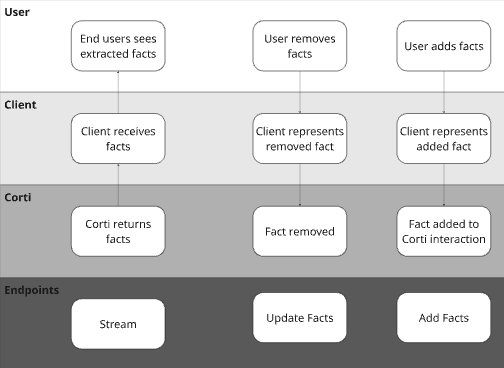
Many Corti customers give their end users the ability to include relevant information from other data sources. For example, some organizations will opt to insert the patient’s problem list from the EHR as a fact to ensure inclusion in post consultation documentation even though they may not discuss each item in the consultation (or they want it to drive an in consultation agentic workflow!).
Similarly, providers may want to dictate facts after a consultation or simply type in additional facts to add to the clinical context for the final document.
{/* Add facts to an interaction */}
```ts title="JavaScript" theme={null}
// Replace these with your values
const INTERACTION_ID = "";
await client.facts.create(INTERACTION_ID, {
facts: [
{
text: "Patient has a history of hypertension.",
group: "other",
},
],
});
```
{/* Add facts to an interaction */}
```csharp title="C# .NET" theme={null}
// Replace these with your values
const string INTERACTION_ID = "";
await client.Facts.CreateAsync(
INTERACTION_ID,
new FactsCreateRequest
{
Facts = new List
{
new() { Text = "Patient has a history of hypertension.", Group = "other" },
},
}
);
```
```python title="Python" theme={null}
import requests
# Replace these with your values
ENVIRONMENT = ""
INTERACTION_ID = ""
TENANT = ""
TOKEN = ""
response = requests.post(
f"https://api.{ENVIRONMENT}.corti.app/v2/interactions/{INTERACTION_ID}/facts",
headers={
"Authorization": f"Bearer {TOKEN}",
"Tenant-Name": TENANT,
"Content-Type": "application/json",
},
json={
"facts": [
{
"text": "Patient has a history of hypertension.",
"group": "other",
}
]
},
)
response.raise_for_status()
```
```bash title="cURL" theme={null}
# Replace these with your values
ENVIRONMENT=""
INTERACTION_ID=""
TENANT=""
TOKEN=""
curl -X POST "https://api.${ENVIRONMENT}.corti.app/v2/interactions/${INTERACTION_ID}/facts" \
-H "Authorization: Bearer ${TOKEN}" \
-H "Tenant-Name: ${TENANT}" \
-H "Content-Type: application/json" \
-d '{
"facts": [
{ "text": "Patient has a history of hypertension.", "group": "other" }
]
}'
```
#### Why Remove Facts?
Corti’s fact extraction will extract all medically relevant facts in a consultation. While this is great to make sure that all information is presented to the provider, not all facts may be relevant for all of the different documents you may generate (e.g. a referral letter might not need corti-emergency-situation-details facts).
We have found giving users the ability to deselect facts keeps them in the loop and gives them more control over the documentation being generated.
{/* Discard a fact from an interaction */}
```ts title="JavaScript" theme={null}
// Replace these with your values
const FACT_ID = "";
const INTERACTION_ID = "";
await client.facts.update(INTERACTION_ID, FACT_ID, {
isDiscarded: true,
});
```
{/* Discard a fact from an interaction */}
```csharp title="C# .NET" theme={null}
// Replace these with your values
const string FACT_ID = "";
const string INTERACTION_ID = "";
await client.Facts.UpdateAsync(
INTERACTION_ID,
FACT_ID,
new FactsUpdateRequest { IsDiscarded = true }
);
```
```python title="Python" theme={null}
import requests
# Replace these with your values
ENVIRONMENT = ""
FACT_ID = ""
INTERACTION_ID = ""
TENANT = ""
TOKEN = ""
response = requests.patch(
f"https://api.{ENVIRONMENT}.corti.app/v2/interactions/{INTERACTION_ID}/facts/{FACT_ID}",
headers={
"Authorization": f"Bearer {TOKEN}",
"Tenant-Name": TENANT,
"Content-Type": "application/json",
},
json={"isDiscarded": True},
)
response.raise_for_status()
```
```bash title="cURL" theme={null}
# Replace these with your values
ENVIRONMENT=""
FACT_ID=""
INTERACTION_ID=""
TENANT=""
TOKEN=""
curl -X PATCH "https://api.${ENVIRONMENT}.corti.app/v2/interactions/${INTERACTION_ID}/facts/${FACT_ID}" \
-H "Authorization: Bearer ${TOKEN}" \
-H "Tenant-Name: ${TENANT}" \
-H "Content-Type: application/json" \
-d '{ "isDiscarded": true }'
```
### 4. Determine Your Document Management Strategy
Corti supports multiple approaches to documentation generation. We recommend selecting based on your maturity, product goals, and need for speed.
#### Why Add Facts?
Many Corti customers give their end users the ability to include relevant information from other data sources. For example, some organizations will opt to insert the patient’s problem list from the EHR as a fact to ensure inclusion in post consultation documentation even though they may not discuss each item in the consultation (or they want it to drive an in consultation agentic workflow!).
Similarly, providers may want to dictate facts after a consultation or simply type in additional facts to add to the clinical context for the final document.
{/* Add facts to an interaction */}
```ts title="JavaScript" theme={null}
// Replace these with your values
const INTERACTION_ID = "";
await client.facts.create(INTERACTION_ID, {
facts: [
{
text: "Patient has a history of hypertension.",
group: "other",
},
],
});
```
{/* Add facts to an interaction */}
```csharp title="C# .NET" theme={null}
// Replace these with your values
const string INTERACTION_ID = "";
await client.Facts.CreateAsync(
INTERACTION_ID,
new FactsCreateRequest
{
Facts = new List
{
new() { Text = "Patient has a history of hypertension.", Group = "other" },
},
}
);
```
```python title="Python" theme={null}
import requests
# Replace these with your values
ENVIRONMENT = ""
INTERACTION_ID = ""
TENANT = ""
TOKEN = ""
response = requests.post(
f"https://api.{ENVIRONMENT}.corti.app/v2/interactions/{INTERACTION_ID}/facts",
headers={
"Authorization": f"Bearer {TOKEN}",
"Tenant-Name": TENANT,
"Content-Type": "application/json",
},
json={
"facts": [
{
"text": "Patient has a history of hypertension.",
"group": "other",
}
]
},
)
response.raise_for_status()
```
```bash title="cURL" theme={null}
# Replace these with your values
ENVIRONMENT=""
INTERACTION_ID=""
TENANT=""
TOKEN=""
curl -X POST "https://api.${ENVIRONMENT}.corti.app/v2/interactions/${INTERACTION_ID}/facts" \
-H "Authorization: Bearer ${TOKEN}" \
-H "Tenant-Name: ${TENANT}" \
-H "Content-Type: application/json" \
-d '{
"facts": [
{ "text": "Patient has a history of hypertension.", "group": "other" }
]
}'
```
#### Why Remove Facts?
Corti’s fact extraction will extract all medically relevant facts in a consultation. While this is great to make sure that all information is presented to the provider, not all facts may be relevant for all of the different documents you may generate (e.g. a referral letter might not need corti-emergency-situation-details facts).
We have found giving users the ability to deselect facts keeps them in the loop and gives them more control over the documentation being generated.
{/* Discard a fact from an interaction */}
```ts title="JavaScript" theme={null}
// Replace these with your values
const FACT_ID = "";
const INTERACTION_ID = "";
await client.facts.update(INTERACTION_ID, FACT_ID, {
isDiscarded: true,
});
```
{/* Discard a fact from an interaction */}
```csharp title="C# .NET" theme={null}
// Replace these with your values
const string FACT_ID = "";
const string INTERACTION_ID = "";
await client.Facts.UpdateAsync(
INTERACTION_ID,
FACT_ID,
new FactsUpdateRequest { IsDiscarded = true }
);
```
```python title="Python" theme={null}
import requests
# Replace these with your values
ENVIRONMENT = ""
FACT_ID = ""
INTERACTION_ID = ""
TENANT = ""
TOKEN = ""
response = requests.patch(
f"https://api.{ENVIRONMENT}.corti.app/v2/interactions/{INTERACTION_ID}/facts/{FACT_ID}",
headers={
"Authorization": f"Bearer {TOKEN}",
"Tenant-Name": TENANT,
"Content-Type": "application/json",
},
json={"isDiscarded": True},
)
response.raise_for_status()
```
```bash title="cURL" theme={null}
# Replace these with your values
ENVIRONMENT=""
FACT_ID=""
INTERACTION_ID=""
TENANT=""
TOKEN=""
curl -X PATCH "https://api.${ENVIRONMENT}.corti.app/v2/interactions/${INTERACTION_ID}/facts/${FACT_ID}" \
-H "Authorization: Bearer ${TOKEN}" \
-H "Tenant-Name: ${TENANT}" \
-H "Content-Type: application/json" \
-d '{ "isDiscarded": true }'
```
### 4. Determine Your Document Management Strategy
Corti supports multiple approaches to documentation generation. We recommend selecting based on your maturity, product goals, and need for speed.
 #### Corti's Recommended Document Strategies
| Approach | Description | Best for | Benefits |
| ---------------------- | ----------------------------------------------------------------------------------------------------------------------------------------------------------------------------- | ----------------------------------------------------------------- | ------------------------------------------------------------------------------------------------------------------------------------------------------------ |
| **Standard Templates** | The fastest path to getting an ambient scribe in front of your users! | Fast MVPs, Pilot Programs, Out of the box configurations | Predefined templates for structured documentation |
| **Section Assembly** | A more flexible path that lets you (or your users) to slice and dice Corti's standard sections. | Gradual Customization, Specialty Support, Product Differentiation | Specialty support and giving users the ability to assemble their own templates using standard sections. |
| **Full Customization** | Use section level overrides to give you our your end users the ability to further prompt templates to give a fully custom feel while still using Corti's clinical guardrails. | Enterprise Deployments, Deep EHR-aligned formatting | Either tuning sections to having your own custom org templates OR giving users the ability to further prompt templates to create their own custom templates. |
### 5. Integrate With Other Systems
Ambient scribing becomes powerful when integrated bi-directionally.
#### Pull Context Before the Interaction
A common practice is organizations will build such that specific data points are able to be incorporated in the context of their document generation.
Improve quality by pre-loading:
* Chief complaint
* Appointment reason
* Patient demographics
* Medication lists
* Past medical history
Inject these (where relevant) as context before generation to improve accuracy and relevance.
#### Push Outputs After the Interaction
Send:
* Structured sections
* Final narrative note
Into:
* EHR systems
* Practice management software
* Billing systems
* Quality tracking tools
***
## Tying It All Together: Best Practices for Ambient Success
* Always keep clinician in control
* Design for action - don’t maximize content on the screen, maximize what you want actioned
Happy building!
#### Corti's Recommended Document Strategies
| Approach | Description | Best for | Benefits |
| ---------------------- | ----------------------------------------------------------------------------------------------------------------------------------------------------------------------------- | ----------------------------------------------------------------- | ------------------------------------------------------------------------------------------------------------------------------------------------------------ |
| **Standard Templates** | The fastest path to getting an ambient scribe in front of your users! | Fast MVPs, Pilot Programs, Out of the box configurations | Predefined templates for structured documentation |
| **Section Assembly** | A more flexible path that lets you (or your users) to slice and dice Corti's standard sections. | Gradual Customization, Specialty Support, Product Differentiation | Specialty support and giving users the ability to assemble their own templates using standard sections. |
| **Full Customization** | Use section level overrides to give you our your end users the ability to further prompt templates to give a fully custom feel while still using Corti's clinical guardrails. | Enterprise Deployments, Deep EHR-aligned formatting | Either tuning sections to having your own custom org templates OR giving users the ability to further prompt templates to create their own custom templates. |
### 5. Integrate With Other Systems
Ambient scribing becomes powerful when integrated bi-directionally.
#### Pull Context Before the Interaction
A common practice is organizations will build such that specific data points are able to be incorporated in the context of their document generation.
Improve quality by pre-loading:
* Chief complaint
* Appointment reason
* Patient demographics
* Medication lists
* Past medical history
Inject these (where relevant) as context before generation to improve accuracy and relevance.
#### Push Outputs After the Interaction
Send:
* Structured sections
* Final narrative note
Into:
* EHR systems
* Practice management software
* Billing systems
* Quality tracking tools
***
## Tying It All Together: Best Practices for Ambient Success
* Always keep clinician in control
* Design for action - don’t maximize content on the screen, maximize what you want actioned
Happy building!