> ## Documentation Index
> Fetch the complete documentation index at: https://docs.corti.ai/llms.txt
> Use this file to discover all available pages before exploring further.
# Security Best Practices
> Five essential steps for keeping your client credentials and access tokens secure.
Client credentials act as a powerful service account. Anyone holding them can act on your behalf and access your tenant. Protect them as you would any internal system password.
## How to keep your tokens safe
### 1. Use environment variables and a proper secret store
Never hardcode your `client_secret` in source files. Use environment variables and a secure secret manager provided by your cloud platform or infrastructure. Rotate secrets if exposure is suspected.
### 2. Never expose credentials in frontend or untrusted environments
Client credentials must only live on trusted servers. Do not embed them in browser code, mobile apps, desktop apps, or any environment you cannot fully control. Instead, your backend should request access tokens, validate requests, and decide what your users can do.
Never expose client credentials (`client_id` + `client_secret`) to a frontend application. A full-scope access token should also stay on the backend, because it grants the same access as the credentials that produced it.
If you cannot avoid passing a token to the frontend — for example, when opening a real-time speech-to-text WebSocket directly from the browser — issue a **limited-scope token** instead. Request the token with `scope="openid transcribe"` and/or `scope="openid streams"`, and the resulting access token will only be accepted by the corresponding streaming endpoints (`/transcribe` and `/streams`). It cannot be used to read or modify any other data, so the blast radius if it is intercepted is limited to a streaming session.
See [Limited-scope credentials for streaming APIs](#4-if-you-must-use-tokens-in-special-cases-use-limited-scope-credentials) below for the full request format.
### 3. Use a backend proxy to handle all Corti API calls from frontends
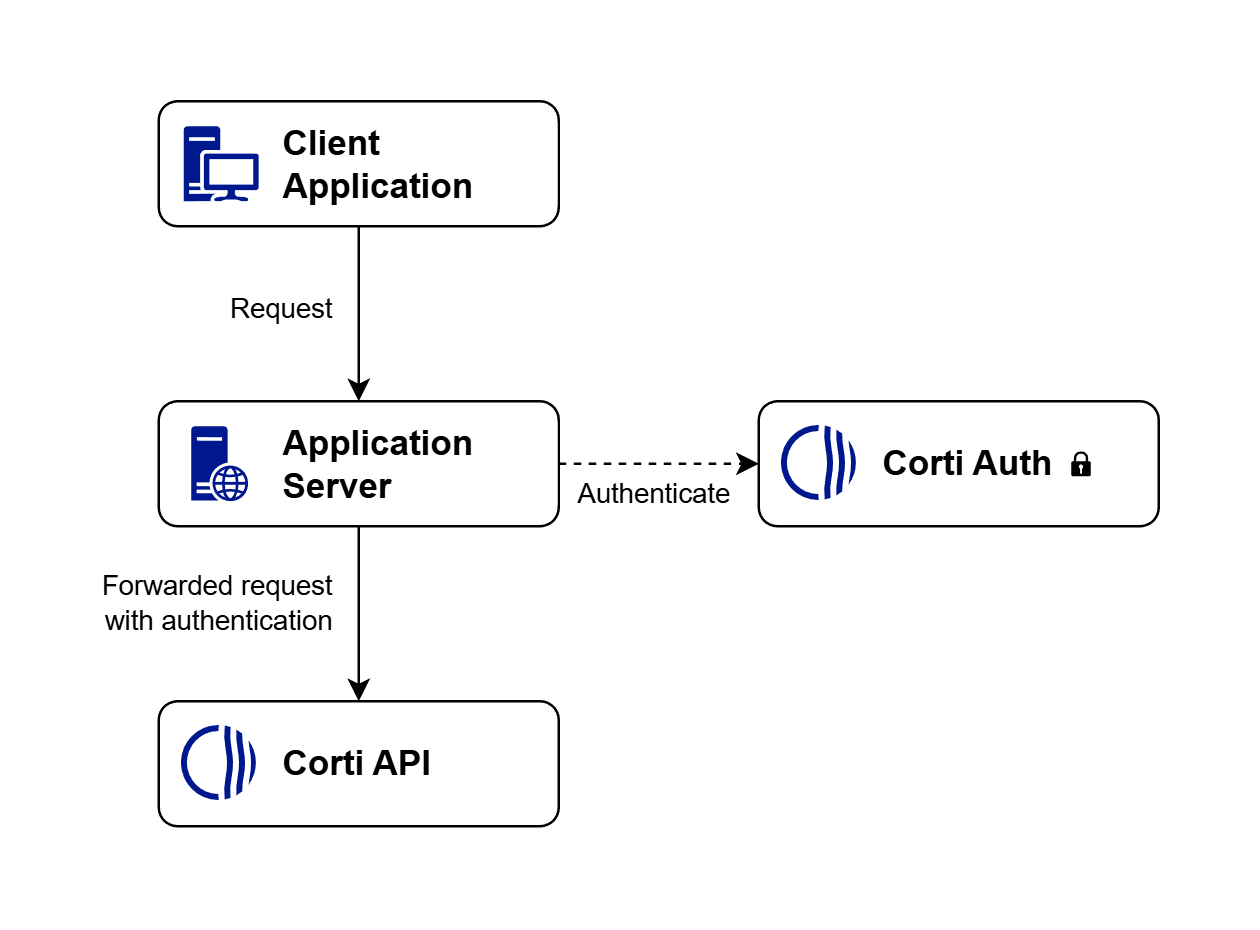
When you need a frontend to be able to call the Corti API, it is advised to use a proxy. This means all requests are through a proxy that you control. The proxy injects authentication, performs validation, and enforces user-level rules.
 ### 4. If you must use tokens in special cases, use limited-scope credentials
Some scenarios — most commonly browser-based real-time speech-to-text — make it impractical to keep every token on the backend. For these cases, Corti supports **limited-scope tokens** that restrict the access token to the streaming APIs only. If such a token is intercepted, it cannot be used to call any other endpoint or to read or modify your data.
**Available streaming scopes:**
| Scope value | Grants access to |
| :-------------------------- | :---------------------------------------- |
| `openid transcribe` | The `/transcribe` WebSocket endpoint only |
| `openid streams` | The `/streams` WebSocket endpoint only |
| `openid transcribe streams` | Both streaming WebSocket endpoints |
The `openid` scope is always required alongside the streaming scope(s).
**Request a limited-scope token from your backend** using the standard OAuth 2.0 client credentials grant — only the `scope` parameter changes:
```bash title="Limited-scope token (transcribe + streams)" theme={null}
curl \
"https://auth.${ENVIRONMENT}.corti.app/realms/${TENANT}/protocol/openid-connect/token" \
-H 'Content-Type: application/x-www-form-urlencoded' \
-d "client_id=${CLIENT_ID}" -d "client_secret=${CLIENT_SECRET}" \
-d 'grant_type=client_credentials' \
-d 'scope=openid transcribe streams'
```
If you are using the Corti SDK, pass `scopes: ["transcribe"]` and/or `scopes: ["streams"]` to `auth.getToken(...)` — see [Scoped tokens in the JavaScript SDK](/sdk/js/authentication#scoped-tokens) for full examples.
**Recommended pattern:**
1. Frontend asks your backend to start a streaming session.
2. Backend authenticates the user, then calls Corti Auth with `scope=openid transcribe`, `scope=openid streams`, or both, depending on which streaming API the frontend needs.
3. For `/transcribe`, the backend returns the resulting short-lived `access_token` to the frontend, and the frontend uses it to open the `/transcribe` WebSocket.
4. For `/streams`, the backend must also create an interaction via the interactions API and return the resulting `websocketUrl` to the frontend. The browser then connects using that `websocketUrl` rather than constructing a `/streams` WebSocket URL itself.
5. Refresh by repeating the same backend flow before expiry: issue a new limited-scope token, and for `/streams` create a new interaction if a new `websocketUrl` is required.
If you can route WebSocket traffic through your own server, prefer a [proxy](#3-use-a-backend-proxy-to-handle-all-corti-api-calls-from-frontends) over exposing tokens to the frontend at all — it gives you full control over authentication and per-user authorization.
## Related guides
* [Authentication overview](/authentication/overview) — OAuth 2.0 client credentials and how to use access tokens.
* [JavaScript SDK – Scoped tokens](/sdk/js/authentication#scoped-tokens) — issuing and using scoped tokens from the SDK.
* [Dictation Web Component – Authentication](/sdk/dictation/authentication) — passing tokens (including scoped tokens) to the Dictation component.
* [Streams endpoint](/stt/streams) and [Transcribe endpoint](/stt/transcribe) — the streaming APIs that accept limited-scope tokens.
### 4. If you must use tokens in special cases, use limited-scope credentials
Some scenarios — most commonly browser-based real-time speech-to-text — make it impractical to keep every token on the backend. For these cases, Corti supports **limited-scope tokens** that restrict the access token to the streaming APIs only. If such a token is intercepted, it cannot be used to call any other endpoint or to read or modify your data.
**Available streaming scopes:**
| Scope value | Grants access to |
| :-------------------------- | :---------------------------------------- |
| `openid transcribe` | The `/transcribe` WebSocket endpoint only |
| `openid streams` | The `/streams` WebSocket endpoint only |
| `openid transcribe streams` | Both streaming WebSocket endpoints |
The `openid` scope is always required alongside the streaming scope(s).
**Request a limited-scope token from your backend** using the standard OAuth 2.0 client credentials grant — only the `scope` parameter changes:
```bash title="Limited-scope token (transcribe + streams)" theme={null}
curl \
"https://auth.${ENVIRONMENT}.corti.app/realms/${TENANT}/protocol/openid-connect/token" \
-H 'Content-Type: application/x-www-form-urlencoded' \
-d "client_id=${CLIENT_ID}" -d "client_secret=${CLIENT_SECRET}" \
-d 'grant_type=client_credentials' \
-d 'scope=openid transcribe streams'
```
If you are using the Corti SDK, pass `scopes: ["transcribe"]` and/or `scopes: ["streams"]` to `auth.getToken(...)` — see [Scoped tokens in the JavaScript SDK](/sdk/js/authentication#scoped-tokens) for full examples.
**Recommended pattern:**
1. Frontend asks your backend to start a streaming session.
2. Backend authenticates the user, then calls Corti Auth with `scope=openid transcribe`, `scope=openid streams`, or both, depending on which streaming API the frontend needs.
3. For `/transcribe`, the backend returns the resulting short-lived `access_token` to the frontend, and the frontend uses it to open the `/transcribe` WebSocket.
4. For `/streams`, the backend must also create an interaction via the interactions API and return the resulting `websocketUrl` to the frontend. The browser then connects using that `websocketUrl` rather than constructing a `/streams` WebSocket URL itself.
5. Refresh by repeating the same backend flow before expiry: issue a new limited-scope token, and for `/streams` create a new interaction if a new `websocketUrl` is required.
If you can route WebSocket traffic through your own server, prefer a [proxy](#3-use-a-backend-proxy-to-handle-all-corti-api-calls-from-frontends) over exposing tokens to the frontend at all — it gives you full control over authentication and per-user authorization.
## Related guides
* [Authentication overview](/authentication/overview) — OAuth 2.0 client credentials and how to use access tokens.
* [JavaScript SDK – Scoped tokens](/sdk/js/authentication#scoped-tokens) — issuing and using scoped tokens from the SDK.
* [Dictation Web Component – Authentication](/sdk/dictation/authentication) — passing tokens (including scoped tokens) to the Dictation component.
* [Streams endpoint](/stt/streams) and [Transcribe endpoint](/stt/transcribe) — the streaming APIs that accept limited-scope tokens.